
 Arabic
  English
  Turkish
  Chinese
  Japanese
  Russian
  Spanish
  German
  French
  Hindi
Hindi Download BrowserOS Neo 1.0 for Windows
Download BrowserOS Neo 1.0 for Windows.
BrowserOS Neo Overview
It is built for people who want to save time by letting AI handle repetitive online work. Instead of copying information across websites or clicking through endless pages yourself, the software lets AI agents browse the web on your behalf. Every action happens inside a dedicated browser window, giving you complete visibility and control. The platform is designed with transparency in mind. You can watch every click, approve important actions, and replay completed sessions whenever needed. Its clean interface makes it simple to connect your favorite AI coding assistants and productivity tools without dealing with complicated setup files or command-line commands.Features of BrowserOS Neo
Simple One-Click Connection
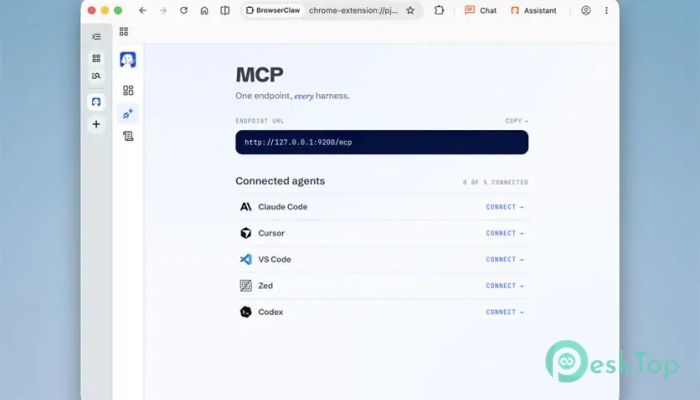
Getting started is refreshingly easy. The software allows you to connect popular AI assistants such as Claude Code, Cowork, Cursor, and Codex using MCP with just one click. There are no confusing configuration files or technical setup steps.
Think of it like plugging a keyboard into your computer. Once connected, everything is ready to work, so you can spend more time being productive rather than adjusting settings.
Import Your Existing Browser Data
Moving from Chrome is quick and painless. The tool can import your existing logins with a single click, allowing your AI agents to work using your authenticated accounts.
This means you do not need to sign in to every website again. Your accounts stay available while the software performs tasks securely inside the browser environment.
AI Browses the Web for You
One of the biggest highlights is live browser automation. After giving a request from your terminal or IDE, the software opens browser tabs, visits websites, clicks buttons, reads content, and completes web-based tasks automatically.
You can watch every movement as it happens. Instead of wondering what the AI is doing behind the scenes, you see every step in real time, giving you confidence and peace of mind.
Run Multiple AI Agents Together
The software is built for multitasking. Rather than limiting you to a single AI assistant, it allows several agents to work simultaneously on different tasks.
A cockpit-style dashboard displayed on the new-tab page shows which website each agent is visiting, which tools are being used, and how many steps have been completed. Every agent runs inside isolated tab groups, keeping projects organized and preventing interference.
Complete Visibility and Control
Unlike many automation tools that work silently in the background, this browser keeps you informed at every stage. Every action remains visible, allowing you to approve important tasks before they continue.
This creates a balance between automation and control. The AI handles repetitive work while you remain the decision-maker whenever necessary.
Replay Every Session
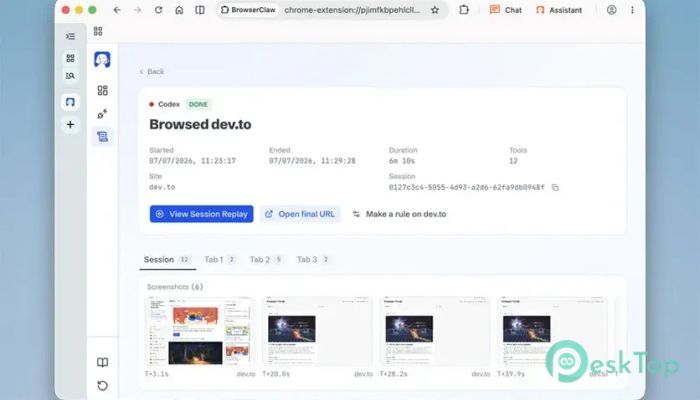
Every browsing session can be saved as a full-screen replay. You can scrub through the recording, rewind specific moments, and review every action the AI took.
This feature works like having a security camera for your browser. If something unexpected happens, you can easily review the entire process rather than guessing what went wrong.
Perfect for Developers and Professionals
The tool is especially useful for developers, researchers, content creators, and business professionals. It can automate repetitive website interactions while allowing users to stay focused on more valuable work.
Whether you are gathering information, testing websites, managing online services, or performing repetitive research, it helps reduce manual effort without sacrificing transparency.
Open-Source and Privacy-Focused
Being open source gives users greater confidence in how the browser works. Anyone can inspect the project, contribute improvements, or verify how the software handles browsing sessions.
Because AI agents use your authenticated browser rather than hidden cloud sessions, you always know where your data is being accessed. This approach improves trust while maintaining flexibility.
Clean Dashboard Experience
The dashboard acts like an air traffic control tower for your AI agents. From a single screen, you can monitor active sessions, switch between running tasks, and quickly identify which websites are currently open.
This organized layout keeps even complex workloads manageable. Instead of jumping between dozens of browser windows, everything stays neatly arranged in one place.
System Requirements and Technical Details
Operating System: Windows 11 / 10 / 8.1 / 7
Processor: Minimum 1 GHz Processor (2.4 GHz recommended)
RAM: 2GB (4GB or more recommended)
Free Hard Disk Space: 200MB or more is recommended

-
Program size121.14 MB
-
Version1.0
-
Program languagemultilanguage
-
Last updatedBefore 2 Month
-
Downloads19
 Samsung Browser
 Suprow
 SSuite NetSurfer Prometheus Browser
 Wavebox Browser
  Waterfox
 Tor Browser