
 Arabic
  English
  Turkish
  Chinese
  Japanese
  Russian
  Spanish
  German
  French
  Hindi
Hindi Download BullZip Access to MSSQL 5.5.0.281 for Windows
Download BullZip Access to MSSQL 5.5.0.281 for Windows.
BullZip Access to MSSQL Overview
Moving data from Microsoft Access to SQL Server can feel like shifting houses. You want everything packed correctly, nothing lost, and no damage along the way. That is exactly where this utility steps in. It is designed to convert Access database files to MSSQL format without making the process a technical headache. The software is designed for developers, database administrators, students, and even small business owners who rely on Access but need the power and stability of SQL Server. Instead of manually recreating tables, fields, and relationships, it handles the heavy lifting. If you have ever worked with database migration, you know how risky it can be. A single mismatch in data types or structure can cause serious trouble later. This tool mitigates those risks and ensures a smooth, reliable transition. Why Database Conversion Matters Microsoft Access works great for small projects and local data storage. But as your data grows, it can start to feel tight, like wearing shoes that are one size too small. MSSQL, on the other hand, is built for larger systems, better performance, and more advanced database management. When businesses scale, they often need stronger security, better concurrency handling, and improved performance. Converting databases becomes necessary. Doing it manually can take hours or even days. With this solution, the process becomes much faster and more controlled.Features of BullZip Access to MSSQL
Let’s break down what makes this converter practical and useful:
Direct conversion from Access to MSSQL.
Preserves table structure and data types.
Transfers indexes and relationships.
User-friendly interface with simple steps.
Supports large database files.
Reduces manual errors during migration.
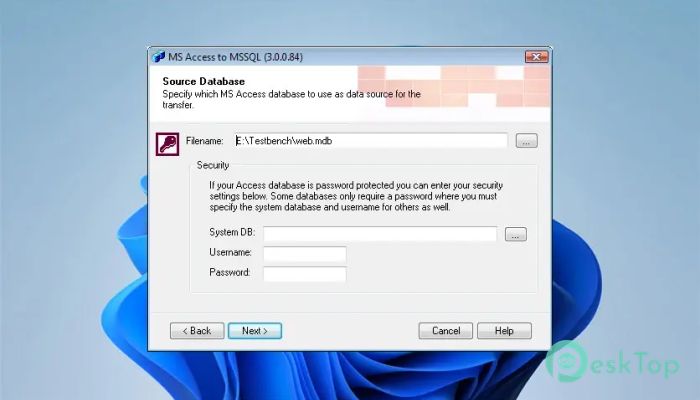
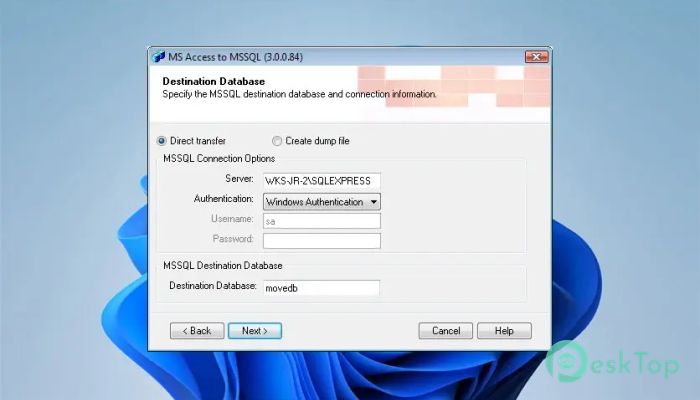
Instead of forcing you to write complex SQL scripts, it gives you a guided path. You select your Access file, configure connection settings, and let the software do the work.
How It Works
The process is simple and logical. First, you select the source Access database. Then you enter the connection details for your MSSQL server. After that, you choose conversion settings and start the process.
Behind the scenes, the tool reads the Access structure, analyzes tables, fields, and indexes, and maps them correctly to MSSQL equivalents. Think of it as a translator between two database languages. It understands both sides and ensures nothing important gets lost in translation.
The conversion includes data, table definitions, and relationships. That means your migrated database will closely match the original structure.
User Interface and Ease of Use
No one enjoys complicated software. This program keeps things clean and straightforward. The layout is simple, with clear options and minimal confusion. Even if you are not a database expert, you can navigate through it without feeling overwhelmed.
It does not bury you in advanced jargon. Instead, it provides step-by-step guidance from source selection through final migration. That simplicity is one of its strongest advantages.
Performance and Reliability
When dealing with databases, speed and accuracy matter. A slow migration can waste time. An inaccurate one can damage data. The software focuses on both performance and reliability.
It is optimized to handle large tables efficiently. During conversion, it ensures data integrity, keeping records consistent. You do not want half your customer records missing or numeric fields converted incorrectly. This tool minimizes such risks.
Because it follows structured mapping rules, it keeps field types aligned properly. That means text fields stay text, numeric fields remain numeric, and date values are preserved correctly.
Similarities with Access to MySQL
This product shares many features with its MySQL counterpart. The logic, workflow, and documentation are very similar. The main difference lies in the destination database engine.
If you are already familiar with converting Access to MySQL, you will feel right at home here. The documentation principles remain the same. Just replace MySQL references with MSSQL, and the concepts still apply.
This consistency makes it easier for users who work with multiple database systems. You do not need to learn everything from scratch.
Who Should Use It
This solution is ideal for developers upgrading applications, IT teams migrating systems, and small businesses scaling their operations. It is also useful for students learning database management and wanting to experiment with SQL Server.
If you maintain legacy Access systems and want to modernize them, this converter can save you time. Instead of rewriting everything manually, you can move forward with fewer obstacles.
Advantages Over Manual Migration
Manual database migration is like rebuilding a car engine piece by piece. One wrong move and the whole system may fail. Automated conversion reduces that risk.
Here are some clear benefits:
Less time spent on scripting.
Reduced risk of human error.
Faster deployment to production servers.
Cleaner and more consistent results.
By automating repetitive tasks, the software enables you to focus on optimization and performance rather than on basic data transfer.
System Requirements and Technical Details
Operating System: Windows 11 / 10 / 8.1 / 7
Processor: Minimum 1 GHz Processor (2.4 GHz recommended)
RAM: 2GB (4GB or more recommended)
Free Hard Disk Space: 200MB or more is recommended

-
Program size3.10 MB
-
Version5.5.0.281
-
Program languagemultilanguage
-
Last updatedBefore 7 Month
-
Downloads7
 Reportizer
 AccdbMerge
 RdpGuard
 Checkbook For Excel
 SysTools SQL Recovery
 Pointdev Ideal Dispatch