
 Arabic
  English
  Turkish
  Chinese
  Japanese
  Russian
  Spanish
  German
  French
  Hindi
Hindi Download BullZip Access To MySQL 5.5.0.282 for Windows
Download BullZip Access To MySQL 5.5.0.282 for Windows.
BullZip Access To MySQL Overview
This utility is designed for users who need to migrate data from Microsoft Access to a MySQL database with ease. Instead of manually recreating tables, copying records, and fixing errors one by one, you can rely on this software to handle the heavy lifting. It serves as a bridge between two database systems, enabling smooth, structured data transfers. The interface is built around a step-by-step wizard, making the entire process simple even if you are not a database expert. You just follow the prompts, select your source and destination, choose your tables and fields, and let the program do the rest. It is compact, easy to install, and does not overload your system.Features of BullZip Access To MySQL
Simple Wizard Interface
The software uses a guided wizard to walk you through each step of the transfer process. Think of it like a GPS for your data migration. Instead of guessing what to do next, you just click “Next” and follow clear instructions.
This makes it ideal for beginners and professionals alike. You do not need advanced technical knowledge to complete a database transfer. The wizard ensures that no critical step is missed.
Direct Server-to-Server Transfer
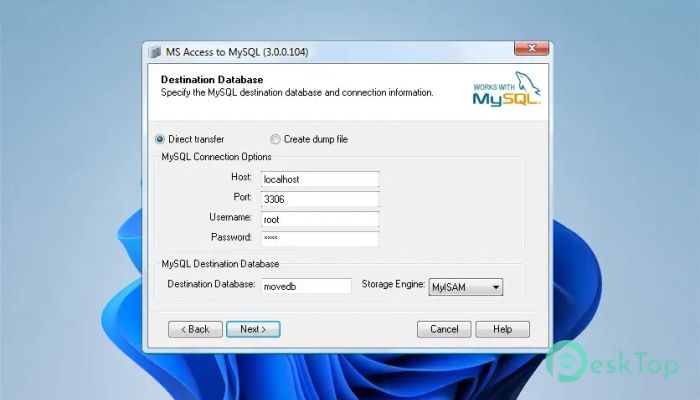
One of the most useful features is the ability to transfer data directly from an Access database to a MySQL server. This saves time and avoids unnecessary manual steps. You connect to your source database, enter your MySQL connection details, and the tool handles the rest.
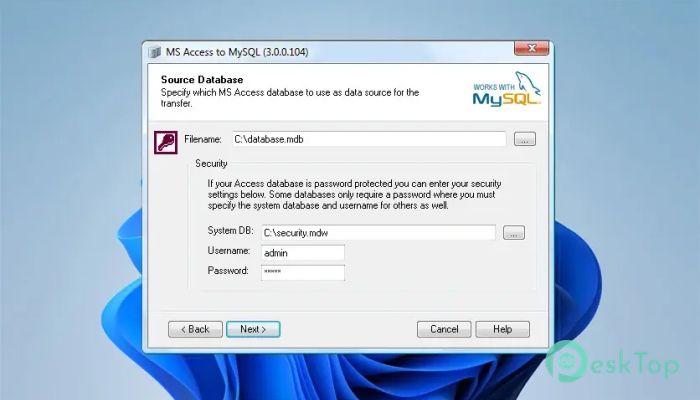
If your Access database requires login credentials, you can easily enter a username and password and specify a system database. This ensures secure and accurate transfers, even for protected databases.
Create Dump Files Instead of Direct Transfer
Sometimes you may not want to connect directly to a MySQL server. In such cases, the software allows you to generate a dump file. This file can later be imported into a MySQL database whenever needed.
This option is especially useful for backup purposes or when working in environments where direct server access is restricted. It gives you flexibility and control over how and when your data is moved.
Select Tables and Fields to Transfer
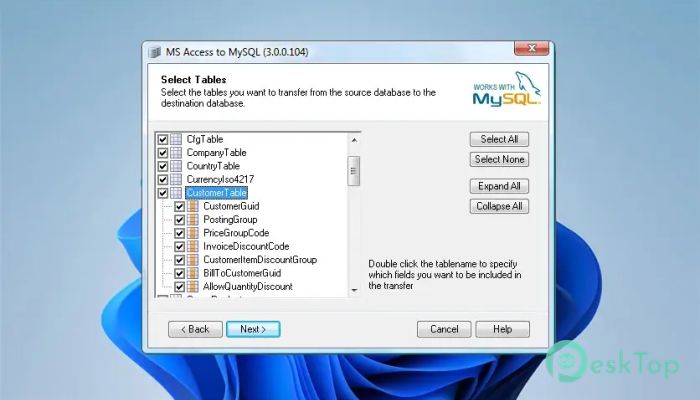
You are not forced to transfer the entire database. The program lets you choose which tables to move. Just tick the boxes next to the tables you need, and skip the rest.
It also allows you to select specific fields within those tables. This means you can fine-tune the transfer process and move only the data that matters. It is like packing only the essentials when moving to a new house.
Security Support and Password-Protected Databases
The tool supports both shared security and user-level security in Access databases. If your file is password-protected, you can provide the necessary credentials during setup.
This ensures that secure databases can still be transferred without compromising data integrity. You stay in control while the software handles the technical side.
Optional Transfer of Indexes and Records
When migrating a database, structure is just as important as data. The program allows you to transfer indexes from the tool. This helps maintain performance and search efficiency in the new database.
You can also choose not to transfer any records. In that case, it will only create empty tables in the destination database. This is useful when you want to rebuild the structure first and insert data later.
Preserve Default Values and Auto Number Fields
Fields in both Access and MySQL can have default values. During conversion, the software can preserve these default settings. This ensures that your database behaves the same way after migration.
It also identifies and transfers auto-number field types. This means that primary keys and automatically incremented values remain intact. It prevents errors and saves you from manually fixing numbering issues.
Command Line Interface
For advanced users, the software offers a command-line interface. This allows you to automate database transfers through scripts. It is especially useful for scheduled tasks or repeated migrations.
With command line support, you can integrate the tool into larger workflows. It becomes part of your automation strategy rather than just a standalone utility.
Easy Installation and Maintenance
The setup process is straightforward. Installation takes only a few moments, and upgrading to a newer version is just as simple. Uninstalling is clean and does not leave unnecessary files behind.
This makes it suitable for both personal computers and professional environments. You can deploy it quickly without complicated configurations.
How the Transfer Process Works
The process begins by specifying your Access database. After that, you enter the MySQL server connection details and choose the destination database. You can decide whether to transfer data directly or generate a dump file.
Next, you select the tables you want to move. Additional options allow you to transfer indexes, records, default values, and auto-number properties. Once everything is set, you click Finish.
The transfer then runs automatically. When it completes, a small report appears showing how much data was moved. This confirmation gives you peace of mind that everything went as planned.
System Requirements and Technical Details
Operating System: Windows 11 / 10 / 8.1 / 7
Processor: Minimum 1 GHz Processor (2.4 GHz recommended)
RAM: 2GB (4GB or more recommended)
Free Hard Disk Space: 200MB or more is recommended

-
Program size3.10 MB
-
Version5.5.0.282
-
Program languagemultilanguage
-
Last updatedBefore 7 Month
-
Downloads8
 Reportizer
 AccdbMerge
 RdpGuard
 Checkbook For Excel
 SysTools SQL Recovery
 Pointdev Ideal Dispatch