
 Arabic
  English
  Turkish
  Chinese
  Japanese
  Russian
  Spanish
  German
  French
  Hindi
Hindi Download BullZip Color Syntax 1.0.4006.19702 for Windows
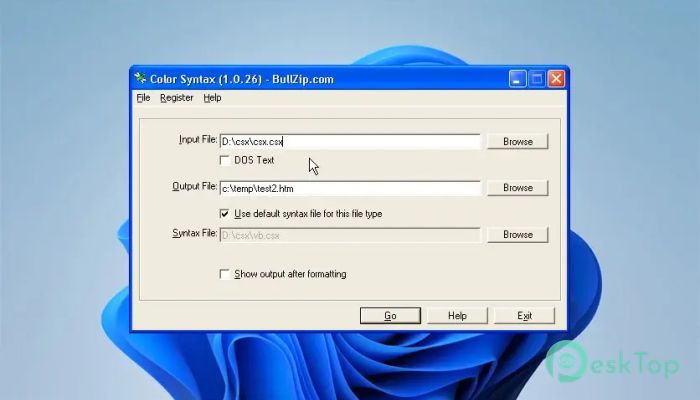
Download BullZip Color Syntax 1.0.4006.19702 for Windows.
BullZip Color Syntax Overview
When you work with source code, plain text can look dull and hard to read. That is where this smart little utility makes a real difference. It transforms your raw code into HTML with clear and attractive color formatting. Instead of staring at endless black-and-white lines, you get structured, highlighted content that is much easier on the eyes. The software is designed for developers, teachers, technical writers, and anyone who needs to present code in a clean format. Whether you are building documentation, creating tutorials, or sharing snippets online, it helps you turn complex scripts into visually organized content. Think of it as giving your code a fresh coat of paint before showing it to the world. Why Colorized Code Matters Reading plain source code is like reading a book with no punctuation. Everything blends together. When syntax is highlighted with colors, keywords, comments, strings, and variables become instantly recognizable. This visual separation improves understanding and reduces mistakes. The tool handles this process automatically. You just load your source file, and it converts it into HTML with proper formatting and color styling. The result is ready to publish on websites, include in documentation, or share in educational material.Features of BullZip Color Syntax
Simple and Friendly User Interface
One of the best things about this program is its clean and straightforward interface. You do not need advanced skills to use it. Open the file, choose your settings, and generate the output. It feels smooth and natural.
The layout keeps things simple. There are no complicated menus or hidden options. Everything is placed where you expect it to be. Even if you are new to development tools, you can get started in minutes.
Command Line Support for Advanced Users
While the graphical interface is perfect for everyday tasks, the software also offers command-line support. This is especially useful for developers who prefer automation. You can process source files directly from scripts or batch operations without opening the main window.
Command-line control makes it powerful for large projects. For example, if you need to convert multiple files at once, you can automate the workflow and save time. It is like having a silent assistant working behind the scenes.
Ideal for Documentation and Tutorials
If you create technical guides or educational content, this tool becomes incredibly valuable. Clean, colored code blocks make tutorials easier to follow. Readers can quickly identify structure and logic without confusion.
It helps maintain professionalism in documentation. Instead of messy text, you get well-formatted HTML that looks polished and organized. This improves readability and gives your content a more refined appearance.
Lightweight and Efficient Performance
The program is small in size but big in usefulness. It does not consume heavy system resources. You can run it on older machines without any slowdown. That makes it practical for daily use.
Because it focuses on a single purpose, it stays fast and reliable. There is no unnecessary clutter. Just open, convert, and export. The process is quick and efficient every time.
Flexible Output in HTML Format
The output is standard HTML, so you can easily embed it in websites or web applications. Once converted, the formatted code keeps its color styling when published online.
This makes it perfect for blog posts, developer documentation, and online learning platforms. You do not need extra plugins or complicated setups. The generated HTML works smoothly across modern browsers.
How It Improves Workflow
Imagine manually formatting hundreds of lines of code for presentation. It would take hours. This utility automates that entire task. With just a few clicks, you transform your source into ready-to-use HTML.
By removing repetitive formatting work, you can focus more on writing and refining your content. It becomes part of your workflow, quietly improving productivity in the background.
System Requirements and Technical Details
Operating System: Windows 11 / 10 / 8.1 / 7
Processor: Minimum 1 GHz Processor (2.4 GHz recommended)
RAM: 2GB (4GB or more recommended)
Free Hard Disk Space: 200MB or more is recommended

-
Program size6.94 KB
-
Version1.0.4006.19702
-
Program languagemultilanguage
-
Last updatedBefore 7 Month
-
Downloads3
 Reportizer
 AccdbMerge
 RdpGuard
 Checkbook For Excel
 SysTools SQL Recovery
 Pointdev Ideal Dispatch