
 Arabic
  English
  Turkish
  Chinese
  Japanese
  Russian
  Spanish
  German
  French
  Hindi
Hindi Download Buzz Desktop 0.5.5 for Windows
Download Buzz Desktop 0.5.5 for Windows.
Buzz Desktop Overview
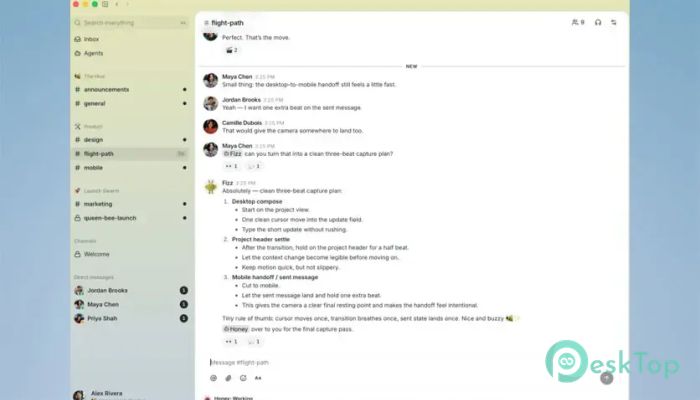
It is built for teams that want to bring human collaboration and AI assistance into one workspace. Instead of switching between multiple apps, it lets everyone communicate, plan projects, manage tasks, write code, and review pull requests from a single environment. Every action is securely recorded as a signed event, creating a clear history that is easy to track and verify. The software creates a shared room where both people and AI agents can participate equally. Whether a message comes from a teammate or an automated process, everything follows the same identity system and audit trail. This makes teamwork more organized, reliable, and transparent.Features of Buzz Desktop
Unified Collaboration Workspace
The software brings conversations, planning, and project management into one place. Team members no longer need to jump between chat applications, task managers, and coding tools. Everything stays connected, making work smoother from start to finish.
Think of it like a digital office where every desk, meeting room, and whiteboard exists in the same building. This approach saves time, reduces confusion, and helps everyone stay focused on the project.
Work Alongside AI Agents
One of the biggest strengths of the tool is its ability to enable AI agents to work alongside human teammates. Specialized agents can answer questions, generate ideas, assist with coding, and support project planning while remaining part of the same conversation.
Since every action is recorded using the same identity model, users always know whether a response came from a person or an AI assistant. This improves trust and makes collaboration feel natural.
Secure Identity and Audit Trail
Every message, reaction, and decision is stored as a signed event in a single activity log. This creates a detailed history that cannot easily be misunderstood or lost over time.
The software makes it easy to review past discussions, track project decisions, and understand who performed each action. This level of transparency is especially valuable for business teams and software development projects.
Integrated Project Management
Managing projects becomes much easier when discussions and tasks live in the same workspace. Users can move directly from brainstorming ideas into creating plans, assigning work, and tracking progress.
Because everything remains connected, there is less risk of missing important information. Conversations naturally become part of the project's history, making future reviews much simpler.
Developer-Friendly Environment
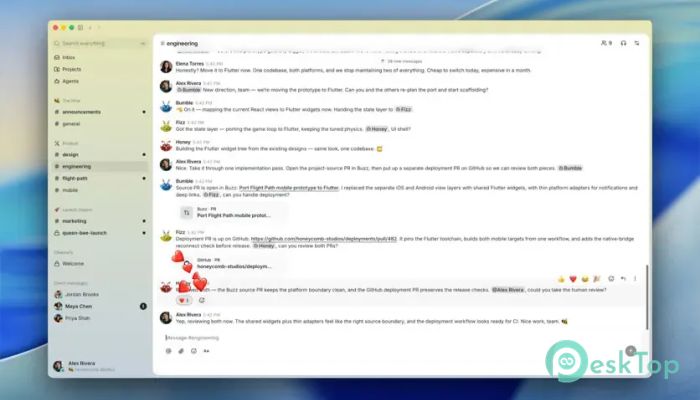
The platform is designed with software development in mind. Developers can chat with teammates, receive AI coding assistance, manage development tasks, and continue directly into coding and pull request workflows.
This streamlined process reduces unnecessary interruptions. Instead of copying information across different platforms, the entire development cycle stays organized within a single workspace.
Real-Time Team Communication
Fast communication is essential for productive teams. The tool provides shared rooms where discussions happen instantly, helping members solve problems without delays.
Reactions, messages, and updates appear in real time, ensuring everyone stays informed. Whether the team is working remotely or from different offices, collaboration remains smooth and efficient.
Transparent Decision Tracking
Every important decision becomes part of a permanent and searchable history. Instead of relying on memory or scattered chat logs, users can quickly review why certain choices were made.
This organized timeline improves accountability and helps new team members understand previous discussions without having to ask the same questions repeatedly.
Simple and Productive Workflow
The software focuses on reducing unnecessary complexity. Its clean interface keeps important tools within easy reach while allowing users to concentrate on meaningful work.
By combining communication, planning, coding, and AI assistance into one platform, it removes many of the obstacles that slow down modern teams.
Perfect for Modern Teams
The platform works well for startups, software companies, remote teams, and organizations that depend on fast collaboration. Since humans and AI agents share the same environment, projects progress more quickly while maintaining full visibility.
Its flexible design also makes it suitable for businesses that want secure records of every conversation and project decision without adding extra administrative work.
System Requirements and Technical Details
Operating System: Windows 11 / 10 / 8.1 / 7
Processor: Minimum 1 GHz Processor (2.4 GHz recommended)
RAM: 2GB (4GB or more recommended)
Free Hard Disk Space: 200MB or more is recommended

-
Program size50.72 MB
-
Version0.5.5
-
Program languagemultilanguage
-
Last updatedBefore 2 Month
-
Downloads3
 Reportizer
 AccdbMerge
 RdpGuard
 Checkbook For Excel
 SysTools SQL Recovery
 Pointdev Ideal Dispatch