
 Arabic
  English
  Turkish
  Chinese
  Japanese
  Russian
  Spanish
  German
  French
  Hindi
Hindi Download ChillShot AI 1.0 for Windows
Download ChillShot AI 1.0 for Windows.
ChillShot AI Overview
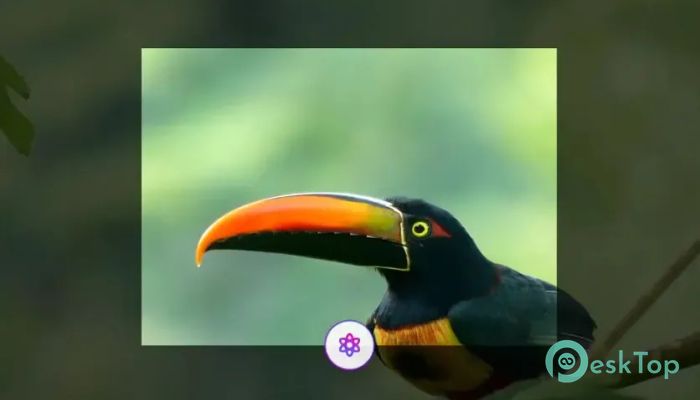
It is designed to make screenshots much more useful than simple images. Instead of just capturing your screen, it understands the content inside every screenshot and helps you interact with it instantly. Whether you are working with PDFs, images, websites, handwritten notes, or error messages, the software extracts information in seconds and turns it into something you can actually use. The software combines OCR, AI-powered translation, visual question answering, and image editing into one simple workspace. Everything works with a quick keyboard shortcut, allowing you to stay focused without constantly switching between applications. Even better, all processing happens locally, so your private information stays on your computer.Features of ChillShot AI
Smart OCR for Every Screenshot
The software can recognize text from almost anything you capture. It works with screenshots, scanned documents, PDF pages, photos, handwritten notes, and web pages. Instead of typing everything manually, you can instantly copy the detected text directly to your clipboard.
It also recognizes stylized fonts, programming code, mathematical formulas, and complex layouts. This makes it useful for students, developers, office workers, researchers, and anyone who works with digital documents every day.
Keeps Tables and Formatting Intact
Many OCR tools destroy the layout of tables, making copied data difficult to use. This tool solves that problem by detecting rows and columns accurately while preserving their original structure.
This feature is especially useful when copying invoices, spreadsheets, financial reports, product lists, or research tables because the content stays organized and ready to paste into other applications.
Translate Without Leaving Your Screen
Reading documents in another language becomes incredibly simple. Just capture the area you want, and the software instantly translates the content while keeping the original layout almost unchanged.
Tables remain as tables, paragraphs stay organized, and documents remain easy to read. It supports Japanese, Korean, Arabic, and more than 100 additional languages, making communication across regions much easier.
Private Local Processing
Privacy is one of its biggest strengths. Unlike many online AI tools, it processes data locally on your computer rather than uploading sensitive information to external servers.
This means contracts, invoices, confidential reports, medical records, business documents, and personal conversations remain under your control while still benefiting from powerful AI features.
Visual AI Questions and Answers
The software goes beyond simple text recognition by understanding the entire screenshot. You can ask questions in plain English, and it analyzes the captured image to provide clear answers.
For example, you can ask what a chart means, summarize a lengthy report, explain technical documentation, decode complicated error messages, or simplify legal text. It works like having an intelligent assistant that understands everything visible on your screen.
Summarize Long Documents Instantly
Reading lengthy reports or discussion threads can consume valuable time. The tool quickly creates short, easy-to-understand summaries that highlight the most important points.
Instead of reading dozens of pages, you receive a concise overview that helps you understand the content much faster while preserving the essential information.
Edit Screenshots Using Natural Language
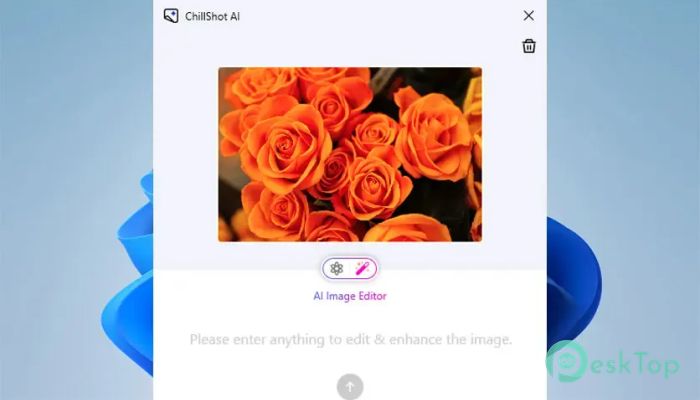
Editing screenshots becomes as simple as having a conversation. Instead of learning complicated editing software, you simply describe what you want to change, and the software performs the task.
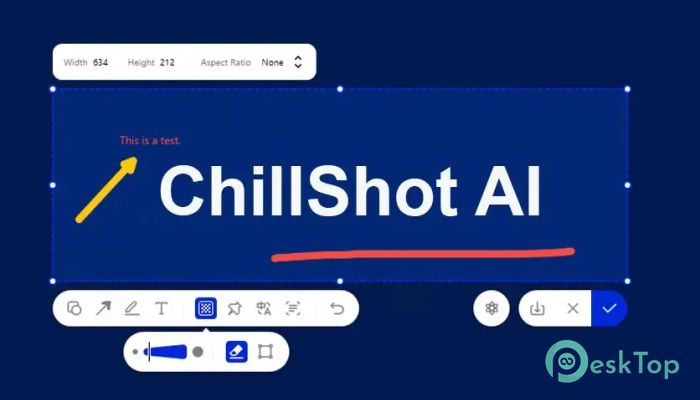
You can remove unwanted objects, erase logos or watermarks, blur private information, adjust brightness, improve colors, increase contrast, or add annotations without interrupting your workflow.
Protect Sensitive Information
Sharing screenshots often requires hiding personal or confidential details. The software makes this process quick and effortless by allowing you to blur faces, names, account numbers, and other private information before sharing.
This feature is valuable for businesses, customer support teams, educators, journalists, and anyone who regularly shares screenshots online.
Fast Export and Easy Workflow
Once editing is complete, the software lets you save your work in popular image formats such as PNG and JPG. Everything can be stored directly on your local device for complete control over your files.
Its simple workflow lets you capture, analyze, edit, and save your screenshots without switching between multiple applications, saving time and effort.
Designed for Everyday Productivity
The software fits naturally into almost any workflow. Whether you are translating documents, fixing technical problems, studying online material, reviewing contracts, or preparing presentations, it helps you complete tasks much faster.
With one shortcut, intelligent AI features, and local processing, it transforms ordinary screenshots into useful information that can be copied, translated, understood, and edited immediately.
System Requirements and Technical Details
Operating System: Windows 11 / 10 / 8.1 / 7
Processor: Minimum 1 GHz Processor (2.4 GHz recommended)
RAM: 2GB (4GB or more recommended)
Free Hard Disk Space: 200MB or more is recommended

-
Program size2.26 MB
-
Version1.0
-
Program languagemultilanguage
-
Last updatedBefore 2 Month
-
Downloads69Ralated programs
![Operant Peak Spectroscopy]() Operant Peak Spectroscopy
Operant Peak Spectroscopy ![NeverWrite]() NeverWrite
NeverWrite![FluentCleaner]() FluentCleaner
FluentCleaner![Snippai]() Snippai
Snippai![ChillShot AI]() ChillShot AI
ChillShot AI![Splunk Enterprise]() Splunk Enterprise
Splunk Enterprise
 Operant Peak Spectroscopy
  NeverWrite
 FluentCleaner
 Snippai
 ChillShot AI
 Splunk Enterprise