
 Arabic
  English
  Turkish
  Chinese
  Japanese
  Russian
  Spanish
  German
  French
  Hindi
Hindi Download Cyotek Sitemap Creator 1.0.6.1 for Windows
Download Cyotek Sitemap Creator 1.0.6.1 for Windows.
Cyotek Sitemap Creator Overview
Managing a website without a sitemap is like trying to explore a city without a map. This handy software simplifies the process by scanning your website and automatically creating various types of sitemaps. Whether you own a personal blog, a business website, or an online store, using a sitemap helps search engines better understand your pages and provides useful insights into your site's structure. The tool is designed to crawl websites quickly and collect valuable information about pages, links, images, and other resources. It can generate Google XML, ASP.NET, and HTML sitemaps without requiring advanced technical knowledge. Its clean interface makes it suitable for both beginners and experienced webmasters.Features of Cyotek Sitemap Creator
Fast Website Scanning
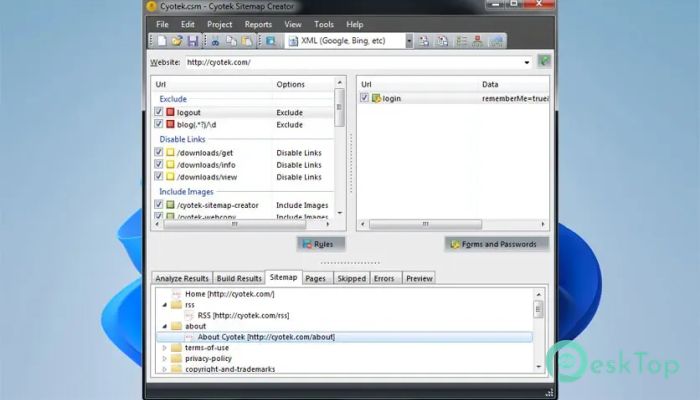
The software quickly scans every accessible page on your website and creates a complete map of its structure. Instead of checking every page manually, you can let the crawler perform the hard work in just a few minutes.
It follows internal links, gathers page information, and organizes everything into an easy-to-understand format. This saves valuable time while helping you identify the complete layout of your website.
Create Multiple Sitemap Types
One of its biggest strengths is the ability to generate several sitemap formats. You can create Google XML sitemaps that improve search engine indexing, ASP.NET sitemaps for web applications, and HTML sitemaps that make navigation easier for visitors.
Since different websites have different needs, having multiple sitemap options gives you greater flexibility. You can generate the format that best matches your project without installing additional utilities.
Improve Search Engine Visibility
A well-structured sitemap acts like a roadmap for search engines. It helps crawlers locate important pages faster and ensures newly added content gets discovered more efficiently.
By keeping your sitemap updated, the software increases the likelihood that your pages will be indexed correctly. This can improve overall website visibility and make your content easier for people to find online.
Find Missing Pages and Broken Links
In addition to creating sitemaps, the tool helps identify problems that may affect your website. Scanning can reveal missing pages, broken links, invalid references, and other navigation issues.
Finding these problems early allows you to fix them before they affect visitors or search engine rankings. It's like having a quality inspector checking every corner of your website.
Detailed Website Analysis
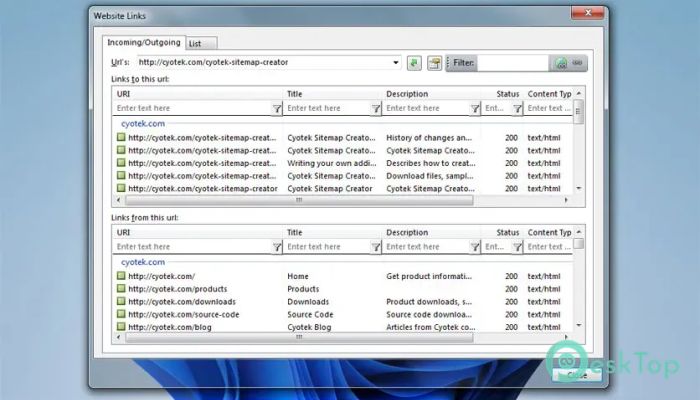
The software collects useful information while crawling your website. It lists discovered pages, outgoing links, incoming links, images, and various resources that make up your site.
This detailed overview helps you understand how your website is organized. Whether you are planning updates or improving navigation, the collected information becomes a valuable reference.
Easy-to-Use Interface
You don't need to be a web development expert to use this application. Everything is arranged in a simple interface that guides you through scanning, reviewing results, and generating sitemaps.
Even first-time users can start a website scan within minutes. Most options are clearly labeled, making the entire workflow smooth and beginner-friendly.
Flexible Crawl Settings
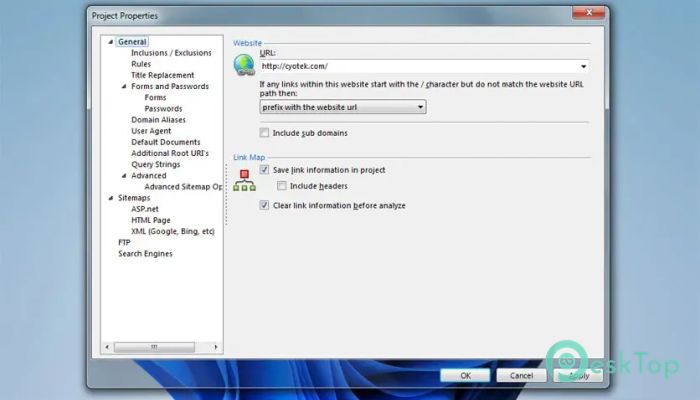
Every website is different, and the software lets you customize how scans are performed. You can control the crawl depth, define starting URLs, exclude specific folders, and adjust other settings to suit your project.
These flexible options help you scan exactly what you need while avoiding unnecessary pages. This improves efficiency and makes sitemap generation more accurate.
Useful Reports and Lists
After completing a scan, the tool provides organized reports containing page information, discovered links, missing files, redirects, and other useful website details.
These reports make it easier to monitor your website's health and plan future improvements. Instead of manually searching through hundreds of pages, everything is presented in one convenient location.
Ideal for Different Website Sizes
Whether your website has a few pages or thousands, the software can handle projects of all sizes. It performs efficient scans while keeping navigation information well organized.
This makes it useful for bloggers, developers, SEO professionals, digital agencies, and businesses that regularly maintain websites.
System Requirements and Technical Details
Operating System: Windows 11 / 10 / 8.1 / 7
Processor: Minimum 1 GHz Processor (2.4 GHz recommended)
RAM: 2GB (4GB or more recommended)
Free Hard Disk Space: 200MB or more is recommended

-
Program size4.13 MB
-
Version1.0.6.1
-
Program languagemultilanguage
-
Last updatedBefore 2 Month
-
Downloads6
 Reportizer
 AccdbMerge
 RdpGuard
 Checkbook For Excel
 SysTools SQL Recovery
 Pointdev Ideal Dispatch