
 Arabic
  English
  Turkish
  Chinese
  Japanese
  Russian
  Spanish
  German
  French
  Hindi
Hindi Download Devolutions PowerShell Universal 2026.2.3.0 for Windows
Download Devolutions PowerShell Universal 2026.2.3.0 for Windows.
Devolutions PowerShell Universal Overview
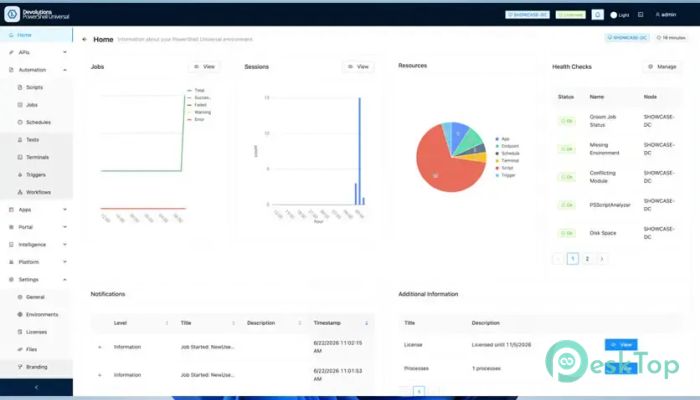
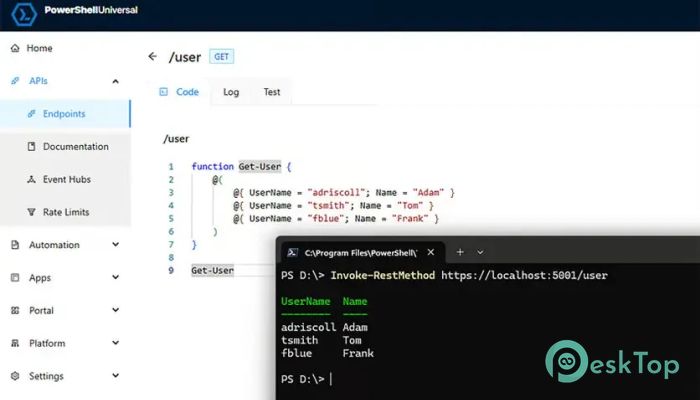
It is a complete automation and development platform that helps individuals and teams manage PowerShell projects from a single place. It combines automation, dashboards, APIs, and security into one powerful solution, making it much easier to move from simple scripts to production-ready applications. Instead of running scripts manually every day, the software provides tools to schedule tasks, monitor execution, create web-based dashboards, and expose PowerShell code as APIs. This saves time, reduces human error, and helps organizations automate repetitive work efficiently. Centralized Automation Management The software gives users a central location to manage all PowerShell automation tasks. Rather than storing scripts in separate folders or running them one by one, everything can be organized within a single interface. It supports scheduled jobs, custom triggers, execution history, and detailed logging. This makes it easy to track every task, identify failures, and ensure automation runs smoothly without constant supervision. Script and Module Hosting Keeping PowerShell scripts organized can become difficult as projects grow. The tool solves this by providing built-in hosting for scripts and modules. Users can store, update, and manage their code from a single location. This approach encourages better collaboration because team members always work with the latest version. It also reduces confusion caused by duplicate files or outdated scripts. Build REST APIs in Minutes One of the platform's biggest strengths is its ability to convert PowerShell scripts into REST APIs. This allows existing automation to communicate with websites, business applications, cloud services, and DevOps pipelines without writing complex backend code. It supports REST APIs, WebSocket APIs, token-based authentication, and automatically generated OpenAPI documentation. As a result, developers can quickly integrate PowerShell automation with almost any modern system. Create Interactive Dashboards The software makes it possible to build professional dashboards directly with PowerShell. Users do not need to learn another frontend framework or spend time creating complicated web interfaces. Dynamic dashboards, custom pages, reusable components, and a built-in UI framework allow administrators to display reports, monitor servers, visualize data, and build internal business tools using familiar PowerShell commands. Enterprise-Grade Security Security is an important part of any automation platform. The tool includes enterprise-level authentication and authorization features to ensure only approved users can access sensitive resources. Role-Based Access Control (RBAC) lets administrators assign permissions for scripts, APIs, dashboards, and automation jobs. Multiple authentication providers are supported, making it simple to integrate with existing company security systems. Schedule and Monitor Automation Manual execution often leads to mistakes and wasted time. Instead, the platform allows users to create scheduled jobs that run automatically at specific times or when predefined events occur. Detailed execution history and logging provide complete visibility into every job. If something fails, users can quickly review logs, identify the cause, and resolve the issue without having to guess what happened. Improve Team Collaboration Managing automation across multiple administrators becomes much easier with centralized management. Everyone works from the same environment, reducing duplicated effort and improving consistency. Code-based configuration also allows settings to be version-controlled, making deployment more predictable and simplifying collaboration between developers and system administrators. Developer Edition for Learning The platform includes a free Developer Edition that provides the complete feature set for local development. Anyone can build dashboards, APIs, automation workflows, and internal tools without paying for a production license. Only a Devolutions account login is required to use the development edition. Organizations only need a paid Server license when deploying production workloads for business use.Features of Devolutions PowerShell Universal
Centralized PowerShell automation management
Script and module hosting
Scheduled jobs and custom triggers
Execution history with detailed logging
REST and WebSocket API generation
Automatic OpenAPI documentation
Token-based authentication support
Interactive dashboards and web apps
Built-in UI framework and components
Role-Based Access Control (RBAC)
Multiple authentication providers
Code-based configuration management
Developer Edition available for free
Why Choose This Platform?
Whether you manage a few automation scripts or hundreds of enterprise workflows, the software scales to meet your needs. It combines development, deployment, monitoring, and security into a single package, eliminating the need for multiple separate tools.
Its ability to transform PowerShell scripts into dashboards, APIs, and scheduled automation tasks makes it valuable for IT administrators, DevOps engineers, developers, and system administrators who want reliable, efficient automation.
System Requirements and Technical Details
Operating System: Windows 11 / 10 / 8.1 / 7
Processor: Minimum 1 GHz Processor (2.4 GHz recommended)
RAM: 2GB (4GB or more recommended)
Free Hard Disk Space: 500MB or more is recommended

-
Program size173.19 MB
-
Version2026.2.3.0
-
Program languagemultilanguage
-
Last updatedBefore 2 Month
-
Downloads16
 Reportizer
 AccdbMerge
 RdpGuard
 Checkbook For Excel
 SysTools SQL Recovery
 Pointdev Ideal Dispatch