
 Arabic
  English
  Turkish
  Chinese
  Japanese
  Russian
  Spanish
  German
  French
  Hindi
Hindi Download DuckDB 1.5.1 for Windows
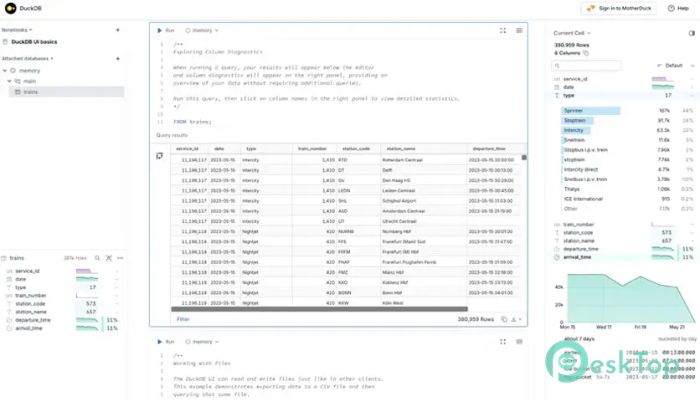
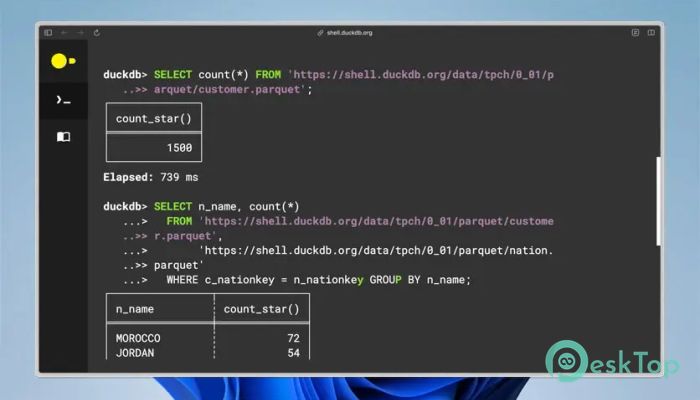
Download DuckDB 1.5.1 for Windows.
DuckDB Overview
There are many database management systems available today, and each one is designed with different goals in mind. Some focus on speed, others on scalability, and some on simplicity. This tool stands out for combining simplicity with powerful analytical capabilities. It is designed to work directly on data files without requiring a separate server, making it incredibly convenient for developers, analysts, and data scientists. Unlike traditional databases, which require complex configuration and maintenance, the software runs within your application. That means you can query large datasets directly from your local machine without needing heavy infrastructure. It supports multiple data sources, including Parquet files, JSON, CSV files, S3 buckets, and even data lakes. This flexibility makes it a perfect companion for modern data workflows. The tool uses a friendly yet powerful SQL dialect, enabling users to write familiar queries while efficiently handling large-scale analytical operations. Whether working with structured data or semi-structured files, it simplifies the process and delivers fast performance.Features of DuckDB
Lightweight Yet Powerful Architecture
One of the biggest advantages of the software is its lightweight architecture. It does not require a separate server or complicated installation. Instead, it runs directly inside your application like an embedded database. This approach reduces overhead and improves performance.
Think of it like carrying a powerful toolbox in your pocket instead of maintaining a full workshop. You get the same functionality without the complexity. This makes it ideal for developers who want fast analytics without deploying additional services.
Fast Analytical Processing
Speed is one of the tool's strongest features. It is optimized for analytical workloads and columnar storage processing. This means queries run faster, especially when working with large datasets.
The software is designed to efficiently process millions of rows. It uses vectorized query execution and parallel processing to deliver rapid results. Whether analyzing logs, datasets, or reports, it ensures minimal waiting time.
Works Directly with Data Files
Another standout feature is the ability to query data directly from files. Instead of importing data into a database first, you can run queries directly on Parquet, CSV, or JSON files. This eliminates unnecessary steps and saves time.
The tool also supports cloud storage services such as S3. This means you can analyze remote data without downloading it locally. It simplifies workflows and improves productivity for data professionals.
Friendly SQL Dialect
SQL is widely used, and the software embraces that familiarity. The SQL dialect is easy to learn but powerful enough for advanced analytics. Users can perform joins, aggregations, filtering, and complex calculations effortlessly.
This friendly approach reduces the learning curve and helps teams adopt it quickly. Even beginners can start querying data within minutes.
Seamless Integration with Data Tools
The software integrates smoothly with popular programming languages like Python, R, and C++. This allows developers to use it directly inside applications or scripts. It also works well with notebooks and analytics tools.
This flexibility makes it suitable for data science workflows. Instead of switching between multiple tools, users can manage everything in one place.
Perfect for Modern Data Lakes
Modern data environments rely heavily on data lakes and file-based storage. The tool fits perfectly into this ecosystem. It allows users to analyze data stored across multiple files and locations.
By supporting formats like Parquet and JSON, it helps organizations manage large-scale data efficiently. This capability makes it a valuable solution for analytics-heavy environments.
Simple Deployment and Setup
Getting started is incredibly simple. There is no need for server configuration or database administration. Users can start working immediately after installation.
This simplicity reduces development time and allows teams to focus on insights instead of infrastructure. It is especially useful for startups and individual developers.
Efficient Memory Usage
The software is designed to use memory efficiently. Even when working with large datasets, it manages resources smartly. This ensures smooth performance without requiring high-end hardware.
Efficient memory handling also makes it suitable for laptops and standard desktop systems. Users can perform analytics without upgrading their machines.
Open Source and Community Support
Being open source means continuous improvements and strong community support. Developers regularly contribute new features and optimizations. This keeps the tool modern and reliable.
The open-source nature also provides transparency. Users can inspect how it works and customize it according to their needs.
Use Cases and Practical Applications
The tool can be used in many scenarios. Data analysts can explore datasets quickly. Developers can embed it into applications. Researchers can analyze experimental data without complex setups.
It is also useful for business intelligence tasks. Teams can generate reports, perform analytics, and gain insights efficiently. The flexibility makes it suitable for a wide range of industries.
System Requirements and Technical Details
Operating System: Windows 11 / 10 / 8.1 / 7
Processor: Minimum 1 GHz Processor (2.4 GHz recommended)
RAM: 2GB (4GB or more recommended)
Free Hard Disk Space: 200MB or more is recommended

-
Program size8.92 MB
-
Version1.5.1
-
Program languagemultilanguage
-
Last updatedBefore 5 Month
-
Downloads12
 Reportizer
 AccdbMerge
 RdpGuard
 Checkbook For Excel
 SysTools SQL Recovery
 Pointdev Ideal Dispatch