
 Arabic
  English
  Turkish
  Chinese
  Japanese
  Russian
  Spanish
  German
  French
  Hindi
Hindi Download FliFlik Sora Video Downloader 1.0 for Windows
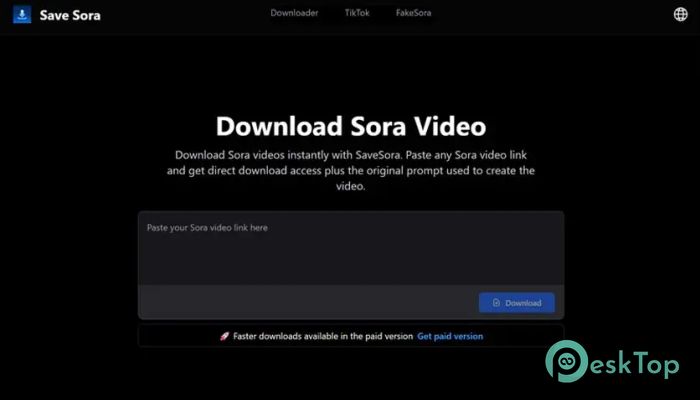
Download FliFlik Sora Video Downloader 1.0 for Windows.
FliFlik Sora Video Downloader Overview
This tool is designed for users who want a clean, quick, and reliable way to save AI-generated videos to their system. It works entirely online, with no setup, large files, or learning curve. You paste a video link, click download, and the file is ready within seconds. It feels like grabbing a photo from the web, only smoother and brighter.Features of FliFlik Sora Video Downloader
Simple and Clean User Experience
It keeps things refreshingly simple. The interface focuses on a single task and does it well. There are no confusing menus or technical terms to slow you down. Everything is clearly organized, so even a first-time user can complete the task in moments. Think of it like a remote control with only the buttons you actually need.
High-Quality MP4 Video Output
The software ensures videos are saved in full-quality MP4 format. This means sharp visuals, smooth motion, and precise details exactly as they appear online. There is no unwanted compression or loss of clarity. The downloaded video looks just as good offline as it does when streamed.
No Software Installation Required
One of the most significant advantages is that it runs without installation. There is no need to clutter your PC with extra programs or worry about compatibility issues. Open the downloader, paste the link, and get the result. It works like a digital shortcut, skipping unnecessary steps.
Download Videos Without Watermarks
After processing the link, the tool lets you download videos without watermarks. This keeps the visuals clean and professional-looking. Whether you want to save clips for reference or personal viewing, the result feels polished and distraction-free.
Step-by-Step Download Process
The workflow is straightforward and fast. First, you open the Sora app and locate the video you want. By clicking the three-dot button, you copy the video link. Next, paste the link into the downloader and click the download button. Once processing is complete, you can preview the video and save it instantly. The entire process feels as easy as copying and pasting text.
Fast Processing Speed
Time matters, and this tool respects that. Videos are processed within seconds, even at high quality. There is no long waiting or unnecessary buffering. It works efficiently, making it perfect for users who value speed and simplicity.
Works Smoothly on Windows Systems
It runs smoothly on Windows PCs and does not demand powerful hardware. Even older systems handle it well. This makes it accessible to a wide range of users, from casual viewers to frequent video downloaders.
Safe and User-Friendly Design
The design focuses on safety and ease of use. There are no hidden actions or confusing prompts. You stay in control throughout the process. It feels like using a trusted tool that does exactly what it promises without surprises.
Perfect for Everyday Video Saving
Whether you want to keep inspiring AI visuals, creative clips, or reference material, this downloader integrates seamlessly into your daily workflow. It acts like a digital notebook for videos, helping you store content you want to revisit later.
System Requirements and Technical Details
Operating System: Windows 11 / 10 / 8.1 / 7
Processor: Minimum 1 GHz Processor (2.4 GHz recommended)
RAM: 2GB (4GB or more recommended)
Free Hard Disk Space: 200MB or more is recommended

-
Program size1.36 MB
-
Version1.0
-
Program languagemultilanguage
-
Last updatedBefore 9 Month
-
Downloads36
 Transmission
 Abelssoft YouTube Song Downloader Plus 2026
 Fast Video Downloader
 3D Youtube Downloader
 Open Video Downloader (youtube-dl-gui)
 qBittorrent