
 Arabic
  English
  Turkish
  Chinese
  Japanese
  Russian
  Spanish
  German
  French
  Hindi
Hindi Download Fungible 1.8.1 for Windows
Download Fungible 1.8.1 for Windows.
Fungible Overview
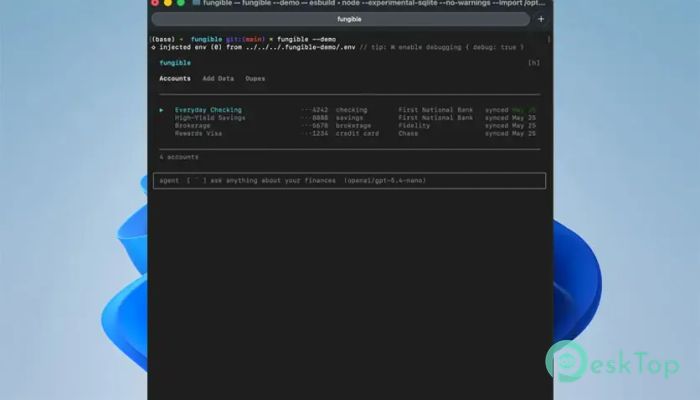
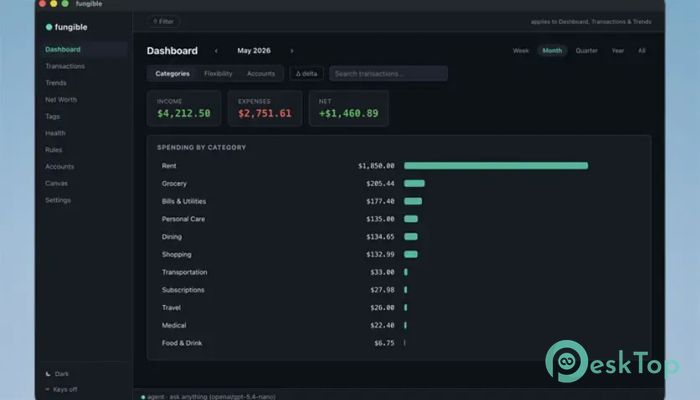
It is a modern terminal user interface (TUI) application designed to manage personal finances in a simple yet powerful way. It brings all your financial data into one place, allowing you to track transactions, monitor assets, and understand spending patterns without relying on complex dashboards or heavy software. Designed for developers, analysts, and everyday users, it turns raw financial data into meaningful insights.Features of Fungible
Unified Financial Control Center
The software acts as a central hub for all financial activity. Instead of switching between banking apps, spreadsheets, or budgeting tools, users can manage everything in one clean terminal interface. This unified approach makes financial tracking faster and less stressful.
It connects directly with financial data sources and organizes them into structured views. Whether you are reviewing daily spending or long-term financial health, everything is accessible in just a few keystrokes.
Plaid Sync for Automatic Transactions
One of the most powerful features is Plaid synchronization. It allows the tool to securely connect to bank accounts and automatically pull transaction data. This removes the need for manual entry and ensures your financial records are always up to date.
A smart debounce system runs every 15 minutes to avoid unnecessary sync requests, while still keeping data fresh. If needed, users can also trigger a force-sync for immediate updates.
CSV Import for Flexible Data Handling
Not all financial data comes directly from banks. That’s why the software supports CSV imports from any financial institution. Users can upload statement files and map columns flexibly to match their format.
This feature ensures compatibility with almost every bank worldwide. It also makes migration from other tools smooth and painless, especially for users switching from spreadsheet-based tracking systems.
Manual Asset Tracking
Beyond transactions, it also allows users to track manual assets such as houses, cars, investments, and other valuable items. Each asset can be assigned a name and current value, helping users build a complete net worth profile.
This feature turns the tool into more than just a spending tracker. It becomes a full financial overview system that includes both income/expense flow and asset growth.
Smart Category and Naming Rules
Organizing transactions is made easy with intelligent category rules. Users can create substring or regex-based rules that automatically categorize and rename transactions as they are imported.
Even after re-syncing data from banks, these rules remain intact. This ensures consistent categorization without the need for repeated manual adjustments, saving time and reducing errors.
Spending Classification System
The software introduces a flexible spending classification model. Categories can be labeled as fixed, flexible, or discretionary. This helps users quickly understand where their money is going and how controllable their expenses are.
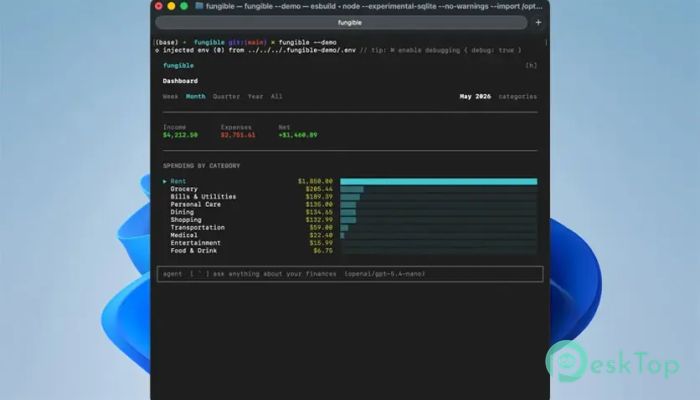
On the dashboard, spending is broken down visually so users can easily see which areas need attention. It’s like having a financial mirror reflecting your habits in real time.
Advanced Delta Analysis
A powerful analytical feature is the delta mode. It compares spending across different time periods, including previous months, the same period last year, and a 12-month rolling average.
Heat-map coloring highlights increases or decreases in spending, making trends easy to spot at a glance. This helps users make better financial decisions based on real patterns instead of guesswork.
Tag-Based Financial Insights
Users can label transactions with tags such as trips, projects, or events. These tags can span across multiple accounts, making it easier to group related expenses.
With tag summaries, users can instantly see how much they have spent on a vacation, a business project, or a personal goal. It adds a layer of flexibility that traditional categories cannot provide.
Net Worth and Financial Health Tracking
The tool provides a complete net worth overview, combining assets and liabilities into one clear picture. It tracks balance history and separates accounts by type for better clarity.
It also calculates financial health metrics like cash runway, liquid runway, and FIRE (Financial Independence, Retire Early) progress. Users can even estimate retirement years based on adjustable assumptions.
Powerful Trends and Visualization Tools
Financial trends are displayed using bar charts and aggregated views. Users can analyze expenses, income, net savings, or any custom category over different time ranges.
This helps identify spending habits, seasonal changes, and long-term financial behavior. Even though it runs in a terminal, the visual representation remains clear and impactful.
Regex-Based Smart Search
The search system supports advanced regex queries across dashboards, transactions, and trend views. This makes it easy to locate specific entries even in large financial datasets.
Instead of scrolling endlessly, users can instantly filter results using patterns, saving time and improving productivity.
Deduplication and Data Cleaning
When importing data from multiple sources, such as CSV files and bank syncs, duplicates can occur. The software includes a deduplication review system that identifies and removes overlapping transactions.
This ensures clean, accurate financial records and prevents inflated spending or income reports caused by duplicate entries.
API and MCP Server Integration
The tool also includes an MCP server and HTTP API. This allows external tools, scripts, or AI systems like Claude to interact directly with your financial data.
Developers can build automation, generate reports, or integrate financial insights into other systems, making it highly extensible and future-ready.
System Requirements and Technical Details
Operating System: Windows 11 / 10 / 8.1 / 7
Processor: Minimum 1 GHz Processor (2.4 GHz recommended)
RAM: 2GB (4GB or more recommended)
Free Hard Disk Space: 200MB or more is recommended

-
Program size104.83 MB
-
Version1.8.1
-
Program languagemultilanguage
-
Last updatedBefore 1 Month
-
Downloads2
 Chess King 2026
 Easy German Platinum
 Easy French Platinum
 Easy English Platinum
 Moneyspire Desktop
 Concept Grid