
 Arabic
  English
  Turkish
  Chinese
  Japanese
  Russian
  Spanish
  German
  French
  Hindi
Hindi Download Gologin 1.0 for Windows

Download Gologin 1.0 for Windows.
Gologin Overview
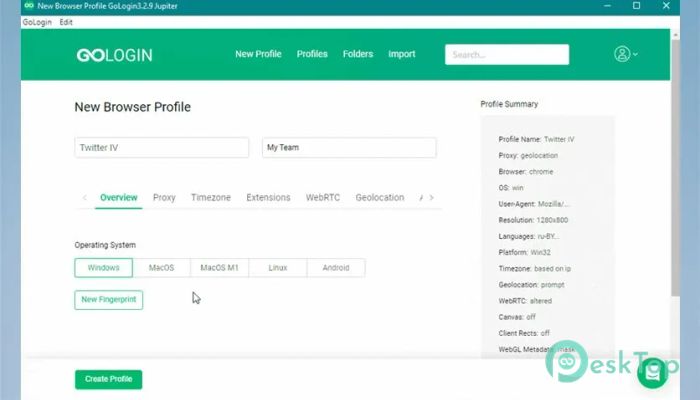
It is designed for people who manage multiple accounts across the same or different platforms. It creates a separate, clean digital identity for each profile, making every login appear to come from a completely different physical device. This approach helps users avoid bans, blocks, and unwanted verifications that usually happen when multiple accounts are detected. Instead of juggling browsers, extensions, or virtual machines, it brings everything together in one smart workspace. Each profile runs independently, with its own fingerprint, system details, and connection settings. This makes daily account handling feel organized rather than chaotic.Features of Gologin
Real Browser Fingerprint Technology
One of the strongest points is its natural mimicry of real devices. Instead of random or broken fingerprints, it uses real browser environments that behave like genuine machines. This makes actions feel human rather than automated.
Think of it like wearing different outfits when visiting different places. Each appearance matches the environment, so nothing feels out of place. This consistency plays a big role in long-term account safety.
Unified Workspace for All Accounts
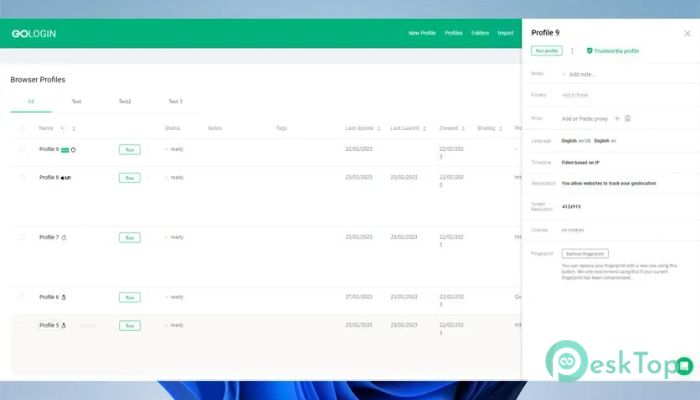
Managing many profiles can quickly become overwhelming. This is where the software shines: it offers a unified dashboard. All profiles are clearly listed, making it easy to launch, pause, or organize them by task.
The interface is fully customizable, allowing users to arrange elements the way they prefer. Whether someone works alone or manages a large team, the layout can be shaped to match their workflow.
Hidden Pro Features You Can Customize
Beyond the basics, it includes many advanced features that are often overlooked. These include flexible fingerprint tuning, profile sharing controls, cloud profile storage, and automation-friendly options.
Everything is included, so there is no need to hunt for add-ons or third-party tools. Users can fine-tune profiles for specific platforms and use cases, all from one place.
Designed for Solo Users and Teams
The platform works equally well for individuals and businesses. Solo users can keep personal projects separate, while teams can collaborate without sharing sensitive login data. Profiles can be assigned, transferred, or restricted by role.
This structure helps teams stay organized and secure, especially when multiple people work on similar tasks across different accounts.
Simple and Friendly User Interface
Despite its advanced capabilities, the interface stays clean and approachable. Buttons, menus, and settings are easy to understand, even for beginners. Nothing feels buried or overly technical.
It feels more like setting up workspaces than configuring complex software. This simplicity saves time and reduces mistakes during daily use.
Performance and Stability
Running multiple profiles does not feel heavy or slow. Each environment is optimized to run smoothly, even when multiple sessions are active simultaneously. This balance between power and performance makes long working sessions comfortable.
Profiles launch quickly, settings load reliably, and overall stability remains strong across different system setups.
Security and Data Control
Account data is kept isolated within each profile, providing an additional layer of protection. Cookies, cache, and local storage do not leak between sessions. This isolation is key to maintaining clean identities.
Users also retain control over their data, choosing how their profiles are stored and accessed. This flexibility helps meet different privacy and security needs.
Use Cases Across Different Platforms
It adapts well to a range of scenarios, including social media management, e-commerce operations, affiliate work, and testing environments. Each profile behaves like a new device, making switching between tasks effortless.
This versatility is why many users rely on it as a daily work companion rather than a one-time solution.
System Requirements and Technical Details
Operating System: Windows 11 / 10 / 8.1 / 7
Processor: Minimum 1 GHz Processor (2.4 GHz recommended)
RAM: 2GB (4GB or more recommended)
Free Hard Disk Space: 500MB or more is recommended

-
Program size267.80 MB
-
Version1.0
-
Program languagemultilanguage
-
Last updatedBefore 3 Month
-
Downloads33
 Samsung Browser
 Suprow
 SSuite NetSurfer Prometheus Browser
 Wavebox Browser
  Waterfox
 Tor Browser