
 Arabic
  English
  Turkish
  Chinese
  Japanese
  Russian
  Spanish
  German
  French
  Hindi
Hindi Download Google Antigravity CLI 1.0 for Windows
Download Google Antigravity CLI 1.0 for Windows.
Google Antigravity CLI Overview
Modern development often requires switching between multiple applications, browser tabs, and AI tools. This command-line solution removes that friction by bringing intelligent agents directly into your terminal. Instead of jumping from one window to another, you can stay focused and communicate with AI assistants using simple natural language commands. The software is designed for developers, engineers, and technical users who spend most of their time in the terminal. It combines speed, flexibility, and automation into a lightweight package that helps users complete tasks more efficiently. Whether you are building applications, managing projects, or automating workflows, the tool helps keep everything in one place.Features of Google Antigravity CLI
Work in Natural Language
One of the most impressive aspects of the software is its ability to understand natural language. Users can simply describe what they want to accomplish instead of memorizing complex commands or writing lengthy scripts.
This makes the experience feel more like working with a helpful teammate than operating traditional command-line software. You can request edits, create workflows, generate solutions, and coordinate tasks through everyday language. The result is a smoother and more intuitive development process.
Powerful Subagent Support
The tool supports multiple agent sessions working simultaneously. Think of it as having several skilled assistants handling different responsibilities while you focus on the bigger picture.
Instead of waiting for one task to finish before starting another, users can delegate multiple jobs in parallel. This capability significantly improves productivity, especially for larger projects involving research, coding, testing, documentation, and analysis.
The built-in agent panel allows users to monitor active sessions and track progress with ease. Managing multiple AI assistants becomes straightforward and organized.
Fast and Lightweight Performance
Speed is one of the main priorities behind the platform. Unlike many resource-heavy applications, the software maintains a minimal footprint while delivering responsive performance.
Because it runs directly from the terminal, system resources remain available for development work. This lightweight approach helps reduce delays and creates a more efficient working environment.
For users who value responsiveness, the software offers one of the quickest ways to launch, monitor, and communicate with intelligent agents.
Built for Terminal Enthusiasts
Many developers prefer spending their entire day inside the terminal because it offers speed and control. The software embraces this philosophy by making the command line the center of the experience.
Instead of treating the terminal as a secondary interface, it transforms it into a complete workspace for interacting with AI-powered assistants. This approach helps eliminate unnecessary distractions and keeps users focused on their tasks.
Builders who enjoy keyboard-driven workflows will appreciate how naturally the software integrates into their daily routines.
Highly Configurable Environment
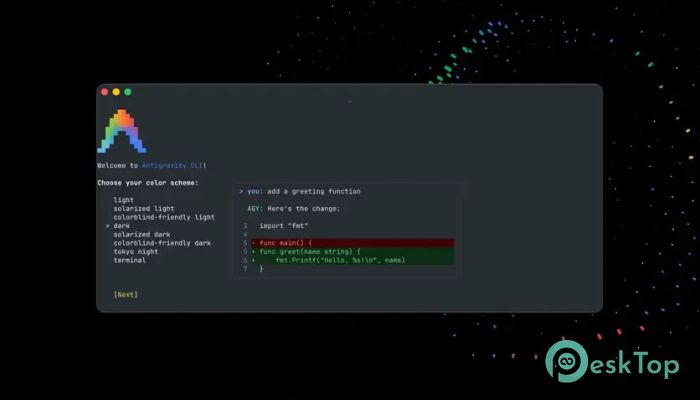
Every developer has unique preferences. Some prefer specific themes, while others rely on custom shortcuts and permission settings. The software recognizes this need by offering extensive customization options.
Users can configure themes, permissions, preferences, and workflow settings through dedicated configuration commands. This flexibility allows individuals and teams to create an environment that matches their working style.
Custom keybindings further enhance efficiency. Frequently used actions can be assigned to shortcuts, reducing repetitive work and accelerating navigation.
Convenient Slash Commands
Slash commands provide quick access to important functionality without requiring complicated setup procedures. These commands act like shortcuts that instantly unlock additional features.
Users can manage plugins, configure integrations, adjust settings, access skills, and activate hooks directly from the terminal. This streamlined approach keeps workflows organized and reduces the time spent searching through menus.
Everything remains accessible through a consistent command structure, making the learning curve much easier.
Improved Workflow Automation
Automation is becoming an essential part of modern software development. The tool helps users automate repetitive operations while maintaining full control over their projects.
By coordinating multiple agents and simplifying communication, it becomes easier to manage large workloads. Tasks that normally require several manual steps can often be completed through a single instruction.
This capability helps developers save valuable time and focus on creative problem-solving rather than repetitive administrative work.
Real-Time Monitoring and Control
Keeping track of multiple processes is important when working on complex projects. The software includes monitoring features that allow users to observe agent activity and task progress in real time.
Through dedicated panels and quick approval shortcuts, users can maintain oversight while still benefiting from automation. This balance between control and convenience creates a productive working environment.
The ability to review actions quickly helps maintain confidence and accuracy during development.
Ideal for Professional Development Teams
The platform is not only useful for individual developers but also for collaborative teams. Multiple contributors can benefit from faster task execution, better organization, and improved coordination.
Since the software operates within existing terminal workflows, it fits naturally into many development environments. Teams can adopt it without significantly changing their established processes.
This flexibility makes it suitable for startups, independent developers, and large engineering organizations alike.
System Requirements and Technical Details
Operating System: Windows 11 / 10
Processor: Minimum 1 GHz Processor (2.4 GHz recommended)
RAM: 2GB (4GB or more recommended)
Free Hard Disk Space: 200MB or more is recommended

-
Program size133.14 MB
-
Version1.0
-
Program languagemultilanguage
-
Last updatedBefore 2 Month
-
Downloads23
 Reportizer
 AccdbMerge
 RdpGuard
 Checkbook For Excel
 SysTools SQL Recovery
 Pointdev Ideal Dispatch