
 Arabic
  English
  Turkish
  Chinese
  Japanese
  Russian
  Spanish
  German
  French
  Hindi
Hindi Download Hastasoft HTML-Editor 1.5 for Windows
Download Hastasoft HTML-Editor 1.5 for Windows.
Hastasoft HTML-Editor Overview
This tool is designed for users who prefer complete command over their website’s structure and code. It provides a professional-grade environment where you can craft, refine, and review your web pages in real time. With support for HTML5 templates and Markdown, the editor ensures a secure, modern, and search-engine-friendly output. Unlike traditional WYSIWYG editors, it focuses on clean coding and performance. Its modern interface combines classic editing precision with advanced visual previews, making it suitable for developers and purists alike who value both flexibility and control.Features of Hastasoft HTML-Editor
Main Interface and Layout
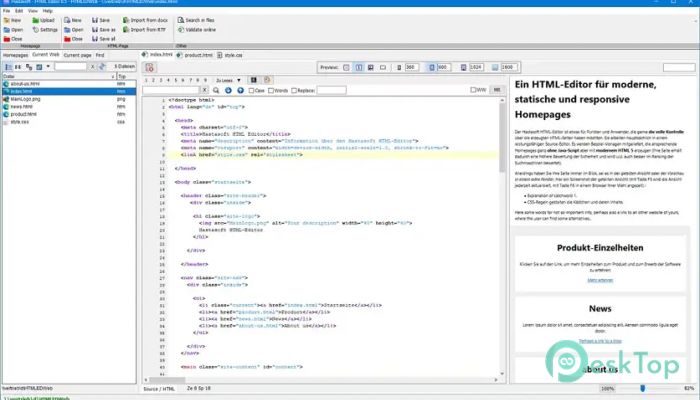
The software is divided into well-organized sections that enhance productivity. On the left, you’ll find a navigation panel that holds main sections, subsections, and lists of pages and files related to your project. Each tab provides access to navigation tools, CSS snippets, and HTML suggestions to improve design consistency.
In the center lies the editor area, where you directly interact with your HTML and CSS code. You can edit, search, replace, and navigate with ease. It also allows users to sync between the HTML text view and the rendered page view, ensuring both accuracy and efficiency.
Live Preview and Split View
One of its standout features is split view mode, which lets you see your source code and the live page side by side. This is ideal for catching design inconsistencies early. Pressing F5 refreshes the view instantly, and pressing F6 opens the page in your chosen browser for complete testing. This seamless transition between code and preview saves time and enhances workflow.
Template and Design Assistance
The tool includes pre-designed templates that conform to HTML5 standards. These templates provide a strong foundation for users to build upon while maintaining security and performance. Each design follows modern web principles without relying on JavaScript, thereby improving compatibility and boosting SEO performance.
In addition, it offers intelligent suggestions for improving design elements, layout structure, and code optimization. This guidance ensures that even less experienced users can produce professional-quality websites with minimal effort.
Markdown Compatibility
Markdown enthusiasts will appreciate the built-in conversion feature. You can write in Markdown syntax, and the editor will automatically convert it to HTML. This feature is perfect for content creators and developers who prefer faster text formatting without manually handling HTML tags. It keeps content writing straightforward while still providing accurate HTML output.
Navigation Tools and Page Management
The navigation system makes managing large web projects much more straightforward. The “Current Page” tab includes subtabs for navigation, CSS snippets, and HTML element lists. These make it easy to find and modify specific components of your website. Whether you’re editing headers, paragraphs, or styles, everything is accessible within a few clicks.
The intelligent error-checking and improvement suggestion lists further refine your workflow. They identify missing tags, unused CSS, or potential layout problems, helping maintain clean, optimized code throughout your project.
Editor Capabilities
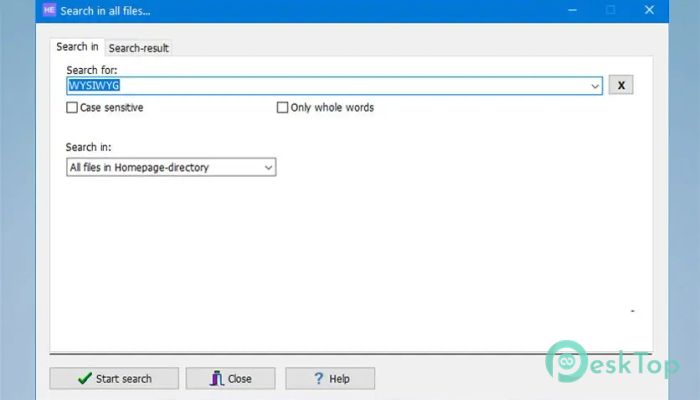
The central editor panel features advanced tools for editing, searching, and replacing. You can quickly navigate through your project files, locate specific lines, or adjust elements across multiple pages. Syntax highlighting and code folding make it easier to manage long code sections. Combined with quick keyboard shortcuts, it speeds up the entire editing process.
It also supports jumping directly from the page preview to the corresponding line in the source code, creating a two-way editing flow that simplifies debugging and layout adjustments.
Ease of Use and Flexibility
Although it offers professional-level functionality, the interface remains beginner-friendly. Everything is logically arranged, so users can quickly become familiar with its operation. Whether you are coding a new site or editing an existing one, the tool adjusts to your workflow. Its ability to work without JavaScript ensures lighter pages that load faster and perform better across devices.
Security and Performance Benefits
By avoiding JavaScript dependencies, the software improves site security and stability. Websites created with it often receive better security ratings and rank higher in search engines. Clean HTML5 structure not only ensures compatibility with all browsers but also provides a better foundation for responsive design.
This makes it ideal for developers aiming for both reliability and high performance while avoiding unnecessary scripts or plugins that can slow down a website.
System Requirements and Technical Details
Operating System: Windows 11 / 10 / 8.1 / 7
Processor: Minimum 1 GHz Processor (2.4 GHz recommended)
RAM: 2GB (4GB or more recommended)
Free Hard Disk Space: 200MB or more is recommended

-
Program size11.81 MB
-
Version1.5
-
Program languagemultilanguage
-
Last updatedBefore 7 Month
-
Downloads35
 Reportizer
 AccdbMerge
 RdpGuard
 Checkbook For Excel
 SysTools SQL Recovery
 Pointdev Ideal Dispatch