
 Arabic
  English
  Turkish
  Chinese
  Japanese
  Russian
  Spanish
  German
  French
  Hindi
Hindi Download Herdr 2026-08-04 for Windows
Download Herdr 2026-08-04 for Windows.
Herdr Overview
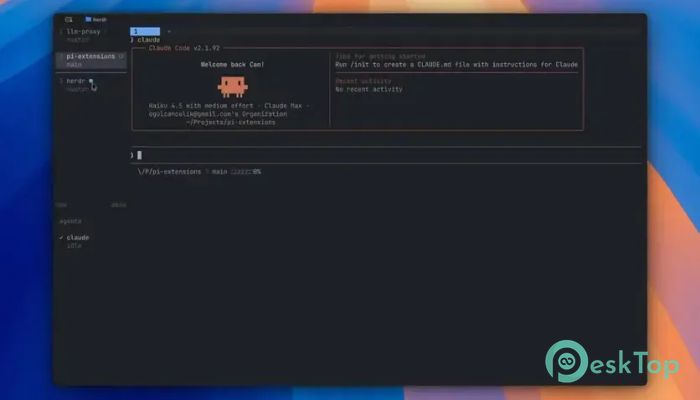
It is a modern terminal management tool built with Rust to make working with multiple AI coding agents easier and more efficient. Whether you use Claude Code, Kimi Code CLI, or other terminal-based assistants, they keep every agent organized in a single interface. Instead of opening several terminal windows, you can manage everything from one place with a clean and structured layout. The software is designed for developers who work on several coding tasks at once. It keeps each agent running in its own persistent session, allowing work to continue even after you disconnect. Like having a personal command center, it keeps everything within reach while reducing clutter and distractions.Features of Herdr
Manage Multiple AI Coding Agents
The software makes it simple to control several AI coding assistants simultaneously. Every agent runs in its own isolated terminal, preventing commands and outputs from getting mixed together. This organized approach allows you to focus on development instead of switching between countless windows.
Whether you are debugging one project while generating code for another, the tool keeps every task separated and easy to monitor. It saves time and helps maintain a smooth workflow throughout the day.
Persistent Sessions That Never Stop
One of the biggest advantages is its persistent session support. Once an agent starts running, it continues working even if you close your laptop or lose your internet connection. When you reconnect later, everything is still running exactly where you left it.
This feature is especially useful for long coding sessions, automated builds, or AI-generated tasks that may take hours to finish. You never have to restart your progress because the server keeps every session alive.
Smart Workspace Organization
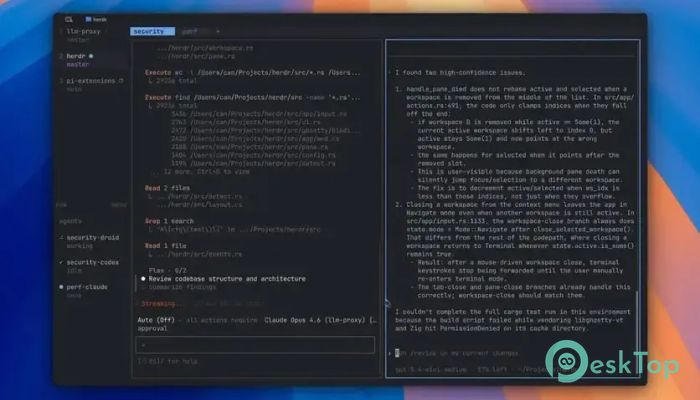
The software uses a hierarchical layout consisting of workspaces, tabs, and panes. This structure makes large development projects much easier to manage. You can separate projects into different workspaces while dividing related tasks into tabs and panes.
Instead of feeling overwhelmed by dozens of terminal windows, you can keep everything neatly arranged. Moving between projects becomes quick and natural, helping you stay productive throughout the day.
Easy Navigation with Mouse Support
Navigating through terminals is fast thanks to built-in mouse support. You can click between panes, resize layouts, and switch tabs without memorizing complicated keyboard shortcuts. This makes the learning curve much easier for new users.
Experienced developers also benefit because they can combine mouse actions with keyboard shortcuts for even faster navigation. It provides flexibility without sacrificing speed.
Works Smoothly Over SSH
The tool is built to perform reliably over SSH connections. Developers can connect to remote servers while keeping a responsive terminal experience. Since every session stays active on the server, remote work feels almost identical to working locally.
This makes it ideal for cloud development, remote servers, virtual machines, and home labs. You can disconnect whenever needed and reconnect later without interrupting your running agents.
Mobile-Friendly Terminal Experience
Working from a phone or tablet is often frustrating because standard terminal interfaces become difficult to use on smaller screens. The software solves this problem with a touch-friendly switcher designed for mobile devices.
The terminal remains fully functional while offering easy-to-tap controls. This allows you to check progress, switch between sessions, or reconnect to active agents while away from your computer.
Monitor Agent Status at a Glance
Keeping track of multiple AI agents can quickly become confusing. The software provides clear status indicators that show whether an agent is currently working, blocked, or has completed its task.
This visual overview helps you identify which tasks need attention without opening every terminal individually. It feels like having a dashboard that keeps your entire workflow under control.
Built with Rust for Performance
The software is written in Rust, a programming language known for its speed, stability, and memory safety. As a result, it delivers responsive performance while consuming minimal system resources.
Even when managing several active coding agents, the application remains lightweight and reliable. This makes it suitable for both personal computers and remote development servers.
Open-Source and Developer Friendly
Being open source gives developers complete transparency and flexibility. Anyone can inspect the source code, contribute improvements, or customize the software to match specific workflows.
This community-driven approach encourages continuous improvements while allowing developers to adapt the tool for different coding environments and automation needs.
Improves Daily Development Workflow
Modern software development often involves juggling multiple repositories, AI assistants, and remote systems. The software brings all of these together into one organized environment, making multitasking significantly easier.
Instead of wasting time opening terminals or reconnecting sessions, you can concentrate on writing better code. The organized interface, persistent sessions, and mobile accessibility create a smoother development experience from start to finish.
System Requirements and Technical Details
Operating System: Windows 11 / 10 / 8.1 / 7
Processor: Minimum 1 GHz Processor (2.4 GHz recommended)
RAM: 2GB (4GB or more recommended)
Free Hard Disk Space: 200MB or more is recommended

-
Program size5.56 MB
-
Version2026-08-04
-
Program languagemultilanguage
-
Last updatedBefore 2 Month
-
Downloads7
 Reportizer
 AccdbMerge
 RdpGuard
 Checkbook For Excel
 SysTools SQL Recovery
 Pointdev Ideal Dispatch