
 Arabic
  English
  Turkish
  Chinese
  Japanese
  Russian
  Spanish
  German
  French
  Hindi
Hindi Download JMP Statistical Discovery JMP Pro 19.1.3 for Windows
Download JMP Statistical Discovery JMP Pro 19.1.3 for Windows.
JMP Statistical Discovery JMP Pro Overview
It is built for scientists, engineers, researchers, analysts, and anyone who works with data. It combines advanced statistical methods with an easy-to-use interface, making even complex analysis feel simple. Whether you are exploring trends, improving products, or solving business challenges, the software gives you the tools to make confident decisions. The platform removes the need for complicated coding by providing interactive menus, visual graphs, and automated workflows. Instead of spending hours writing scripts, users can focus on understanding their data and finding valuable insights much faster.Features of JMP Statistical Discovery JMP Pro
Interactive Statistical Analysis
The software offers a wide range of statistical tools suitable for beginners and experienced professionals alike. From descriptive statistics to advanced predictive modeling, everything is available through an intuitive interface.
Its interactive design allows users to click, filter, compare, and explore information in real time. This hands-on approach makes discovering hidden patterns feel as natural as flipping through the pages of a book.
Powerful Data Visualization
Numbers alone rarely tell the full story. The tool transforms complex datasets into colorful charts, graphs, dashboards, and interactive reports that are easy to understand.
Instead of staring at endless spreadsheets, users can quickly identify trends, outliers, and relationships. These visual insights make presentations clearer and support faster decision-making across teams.
Simple Data Preparation
Before analysis begins, data often needs to be cleaned and organized. The software includes practical tools for importing, filtering, sorting, merging, and transforming data without requiring programming knowledge.
Its streamlined workflow reduces preparation time, allowing users to spend more time exploring results rather than fixing datasets. Even large collections of information can be handled efficiently.
Advanced Analytics Without Coding
One of the biggest advantages is that users can perform sophisticated statistical techniques without writing a single line of code. Everything is available through easy-to-follow menus and interactive controls.
This no-code approach lowers the learning curve while still providing access to professional-grade analytics. It makes advanced statistics accessible to researchers, engineers, educators, and business professionals.
Automation That Saves Time
Repeating the same analysis over and over can become tiring. The software helps automate many routine tasks, enabling users to complete projects faster and with fewer manual steps.
By reducing repetitive work, it increases productivity and allows organizations to focus on innovation instead of spending valuable time performing the same operations repeatedly.
Designed for Scientists and Engineers
Many industries depend on accurate statistical analysis to improve products and processes. The tool is specially designed to support engineering, manufacturing, pharmaceuticals, healthcare, research, and quality improvement projects.
Its specialized capabilities help professionals solve difficult problems using proven statistical methods while improving efficiency throughout the entire workflow.
Interactive Graphs and Reports
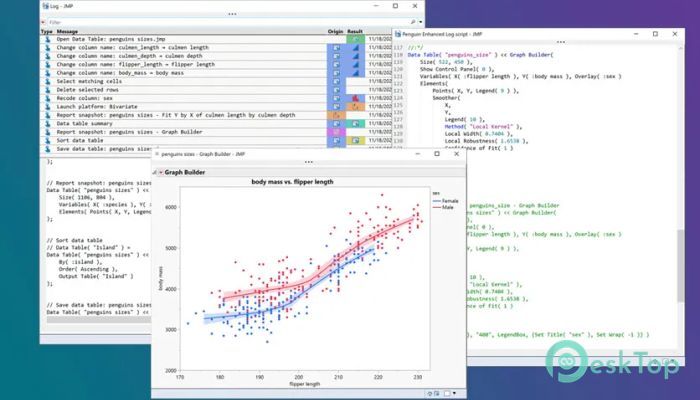
Creating professional reports is simple thanks to the built-in graphing tools. Users can customize charts, compare variables, and generate attractive visual presentations with only a few clicks.
Since graphs remain interactive, exploring new ideas becomes much easier. Small adjustments instantly update results, allowing users to experiment freely without starting over.
Learning Resources and Community Support
Every user learns at a different pace, and the software supports that journey with extensive educational resources. Tutorials, documentation, examples, and an active community help users build confidence over time.
Whether someone is taking their first steps into analytics or mastering advanced statistical techniques, the available learning materials make continuous improvement easier.
Boost Productivity Across Organizations
Modern businesses rely on data to stay competitive. The software brings analysis, visualization, and reporting into one platform, reducing the need to switch between multiple applications.
This integrated workflow improves collaboration between departments, speeds up decision-making, and helps organizations turn valuable information into practical actions more quickly.
System Requirements and Technical Details
Operating System: Windows 11, 10 (version 1809/build 17763 and above), No support for 10 S edition or tablet mode, Windows Server 2025, 2022, 2019
Processor: Minimum 1 GHz Processor (2.4 GHz recommended)
RAM: 2GB (4GB or more recommended)
Free Hard Disk Space: 2GB or more is recommended

-
Program size602.29 MB
-
Version19.1.3
-
Program languagemultilanguage
-
Last updatedBefore 1 Month
-
Downloads33
 Chess King 2026
 Easy German Platinum
 Easy French Platinum
 Easy English Platinum
 Moneyspire Desktop
 Concept Grid