
 Arabic
  English
  Turkish
  Chinese
  Japanese
  Russian
  Spanish
  German
  French
  Hindi
Hindi Download JSON Studio 1.0.6 for Windows
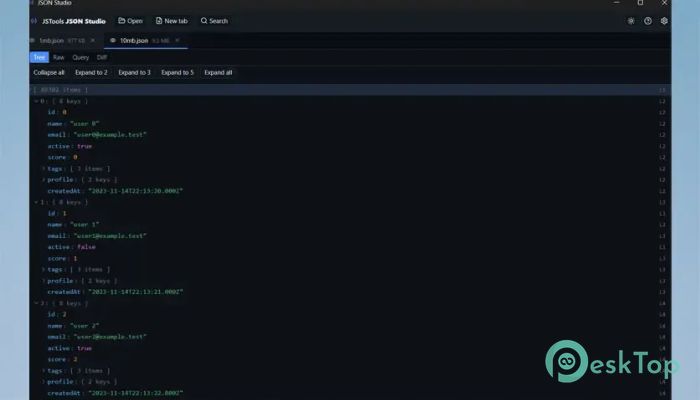
Download JSON Studio 1.0.6 for Windows.
JSON Studio Overview
It is a powerful desktop workspace built for developers, data analysts, testers, and anyone who works with the tool data every day. Whether you are handling small configuration files or massive datasets up to 500 MB, the software keeps everything responsive and easy to navigate. Since everything runs locally, your files never leave your computer, giving you complete privacy and peace of mind. The software is designed with speed and accuracy in mind. Instead of freezing when opening large documents, it uses optimized rendering techniques that let you browse huge files smoothly. It also preserves every detail of your original document, ensuring that nothing changes unless you decide to edit it.Features of JSON Studio
Open Large JSON Files Without Delays
Working with huge JSON documents can feel like trying to read a giant book all at once. The software solves this problem by loading files intelligently, allowing you to open JSON, JSONL, and NDJSON documents up to 500 MB without slowing down your computer.
Its virtualized interface displays only the information you need at the moment. This approach keeps navigation smooth while reducing memory usage, making it ideal for very large datasets.
Lossless Data Preservation
One of the biggest strengths of the tool is that it keeps your data exactly as it was. Large integers, precise decimal values, key order, formatting, and the original source text remain untouched during viewing and inspection.
This means developers can confidently examine important files without worrying about accidental formatting changes or hidden data loss. Every value stays accurate from start to finish.
Flexible Tree and Raw Source Views
The software gives you multiple ways to inspect your data. You can browse nested objects using an interactive tree view or switch to the raw source whenever you need to inspect the original document.
Helpful features such as expand and collapse controls, expand-to-depth options, type indicators, line numbers, keyboard navigation, text wrapping, and detailed parsing errors make complex files much easier to understand.
Powerful Search Options
Finding information inside large datasets becomes incredibly fast. The built-in search engine searches both keys and values and supports case-sensitive searches, whole-field matching, regular expressions, and subtree filtering.
Instead of scrolling endlessly, you can jump directly between matching results. This saves valuable time, especially when working with thousands of records.
Advanced JSONPath Query Support
The software includes full support for RFC 9535 JSONPath expressions. This allows users to extract only the data they need without manually browsing through complex structures.
Each query stores its own history, displays execution time, counts matching results, and allows exporting the output as either JSON or JSONL. This makes repeated analysis both simple and efficient.
Compare Tool Documents Easily
Comparing two large tool files manually can quickly become frustrating. The built-in structural comparison feature highlights added, removed, and modified elements in an organized way.
Users can ignore key order when comparing, or match array elements by position or by a selected key field. This makes reviewing API responses, configuration changes, and version updates much easier.
Optimized JSONL and NDJSON Table View
Line-delimited, the tool files are displayed as fast, virtualized tables that remain responsive even with massive datasets. This layout allows you to inspect records quickly without losing performance.
You can choose which columns to display, review field statistics, and immediately identify invalid rows through visual highlighting. It feels much like browsing a spreadsheet while keeping all the tool capabilities.
Inline Image Preview
Some of the tool documents contain embedded images encoded as Base64 strings or data URIs. Instead of copying the content into another application, the software displays supported images directly inside the interface.
It supports PNG, JPEG, GIF, WebP, and SVG formats, making it easier to verify image data without additional tools.
Tabs, Scratch Space, and Live Reload
The software supports multiple tabs, allowing you to work on several documents at once. You can also paste the temporary tool data into a scratch tab for quick testing without creating a separate file.
Session restoration remembers previously opened documents, while live reload automatically refreshes files whenever changes are detected on disk. These features help maintain a smooth and productive workflow.
Privacy Comes First
Privacy is one of the most valuable parts of the application. There are no user accounts, cloud uploads, analytics, telemetry, or background network requests.
Your documents, settings, and recent history remain stored only on your own computer. This makes it an excellent choice for handling confidential data, internal APIs, financial records, or sensitive business information.
System Requirements and Technical Details
Operating System: Windows 11 / 10 / 8.1 / 7
Processor: Minimum 1 GHz Processor (2.4 GHz recommended)
RAM: 2GB (4GB or more recommended)
Free Hard Disk Space: 200MB or more is recommended

-
Program size2.51 MB
-
Version1.0.6
-
Program languagemultilanguage
-
Last updatedBefore 2 Month
-
Downloads18
 Reportizer
 AccdbMerge
 RdpGuard
 Checkbook For Excel
 SysTools SQL Recovery
 Pointdev Ideal Dispatch