
 Arabic
  English
  Turkish
  Chinese
  Japanese
  Russian
  Spanish
  German
  French
  Hindi
Hindi Download LM Studio Bionic 1.0.3 for Windows

Download LM Studio Bionic 1.0.3 for Windows.
LM Studio Bionic Overview
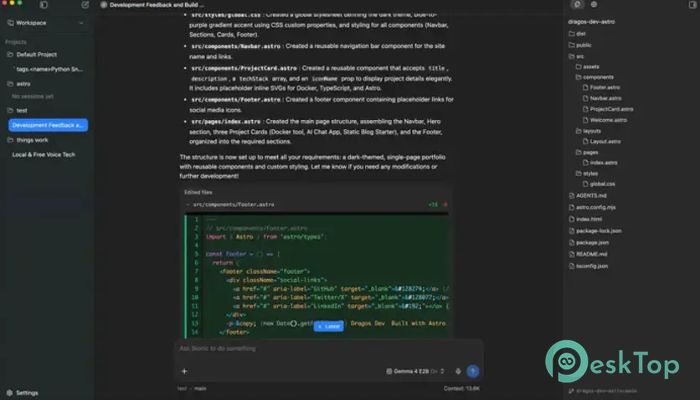
It is a powerful AI assistant built for creativity, productivity, and software development. It works as an intelligent agent that can help you write documents, generate presentations, create PDFs, develop software, and automate daily tasks. Unlike many cloud-based AI tools, it is designed to run natively on your computer, giving you greater control over your data and privacy. The software combines modern AI capabilities with a simple, user-friendly interface. Whether you are writing content, building applications, or organizing projects, it keeps everything running smoothly and efficiently. Every change is automatically saved, allowing you to focus on your work instead of worrying about losing progress.Features of LM Studio Bionic
Built for Creative Work
The software makes creative projects much easier to handle. You can ask it to write reports, prepare articles, generate presentations, or create professional PDFs in just a few moments. It understands natural language, so you simply explain what you need, and it starts working like a helpful teammate.
Instead of switching between several applications, everything can be managed in one place. This saves valuable time and helps you stay focused on your ideas rather than the tools.
Powerful Coding Assistant
The tool is also an excellent companion for developers. It can generate code, explain programming concepts, fix errors, improve existing scripts, and even help automate repetitive tasks. Whether you are a beginner or an experienced programmer, it makes software development faster and more enjoyable.
Because it supports OpenAI models, users can choose the model that best matches their needs. This flexibility allows developers to work with local models for privacy or frontier models for advanced capabilities.
Automatic Saving for Peace of Mind
Losing your work can be frustrating, but this software removes that concern. Every change is automatically saved while you work, making the editing experience smooth and worry-free.
This feature feels like having a safety net under a tightrope. You can experiment with ideas, rewrite content, and make changes freely without constantly pressing the save button.
Natural Voice Conversations
The software allows you to communicate naturally using your voice. As you speak, your words are transcribed in real time, creating a smooth conversation between you and the AI assistant.
This hands-free experience is especially useful when brainstorming ideas, creating documents, or giving coding instructions. Speaking naturally often feels faster than typing long prompts.
Local Privacy Protection
Privacy is one of its strongest advantages. Your voice recordings and audio processing remain entirely on your device, rather than being uploaded to remote servers.
This local-first design gives users greater confidence when working with personal documents, business information, or confidential projects. You remain in control of your own data from start to finish.
Supports Multiple Languages
The software is designed for users around the world. It supports multiple languages for voice transcription, allowing people to communicate naturally in their preferred language.
This makes it useful for international teams, multilingual users, and anyone who wants to work comfortably without language barriers slowing them down.
Automation and Computer Control
Beyond writing and coding, the tool can help automate everyday computer tasks. It can assist with repetitive workflows, organize information, and perform actions that improve productivity.
Think of it as a smart digital assistant sitting beside you. Instead of doing repetitive work yourself, you simply describe the task and let the software handle much of the heavy lifting.
Flexible AI Model Support
One of the platform's biggest strengths is its support for both local and frontier open models. This gives users the freedom to select the AI model that best fits their hardware, performance requirements, and privacy preferences.
Whether you prefer to run everything offline or connect to more advanced models for demanding tasks, the software adapts to your workflow with ease.
Simple Interface for Everyday Use
The interface is clean, modern, and easy to understand. New users can start working almost immediately without spending hours learning complicated settings.
Everything is arranged logically, making navigation simple. From document editing to coding assistance and voice interaction, every feature is only a few clicks away.
System Requirements and Technical Details
Operating System: Windows 11 / 10
Processor: Minimum 1 GHz Processor (2.4 GHz recommended)
RAM: 2GB (4GB or more recommended)
Free Hard Disk Space: 2GB or more is recommended

-
Program size606.12 MB
-
Version1.0.3
-
Program languagemultilanguage
-
Last updatedBefore 2 Month
-
Downloads27
 Reportizer
 AccdbMerge
 RdpGuard
 Checkbook For Excel
 SysTools SQL Recovery
 Pointdev Ideal Dispatch