
 Arabic
  English
  Turkish
  Chinese
  Japanese
  Russian
  Spanish
  German
  French
  Hindi
Hindi Download Lore Version Control 0.8.6 for Windows
Download Lore Version Control 0.8.6 for Windows.
Lore Version Control Overview
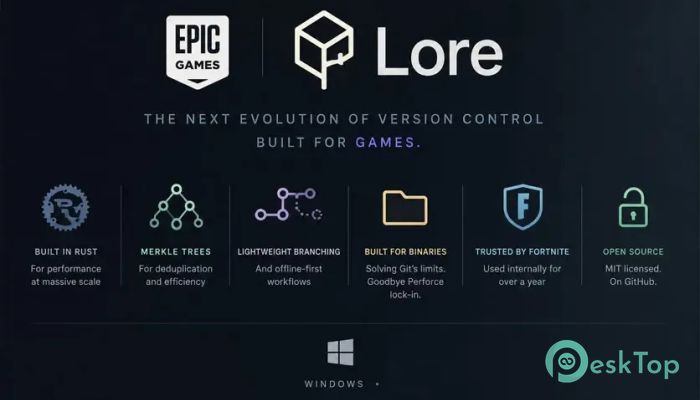
Modern software and content creation projects generate huge amounts of data. Managing source code, artwork, audio files, videos, and other digital assets can quickly become challenging as projects grow. This solution was designed to address those problems by providing a scalable, efficient version control platform that performs well even in demanding environments. Developed and maintained by Epic Games, the platform is especially useful for industries that work with both code and large binary files. Whether a team is building games, creating visual effects, producing animations, or developing enterprise software, it offers the flexibility and performance needed to keep projects moving forward.Features of Lore Version Control
Built for Massive Scalability
One of the biggest strengths of the software is its ability to scale effortlessly. Many version control systems work well for small projects but struggle when repositories become extremely large. This tool was designed from the ground up to support huge datasets and distributed teams without sacrificing performance.
Think of it as a highway built for future traffic. Instead of expanding later when congestion appears, it already has enough lanes to handle growth. This approach helps organizations avoid bottlenecks as projects become more complex.
Optimized for Large Binary Assets
Many industries rely on files that are much larger than traditional source code. Game development, film production, and digital content creation often involve textures, models, audio tracks, videos, and other heavy assets.
The platform is specifically optimized to handle these types of files efficiently. Users can work with large assets without experiencing the slowdowns that often affect traditional systems. This makes collaboration smoother for both technical and creative teams.
Easy Setup and Flexible Growth
Getting started is surprisingly simple. Teams can begin in local mode within minutes and gradually expand as their requirements increase. There is no need to deploy a complicated infrastructure from day one.
As projects grow, the system can scale on demand. Organizations can start small and expand without rebuilding workflows or migrating data. This flexibility makes it suitable for startups, independent creators, and large enterprises alike.
Fast and Efficient Performance
Speed plays a critical role in modern development environments. Waiting for downloads, synchronizations, or updates can slow productivity and frustrate team members.
The software minimizes these delays through shared and reusable data structures. Instead of downloading everything at once, users can access data as needed. This approach reduces storage requirements, improves performance, and helps teams stay focused on their work.
By transferring only necessary information, it keeps operations efficient even when repositories contain enormous amounts of data.
Free Branching for Creative Freedom
Experimentation is an important part of development. Teams often need to test ideas, explore new features, or create release versions without affecting the main project.
The tool makes branching fast and straightforward. Users can create, manage, and synchronize branches with minimal effort. This encourages innovation because developers and artists can freely experiment without worrying about disrupting ongoing work.
Whether building a new feature or testing a major redesign, branching remains simple and efficient throughout the development cycle.
Reliable and Verifiable History
Version history acts as the memory of a project. Every change, update, and revision becomes part of a permanent record that teams rely on for accountability and troubleshooting.
The platform provides a tamper-evident source of truth that helps ensure confidence in project history. Teams can verify revisions and track changes accurately, making it easier to identify issues and understand how a project evolved over time.
This reliability is especially valuable for organizations handling mission-critical projects where data integrity is essential.
Powerful Command-Line Experience
Many developers prefer command-line tools because they offer speed, flexibility, and automation opportunities. The software provides complete access to its functionality through a powerful command-line interface.
Every major feature is available directly from the CLI, allowing users to manage repositories, synchronize data, create branches, and perform advanced operations efficiently. This direct access helps experienced users work faster while maintaining full control over their workflows.
Comprehensive API Support
Customization is another area where the platform excels. Organizations often need to integrate version control into existing pipelines, automation systems, and development tools.
The software includes a full-surface API that supports multiple programming languages. Developers can build custom tools and integrations using C/C++, C#, Rust, Go, Python, or JavaScript.
This broad language support makes it easier to adapt the platform to unique business requirements and specialized workflows.
Ideal for Developers and Artists
Traditional version control solutions often focus primarily on software developers. However, modern projects involve many different contributors, including artists, designers, animators, audio engineers, and technical specialists.
The tool bridges this gap by providing workflows that serve both technical and creative professionals. Everyone can collaborate using the same platform while benefiting from efficient handling of both source code and large digital assets.
This unified approach improves communication, simplifies project management, and reduces workflow complexity across departments.
System Requirements and Technical Details
Operating System: Windows 11 / 10 / 8.1 / 7
Processor: Minimum 1 GHz Processor (2.4 GHz recommended)
RAM: 2GB (4GB or more recommended)
Free Hard Disk Space: 200MB or more is recommended

-
Program size10.40 MB
-
Version0.8.6
-
Program languagemultilanguage
-
Last updatedBefore 2 Month
-
Downloads5
 Reportizer
 AccdbMerge
 RdpGuard
 Checkbook For Excel
 SysTools SQL Recovery
 Pointdev Ideal Dispatch