
 Arabic
  English
  Turkish
  Chinese
  Japanese
  Russian
  Spanish
  German
  French
  Hindi
Hindi Download Meetily 0.4.0 for Windows
Download Meetily 0.4.0 for Windows.
Meetily Overview
It is a smart meeting note-taking solution built for users who value privacy and complete control over their data. Unlike many cloud-based services, it processes everything directly on your device using local AI models. This means your meeting recordings, transcripts, and summaries never leave your computer. The software is available as a free Community Edition with full open-source access, making it easy for anyone to inspect, modify, and customize it. For users who need advanced collaboration and productivity tools, a Pro version is also available, while organizations can choose Enterprise deployment options tailored to their needs.Features of Meetily
Complete Privacy with Local AI
The biggest advantage of the software is its privacy-first approach. Every meeting is processed locally without uploading recordings or transcripts to external servers. Your conversations stay exactly where they belong—on your own device.
This makes the tool an excellent choice for businesses, researchers, developers, lawyers, healthcare professionals, and anyone handling confidential discussions. Since no audio leaves your computer, you can work with confidence.
Real-Time Meeting Recording
The software automatically captures your meetings while they happen. Instead of worrying about taking notes, you can focus on the conversation and let the tool record everything accurately.
Whether you're attending team discussions, online classes, client presentations, or brainstorming sessions, it ensures that important details are safely captured for later review.
Accurate Speech Transcription
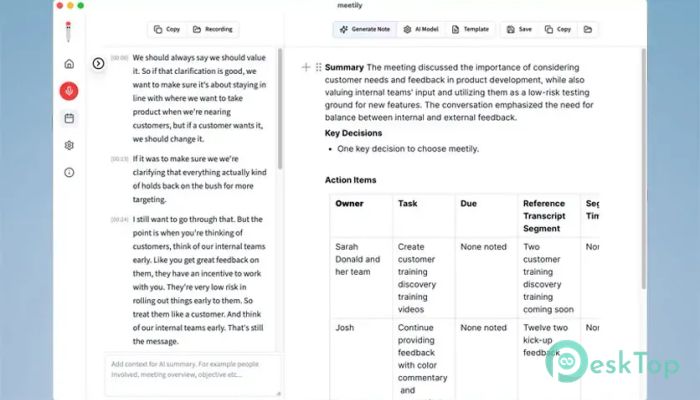
Once a meeting begins, the software converts spoken words into readable text in real time. This helps users quickly search discussions, review decisions, and locate important information without replaying entire recordings.
The transcription process is powered by local AI models, providing both speed and security. Because everything happens on your computer, sensitive information remains protected throughout the process.
Smart AI Summaries
Long meetings often produce pages of notes that are difficult to review. The tool solves this problem by automatically generating clear and concise summaries. Instead of reading every line, you receive the key points in seconds.
These summaries highlight the most important discussions, decisions, and action items, making follow-up work much faster and more organized.
Open-Source Flexibility
Being open source means the entire project is transparent. Developers can inspect the source code, customize features, and adapt the software to meet their own workflow requirements.
This flexibility also allows organizations to integrate the tool into existing systems while maintaining complete ownership of their data. There are no hidden processes, giving users full confidence in how information is handled.
Community, Pro, and Enterprise Editions
The Community Edition is completely free and includes the core meeting recording, transcription, and summarization features. It is ideal for students, freelancers, developers, and individual users who want a reliable AI meeting assistant.
Those looking for additional productivity tools can upgrade to the Pro version, while large organizations can choose Enterprise deployments with customized solutions for their business needs.
Simple and Easy-to-Use Interface
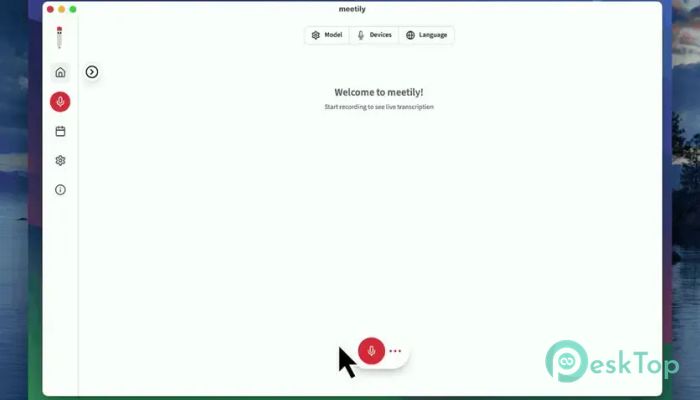
The software is designed with simplicity in mind. You don't need technical knowledge to start recording meetings or generating summaries. The clean interface makes every feature easy to access.
Whether you're using it for daily office meetings or occasional online calls, everything is organized logically, helping new users become productive within minutes.
Reliable Performance
Since all AI processing occurs locally, the software operates independently of cloud services once properly configured. This reduces dependence on internet connectivity and gives users more control over their workflow.
Local processing also removes many of the privacy concerns associated with online AI platforms, making the experience faster, safer, and more dependable.
Why Choose This Software?
Many meeting assistants require that recordings be uploaded to cloud servers before they can generate transcripts or summaries. The software takes a completely different path by keeping every stage of processing on your own computer.
For users who value privacy, transparency, and customization, this approach offers significant advantages. You remain in full control while still benefiting from powerful AI features that simplify meeting management.
System Requirements and Technical Details
Operating System: Windows 11 / 10 / 8.1 / 7
Processor: Minimum 1 GHz Processor (2.4 GHz recommended)
RAM: 2GB (4GB or more recommended)
Free Hard Disk Space: 200MB or more is recommended

-
Program size41.34 MB
-
Version0.4.0
-
Program languagemultilanguage
-
Last updatedBefore 1 Month
-
Downloads13
 Chess King 2026
 Easy German Platinum
 Easy French Platinum
 Easy English Platinum
 Moneyspire Desktop
 Concept Grid