
 Arabic
  English
  Turkish
  Chinese
  Japanese
  Russian
  Spanish
  German
  French
  Hindi
Hindi Download Money Calendar 6.3.2023.108 for Windows
Download Money Calendar 6.3.2023.108 for Windows.
Money Calendar Overview
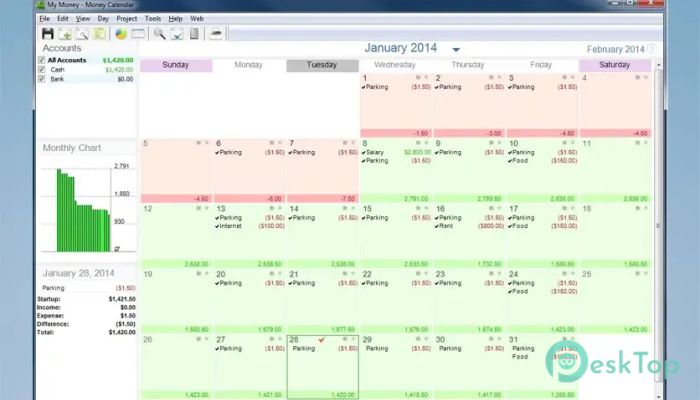
Managing personal finances can become confusing when payments, bills, income, and daily expenses are scattered across different records. This software makes the process much easier by placing financial transactions on a familiar calendar. Instead of dealing with complicated accounting screens, you can view your financial activity by date and see where your finances stand. The calendar-based approach feels natural because most people already use calendars to organize meetings, appointments, and important events. The same idea is applied to money management, turning each date into a clear financial checkpoint. You can review past spending, check current transactions, and plan future income or expenses from one convenient workspace.Features of Money Calendar
Calendar-Based Money Management
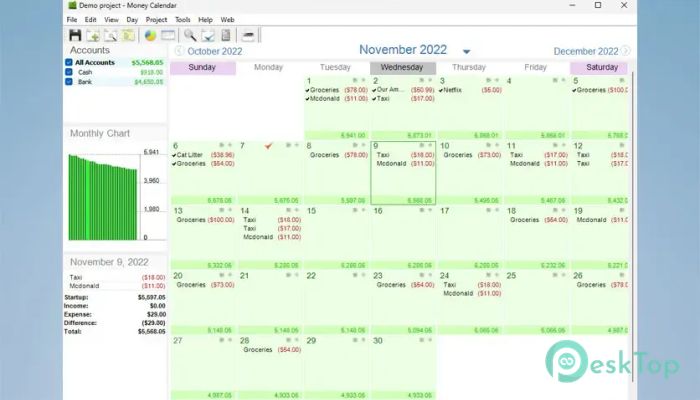
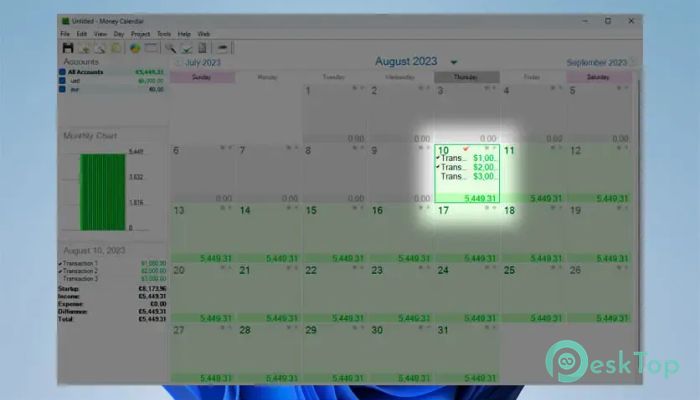
The main strength of the tool is its simple calendar interface. Financial activities can be connected with specific dates, making it easier to understand when money comes in and when it goes out.
A quick look at the current month can give you a useful picture of your financial activity. You can also switch between previous and upcoming months to analyze spending patterns or plan for future payments. It works like a financial diary where every important transaction has its proper place.
Track Income and Expenses
Keeping accurate records of income and expenses is essential for controlling personal finances. The software lets you record transactions so that you can clearly see how much you earn and where your money is being spent.
Regularly entering expenses can also reveal small spending habits that may otherwise go unnoticed. Over time, these records create a clearer picture of your financial behavior and make it easier to make better money decisions.
Plan Upcoming Transactions
Good financial management is not only about recording what has already happened. Planning ahead is equally important. The tool allows you to organize upcoming income and expenses so you can prepare for bills, payments, and expected earnings.
This feature can be especially useful when you have recurring financial commitments. Seeing future transactions on the calendar gives you time to adjust your spending and avoid unnecessary financial pressure.
Account and Category Management
The software provides account and category management features for keeping financial records organized. Different accounts can be used to separate sources of money, while categories help identify the purpose of each transaction.
For example, expenses can be organized by category, such as groceries, transportation, utilities, entertainment, or other needs. Proper categorization makes financial records easier to understand and helps you identify areas where most of your money goes.
Useful Financial Reports
Reports turn everyday transaction records into useful financial information. Instead of manually checking individual entries, you can use reporting tools to review your financial activity more efficiently.
These reports can help you compare income and spending, examine previous months, and understand changes in your financial habits. For freelancers and home users, this provides a practical way to keep finances organized without using an overly complicated accounting system.
Spot Budget Excess
Spending more than planned can quickly disturb a monthly budget. The application helps users spot budget excess so they can identify areas where expenses are becoming too high.
This gives you an opportunity to change your spending habits before small problems become larger ones. Think of it as an early warning sign for your wallet. When a category begins crossing its planned limit, you have a clearer reason to review upcoming purchases.
Multiple Currency Support
People who work internationally or receive money in different currencies may need more flexible financial records. Multiple currency support makes the tool more suitable for freelancers, remote workers, and users managing multiple account types.
It allows financial information to be organized more conveniently when transactions involve different currencies. This can simplify everyday money management for people whose income or expenses span multiple currencies.
Suitable for Home Users and Freelancers
The simple interface makes the application useful for everyday household budgeting. Users can monitor regular expenses, expected income, bills, and other financial commitments without needing advanced accounting knowledge.
Freelancers can also use it to organize incoming payments and business-related expenses. Because everything is connected to dates, it becomes easier to see when payments are expected and when important costs need to be covered.
Data Protection
Personal financial records contain important information, so protecting that data matters. The software includes data protection features designed to help users keep their financial information safer.
This adds another layer of confidence when maintaining long-term financial records. Users can focus on planning and tracking their money while keeping sensitive financial information better organized and protected.
Simple and Friendly Interface
A financial application should save time rather than create extra work. The tool focuses on a straightforward design that allows users to manage transactions without navigating through unnecessary complexity.
Its calendar-centered layout makes important information easy to locate. Beginners can quickly understand the workflow, while experienced users can benefit from having financial planning, tracking, categories, accounts, and reports available in one place.
System Requirements and Technical Details
Operating System: Windows 11 / 10 / 8 / 7
Processor: Minimum 1 GHz Processor (2.4 GHz recommended)
RAM: 2GB (4GB or more recommended)
Free Hard Disk Space: 200MB or more is recommended

-
Program size21.22 MB
-
Version6.3.2023.108
-
Program languagemultilanguage
-
Last updatedBefore 2 Month
-
Downloads41
 Chess King 2026
 Easy German Platinum
 Easy French Platinum
 Easy English Platinum
 Moneyspire Desktop
 Concept Grid