
 Arabic
  English
  Turkish
  Chinese
  Japanese
  Russian
  Spanish
  German
  French
  Hindi
Hindi Download Mouzi 0.1.5 for Windows


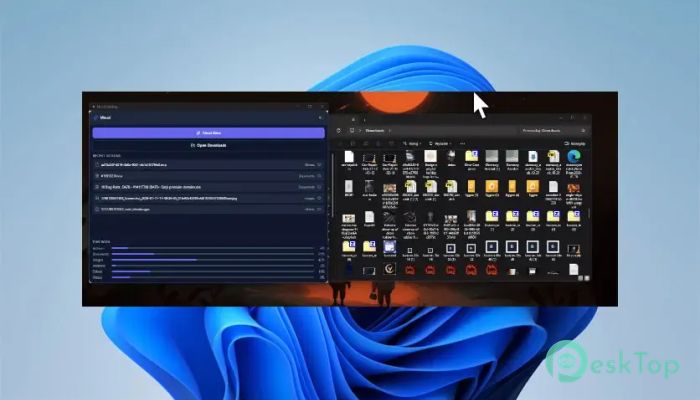
Download Mouzi 0.1.5 for Windows.
Mouzi Overview
Keeping the Downloads folder clean can feel like trying to control a messy desk after a busy workday. Files pile up quickly, screenshots mix with documents, and installers sit around for weeks. This tool solves that problem by automatically organizing everything in the background. It quietly runs from the system tray and handles files according to the user's rules. The software is designed for people who want a cleaner workspace without spending time moving files around every day. It monitors selected folders and instantly sorts content to the appropriate locations. Whether someone downloads images, videos, ZIP archives, or documents, the tool can automatically place them where they belong. Its simple design makes it easy for beginners, while the advanced rule system also gives power users plenty of flexibility. Instead of manually organizing folders over and over, users can let automation handle the heavy lifting.Features of Mouzi
Automatic File Organization
One of the best features of the software is its ability to automatically organize files. Once folder monitoring is enabled, it constantly watches for new files and performs actions instantly. This saves time and keeps folders from turning into digital junk drawers.
Users can create rules for different file types. For example, images can be moved into a Pictures folder, videos into a Movies folder, and documents into a Work files folder. The process feels smooth and natural because everything happens quietly in the background.
Instead of dragging files around like a moving truck every evening, the tool acts more like a personal assistant who cleans the room while nobody is looking.
Custom Rules for Better Control
Flexibility is another strong point. The software allows users to create custom sorting rules depending on their needs. Files can be renamed, moved, or grouped based on file type, keywords, extensions, or other conditions.
This feature becomes very useful for people who download large amounts of content daily. Designers, students, office workers, and content creators often deal with dozens of files every day. Manually organizing everything wastes time and energy.
The tool removes that stress by automating repetitive tasks. Once the rules are created, the software follows them consistently without requiring extra attention.
Runs Quietly in the Background
Many applications consume system resources and constantly interrupt users with notifications. This software takes the opposite approach. It stays hidden in the system tray and works silently without affecting daily tasks.
The lightweight design ensures smooth performance even on older computers. Users can continue browsing, gaming, editing documents, or streaming videos while the organizer quietly manages files in the background.
Because it uses minimal resources, it feels less like a heavy management application and more like an invisible helper working behind the scenes.
Clean and Elegant Interface
The interface focuses on simplicity and ease of use. Everything is arranged clearly, making it easy to understand folder monitoring and rule creation. Even users with little technical knowledge can quickly learn how the features work.
Buttons, menus, and settings are straightforward and uncluttered. There are no confusing dashboards or complicated options hiding important features. The clean layout helps users focus on organization instead of wasting time learning the software.
Its modern appearance also gives it a polished feeling. The minimal design fits nicely with modern Windows systems and avoids unnecessary distractions.
Useful for Daily Productivity
Digital clutter slows down productivity more than many people realize. Searching through messy folders for a missing file wastes time and creates frustration. This software helps create a more organized workflow by ensuring files are always stored properly.
Students can automatically separate assignments, PDFs, and lecture notes. Office workers can keep spreadsheets and reports sorted neatly. Content creators can manage screenshots, recordings, and media files without manual effort.
Over time, the benefits become even more noticeable. A cleaner folder structure means faster searching, better organization, and less stress during busy workdays.
Supports Multiple Folder Monitoring
The tool is not limited to the Downloads folder. Users can monitor multiple folders simultaneously. This makes it highly useful for larger workflows that involve files from different sources.
For example, one folder can handle work documents while another handles media files. A third folder could organize compressed archives or installation packages. The ability to monitor multiple locations creates a flexible organization system that adapts to different needs.
Everything stays automated, reducing the amount of manual cleanup needed each week.
Simple Setup Process
Getting started is quick and easy. Users simply select folders, create sorting rules, and let the software handle the rest. There is no complicated configuration process or advanced technical setup required.
The lightweight installation also means the application becomes ready within minutes. Once active, it immediately starts monitoring selected locations and organizing incoming files.
This quick setup process makes it accessible to casual users while still offering advanced customization options for experienced users.
System Requirements and Technical Details
Operating System: Windows 11 / 10
Processor: Minimum 1 GHz Processor (2.4 GHz recommended)
RAM: 2GB (4GB or more recommended)
Free Hard Disk Space: 200MB or more is recommended

-
Program size3.51 MB
-
Version0.1.5
-
Program languagemultilanguage
-
Last updatedBefore 2 Month
-
Downloads13
 Transmission
 Abelssoft YouTube Song Downloader Plus 2026
 Fast Video Downloader
 3D Youtube Downloader
 Open Video Downloader (youtube-dl-gui)
 qBittorrent