
 Arabic
  English
  Turkish
  Chinese
  Japanese
  Russian
  Spanish
  German
  French
  Hindi
Hindi Download Norton Neo Browser 1.0 for Windows
Download Norton Neo Browser 1.0 for Windows.
Norton Neo Browser Overview
It is designed for the modern web where speed, intelligence, and security matter more than ever. Instead of being just another tool for opening websites, it works like a digital partner, supporting you as you browse. It combines AI features, built-in protection, and smart productivity tools in one place. This browser is created by Norton, a name known for strong security solutions. So, you get more than just browsing. You get protection with intelligence. It feels less like a simple app and more like an assistant sitting quietly beside you, ready to help whenever you need it.Features of Norton Neo Browser
AI-Powered Browsing Experience
What makes this browser different is its AI-native design. The artificial intelligence inside it does not just sit in the background. It actively supports you. Whether you are reading a long article or researching a topic, the built-in AI assistant can summarize content in seconds.
Think of it like having a smart friend who reads everything first and then gives you the key points. You save time. You stay focused. You get answers quickly without jumping between multiple tools.
The assistant can also answer questions directly inside the browser. Instead of opening new tabs and searching repeatedly, you can simply ask and move forward.
Smart Search and Chat in One Place
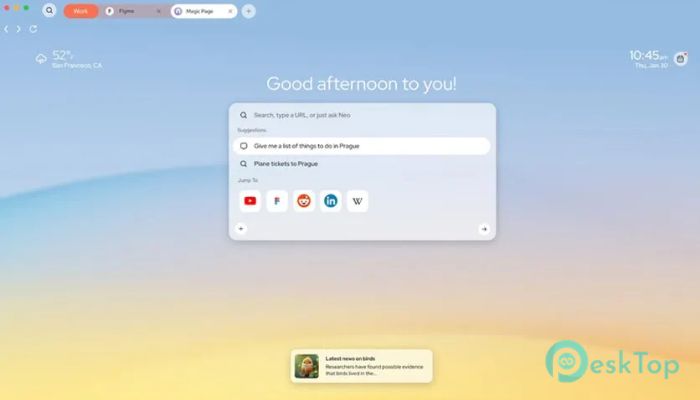
This browser integrates search and chat into a single, seamless system. You do not have to switch platforms to get information. Everything happens in one clean space. It feels natural and smooth.
The search function is enhanced with AI, which means results are not just links. You get clear insights, quick summaries, and helpful explanations. It reduces noise and gives you clarity.
The integrated chat feature works alongside your browsing session. You can ask follow-up questions, refine your research, or get explanations without losing your place.
Built-In Productivity Tools
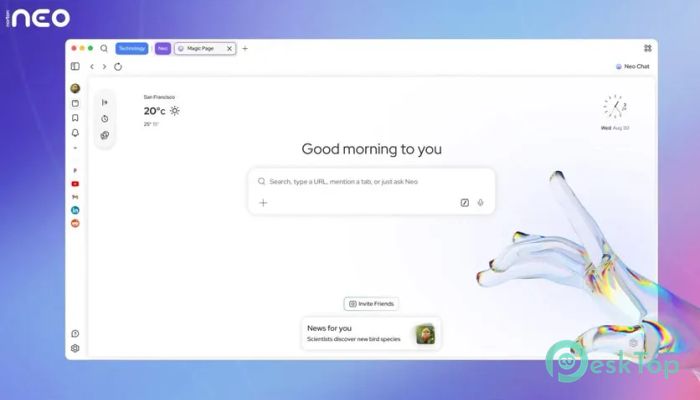
Managing tabs can sometimes feel like juggling too many balls at once. This browser solves that problem with smart tab grouping. It automatically organizes related tabs together, so your workspace stays clean.
If you open 10 or 20 tabs while working, you will appreciate this feature. It keeps everything structured and easy to find. No more endless scrolling through tiny tab titles.
The clean interface also reduces distractions. The layout is simple and user-friendly. You can focus on what matters instead of being overwhelmed by clutter.
Advanced Security with Norton Protection
Security is where this browser truly stands strong. Since it comes from Norton, it includes trusted protection tools. You get WebShield technology that blocks harmful websites before they can cause damage.
Phishing protection is also built in. If a suspicious website tries to trick you into sharing personal information, the browser warns you immediately. It acts like a digital guard at the door, stopping threats before they enter.
This built-in protection gives peace of mind. You can browse, shop, and work online without constantly worrying about hidden dangers.
Adaptive and Personalized Experience
This browser learns from your habits over time. It adapts to how you browse, what you search for, and how you organize your work. The more you use it, the smarter it becomes.
It seems to understand your rhythm. If you often research similar topics or visit certain types of websites, the tool adjusts suggestions and assistance accordingly.
That adaptive nature makes everyday browsing faster and smoother. It reduces repetitive steps and keeps things flowing naturally.
Clean Interface and Smooth Performance
Speed matters. No one likes a slow browser that freezes or lags. This one is optimized for performance, ensuring quick loading times and stable operation.
The interface is minimal yet powerful. Buttons are easy to find. Features are accessible without being intrusive. It strikes a balance between simplicity and capability.
Even with AI tools running in the background, performance remains smooth. It feels lightweight yet powerful.
System Requirements and Technical Details
Operating System: Windows 11 / 10 / 8.1 / 7
Processor: Minimum 1 GHz Processor (2.4 GHz recommended)
RAM: 2GB (4GB or more recommended)
Free Hard Disk Space: 200MB or more is recommended

-
Program size3.91 MB
-
Version1.0
-
Program languagemultilanguage
-
Last updatedBefore 3 Month
-
Downloads29
 Samsung Browser
 Suprow
 SSuite NetSurfer Prometheus Browser
 Wavebox Browser
  Waterfox
 Tor Browser