
 Arabic
  English
  Turkish
  Chinese
  Japanese
  Russian
  Spanish
  German
  French
  Hindi
Hindi Download PixeoAi Video Downloader 1.0 for Windows
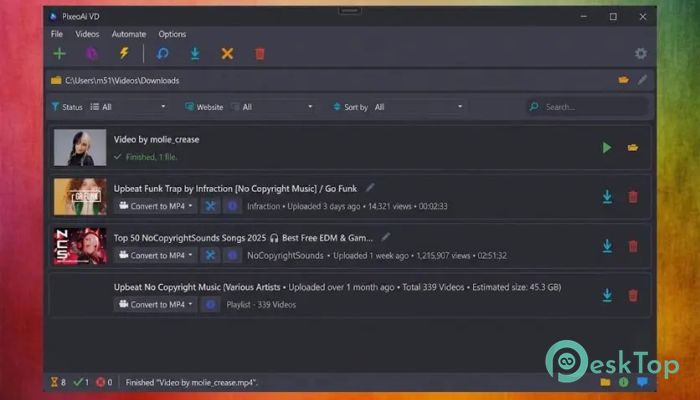
Download PixeoAi Video Downloader 1.0 for Windows.
PixeoAi Video Downloader Overview
This software is designed for people who want full control over their online media. Instead of streaming the same clip over and over, you can save it to your computer and watch it anytime. It supports major platforms such as YouTube, SoundCloud, Vimeo, and Dailymotion, as well as hundreds of other websites. The tool works like a smart assistant. You copy a link, paste it into the app, and it handles the rest. Whether you want a full HD video, a compact mobile file, or just the audio track, everything is possible without complicated steps.Features of PixeoAi Video Downloader
Download from Hundreds of Websites
One of the biggest strengths of this software is its wide compatibility. It supports well-known platforms and many smaller sites as well. You are not limited to a single service. From educational tutorials to music tracks and documentaries, it can capture content from almost anywhere.
The process is simple. Just copy the video URL, paste it into the program, and click download. It quickly analyzes the link and shows available formats and quality options. It feels smooth and efficient, like having a universal remote for the internet.
Convert Videos to Any Format
Sometimes you do not just need the video; you need it in a specific format. This tool gives you flexibility. You can convert files to MP4, AVI, MKV, MOV, and many other popular formats. That means your files will work on smartphones, tablets, smart TVs, and even older devices.
The built-in converter saves you from having to use separate software. Everything happens in one place. It is like having a Swiss Army knife for media files. You download once and shape the file exactly the way you want.
Extract Audio with Ease
Many users only want the audio from a video. Maybe it is a podcast, a music track, or a lecture. With this software, you can extract audio in formats like MP3 or WAV without any hassle.
This feature is perfect for building your own offline music library. Instead of streaming songs online, you can store them locally and listen anytime. It is fast, clean, and maintains good sound quality.
Parallel Downloads for Faster Results
Time matters. Waiting for files one by one can feel frustrating. That is why this tool supports parallel downloads. You can add multiple links to the queue, and it will download them simultaneously.
This is especially useful if you are collecting tutorials, playlists, or multiple episodes. The download manager keeps everything organized, so you always know what is completed and what is still in progress.
Simple and Clean Interface
The layout is clean and beginner-friendly. You do not need technical knowledge to use it. Buttons are clearly labeled, and the main features are easy to find. Even if it is your first time using a downloader, you will feel comfortable within minutes.
The dashboard shows download progress, file size, and format details. Everything is transparent. You stay in control without being overwhelmed by unnecessary options.
High-Quality Video Support
Quality matters when you save a video. The software allows you to choose from different resolutions, including HD and Full HD when available. You can select lower quality to save space, or higher quality for a better viewing experience.
This flexibility helps you manage storage smartly. It is like choosing the right size for your needs instead of forcing everything into one box.
Safe and Reliable Performance
Security is always important when downloading content. The tool focuses on stable performance and clean downloads. It processes links quickly and avoids unnecessary background activity.
Because everything is handled inside the application, you do not need to jump between multiple websites. This reduces risks and keeps your workflow smooth.
Ideal for Personal Media Management
If you like organizing your own collection of videos and audio files, this software can help. You can create folders, rename files, and convert them in bulk. It becomes your personal media manager.
Instead of depending on internet speed or online availability, you build your own library. Think of it as creating a digital shelf where your favorite content is always ready.
System Requirements and Technical Details
Operating System: Windows 11 / 10 / 8.1 / 7
Processor: Minimum 1 GHz Processor (2.4 GHz recommended)
RAM: 2GB (4GB or more recommended)
Free Hard Disk Space: 200MB or more is recommended

-
Program size107.58 MB
-
Version1.0
-
Program languagemultilanguage
-
Last updatedBefore 7 Month
-
Downloads25
 Transmission
 Abelssoft YouTube Song Downloader Plus 2026
 Fast Video Downloader
 3D Youtube Downloader
 Open Video Downloader (youtube-dl-gui)
 qBittorrent