
 Arabic
  English
  Turkish
  Chinese
  Japanese
  Russian
  Spanish
  German
  French
  Hindi
Hindi Download RL Office Notepad2 Bookmark Edition 1.0 for Windows
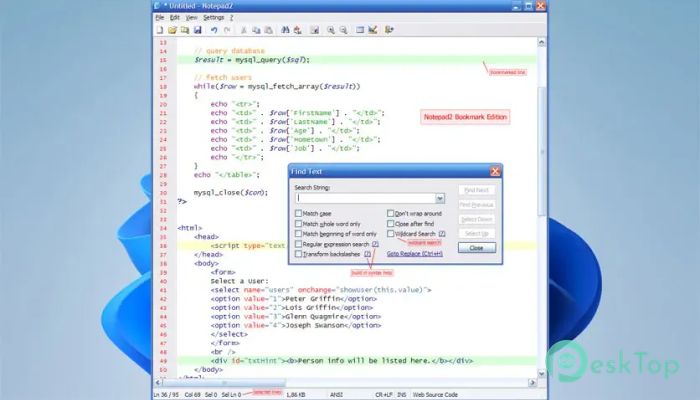
Download RL Office Notepad2 Bookmark Edition 1.0 for Windows.
RL Office Notepad2 Bookmark Edition Overview
This tool is a customized version of the popular Notepad editor, designed to provide a faster, more productive text-editing experience. While the original editor was already known for being lightweight, responsive, and packed with useful coding features, this edition adds a practical bookmark system that helps users navigate large text files with ease. The software is designed for people who work with text every day. Whether you are editing source code, configuration files, scripts, logs, or simple notes, it offers a clean and distraction-free workspace. It starts instantly, uses very little system memory, and remains responsive even when handling large files.Features of RL Office Notepad2 Bookmark Edition
Lightweight and Fast Performance
One of the biggest strengths of the software is its speed. Unlike some modern text editors that feel heavy and resource-hungry, this tool stays light on system resources. It launches almost instantly and performs smoothly on both older and newer computers.
Think of it as a sports car compared to a large truck. It focuses on getting the job done quickly without carrying unnecessary extras. This makes it ideal for users who value efficiency and responsiveness.
Built-In Bookmark Functionality
The standout feature of this edition is its bookmark support. When working with lengthy documents or complex source code, finding important sections repeatedly can become frustrating. The bookmark feature solves this problem by allowing users to mark important lines and return to them instantly.
This feature is especially useful for programmers, web developers, writers, and system administrators. Instead of scrolling endlessly, users can jump directly to critical sections and continue working without interruptions.
Syntax Highlighting for Better Readability
The software includes syntax highlighting, making code and structured text easier to read. Different elements are displayed in various colors, helping users identify keywords, variables, comments, and commands at a glance.
This visual organization reduces mistakes and improves productivity. Whether you are editing HTML, CSS, JavaScript, Python, or other programming languages, the colored formatting makes the content much easier to understand.
Open Source and Free to Use
Another major advantage is its open-source nature. Users can freely use, modify, and distribute the software without worrying about licensing fees. This openness has allowed developers to enhance the editor and add useful features that improve the overall experience.
Because it is community-driven, the tool continues to benefit from improvements and refinements that focus on real-world productivity needs.
Simple and Clean User Interface
The interface follows a minimalist design philosophy. Everything is arranged logically, allowing users to focus on their work rather than navigating complicated menus and settings.
The clean layout feels familiar to anyone who has used Windows Notepad. However, behind this simplicity lies a powerful set of editing tools that significantly extend its capabilities.
Perfect for Developers and Power Users
Programmers often need a reliable editor that opens quickly and supports coding-related features. The software delivers exactly that. It provides syntax highlighting, bookmarks, search tools, and efficient navigation features without overwhelming users with unnecessary complexity.
Power users can edit scripts, configuration files, log files, and source code comfortably while maintaining excellent performance.
Advanced Search and Navigation Tools
Searching through large files becomes much easier with its built-in search capabilities. Users can quickly locate words, phrases, or code snippets and navigate between results efficiently.
When combined with bookmarks, these tools create a workflow that feels smooth and organized. Large documents become easier to manage, saving valuable time during editing sessions.
Ideal Replacement for Windows Notepad
Many users outgrow the limitations of the default Windows Notepad. While the standard editor handles basic text files, it lacks the advanced functionality professionals need.
The software fills this gap perfectly. It maintains the simplicity people love while adding practical features that enhance productivity. As a result, it serves as an excellent replacement for the built-in editor.
Low Resource Consumption
Modern applications often consume large amounts of memory and processing power. This tool takes a different approach by staying lightweight and efficient. It uses minimal RAM and CPU resources, allowing it to run smoothly alongside other applications.
This makes it a great choice for multitasking environments where performance matters.
Enhanced Workflow and Productivity
The combination of speed, bookmarks, syntax highlighting, and easy navigation creates a highly productive editing environment. Small improvements may seem simple at first, but together they significantly reduce repetitive actions and save time throughout the day.
For users who spend hours editing text or code, these workflow enhancements can make a noticeable difference in daily productivity.
System Requirements and Technical Details
Operating System: Windows 11 / 10 / 8.1 / 7
Processor: Minimum 1 GHz Processor (2.4 GHz recommended)
RAM: 2GB (4GB or more recommended)
Free Hard Disk Space: 200MB or more is recommended

-
Program size279.49 KB
-
Version1.0
-
Program languagemultilanguage
-
Last updatedBefore 3 Month
-
Downloads14
 Reportizer
 AccdbMerge
 RdpGuard
 Checkbook For Excel
 SysTools SQL Recovery
 Pointdev Ideal Dispatch