
 Arabic
  English
  Turkish
  Chinese
  Japanese
  Russian
  Spanish
  German
  French
  Hindi
Hindi Download Scrintal 0.2.13 for Windows

Download Scrintal 0.2.13 for Windows.
Scrintal Overview
When you are trying to organize ideas, normal note apps often feel like small boxes where thoughts get stuck. This software changes that experience completely. It provides a visual workspace where ideas can move freely and connect naturally, much like a whiteboard filled with sticky notes and arrows. The software blends two powerful methods: mind mapping and linked notes. Instead of writing notes in a simple list, users can create connections between ideas. This makes thinking feel more natural and flexible. Whether someone is planning a project, studying a complex topic, or solving a difficult problem, the tool helps clarify information. Another great thing is its visual design. Colors, tags, and links help organize thoughts in a way that is easy to understand at a glance. Imagine building a map of your ideas where every point connects like stars forming a constellation. That is exactly how the workspace feels.Features of Scrintal
Visual Brainstorming Experience
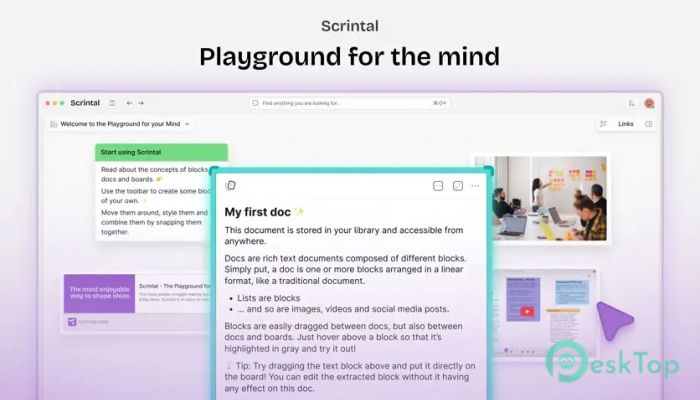
The tool's biggest strength is its visual thinking environment. Instead of forcing users into rigid folders or documents, it allows ideas to float around a workspace. Notes can be placed anywhere and connected with lines, creating a visual network of thoughts.
This approach works very well for creative thinking. When ideas are visible and connected, it becomes easier to see patterns and relationships. It feels similar to drawing diagrams on a whiteboard during a brainstorming session. The difference is that everything stays organized and easy to revisit later.
Students, writers, and researchers especially benefit from this style. It helps them understand complicated topics by visually breaking them into smaller pieces.
Networked Note-Taking System
Traditional note apps store information in separate documents. This can make it difficult to connect related ideas. The software solves this problem through a networked note-taking system.
Each note can link to another one, forming a knowledge network. Over time, this network grows into a powerful knowledge base. Instead of searching through endless files, users simply follow the connections between notes.
This structure is similar to how the human brain works. Thoughts naturally connect to other thoughts. By mirroring this process, the tool makes it easier to build and expand knowledge.
Flexible Workspace for Projects
The workspace acts like a digital canvas where users can arrange information however they like. Notes can be moved, grouped, or connected based on the task at hand.
For project planning, this flexibility becomes extremely useful. Tasks, ideas, and research materials can all live in the same visual space. It becomes easier to see the full picture by focusing on more than one document at a time.
For example, someone planning a business project could place goals, research, timelines, and strategies in one connected view. This allows them to understand the project structure much more quickly.
Support for Multiple File Types
The software does not limit users to plain text notes. It supports multiple file types, allowing images, documents, and other content to be integrated into the workspace.
This feature makes it ideal for research and study. Students can attach references, diagrams, and documents directly to their notes. Everything stays connected in one place, rather than being scattered across folders.
It is like building a digital library where every piece of information connects to the next. This makes studying and research far more efficient.
Tags and Color Organization
Organization plays a huge role when working with large amounts of information. The tool offers tagging and color options that help categorize ideas quickly.
Tags act like labels that group related notes together. Colors add another visual layer, making it easy to identify categories instantly. For example, research notes might be blue, tasks might be green, and important ideas might be red.
This visual structure helps users navigate their workspace easily. Instead of scanning endless text, they can rely on colors and tags to find what they need instantly.
Ideal for Learning and Study
Students often struggle to organize their study materials. Long textbooks, scattered notes, and disconnected ideas can make learning difficult. This software helps simplify that process.
With a visual knowledge map, students can connect concepts together. For example, when studying history, one event can link to another, forming a timeline of knowledge. When studying science, different concepts can connect like pieces of a puzzle.
This approach improves understanding by focusing on the relationships between ideas rather than isolated facts.
Useful for Writers and Creators
Writers often deal with scattered thoughts, story ideas, and research notes. Keeping everything organized can become challenging. The tool works like a digital creative board where writers can map out characters, plots, and themes.
Each story element can link to another, creating a complete narrative structure. This helps writers see how different parts of the story interact.
It feels similar to building a story map on a wall filled with notes and connections. The difference is that everything remains neat, searchable, and editable.
Simple Interface with Powerful Features
Despite offering advanced features, the interface remains clean and easy to understand. New users can quickly learn how to create notes, move them around, and connect ideas.
The design focuses on simplicity so that users spend more time thinking and less time figuring out how the software works. This balance between power and simplicity makes it suitable for both beginners and experienced users.
Over time, the workspace grows into a personal knowledge hub. Ideas, research, plans, and insights all live in one connected system.
System Requirements and Technical Details
Operating System: Windows 11 / 10 / 8.1 / 7
Processor: Minimum 1 GHz Processor (2.4 GHz recommended)
RAM: 2GB (4GB or more recommended)
Free Hard Disk Space: 200MB or more is recommended

-
Program size77.25 MB
-
Version0.2.13
-
Program languagemultilanguage
-
Last updatedBefore 6 Month
-
Downloads37
 Chess King 2026
 Easy German Platinum
 Easy French Platinum
 Easy English Platinum
 Moneyspire Desktop
 Concept Grid