
 Arabic
  English
  Turkish
  Chinese
  Japanese
  Russian
  Spanish
  German
  French
  Hindi
Hindi Download SQL Maestro ASA Maestro 19.4.0.2 for Windows
Download SQL Maestro ASA Maestro 19.4.0.2 for Windows.
SQL Maestro ASA Maestro Overview
It is built to make database administration feel less like a burden and more like a smooth routine. It brings together management, control, and development tools in one clean workspace. Instead of jumping between multiple utilities, everything you need stays within reach, much like having a well-organized toolbox where every instrument is placed exactly where you expect it to be.Features of SQL Maestro ASA Maestro
Designed for SQL Anywhere Environments
The software is fully focused on SQL Anywhere servers and supports versions from 10 through 16. This wide compatibility makes it suitable for both legacy systems and modern setups. Whether you are maintaining an older environment or working on a newer deployment, it adapts without forcing you to change your workflow.
Smooth Database Object Management
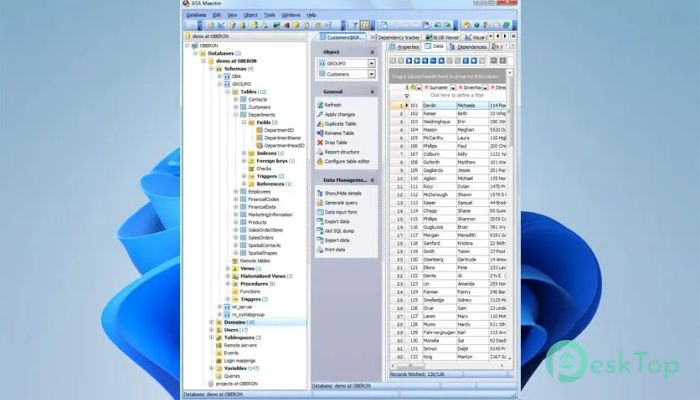
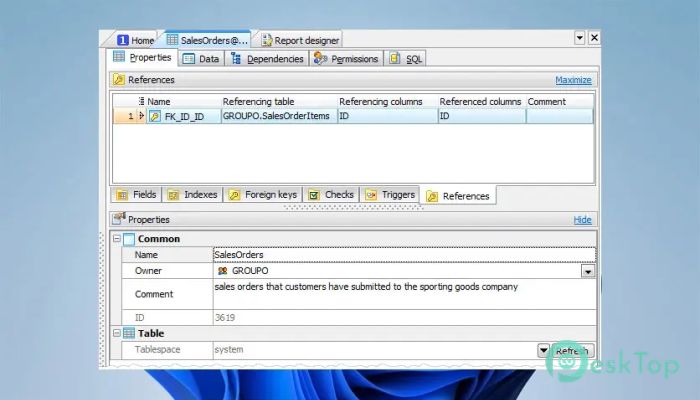
Managing database objects becomes straightforward and intuitive. Tables, views, triggers, procedures, and functions are easy to create, modify, or remove. Everything is presented in a logical structure, helping you stay oriented even when dealing with complex schemas. It feels like browsing neatly arranged folders rather than digging through cluttered files.
Built-In Database Designer
The Database Designer adds a visual layer to development tasks. Instead of relying only on scripts, you can design structures visually and instantly see relationships between objects. This approach reduces errors and accelerates planning, especially when working with large or evolving databases.
Comfortable Security Management
Handling users, roles, and permissions is often one of the most sensitive tasks in database administration. The tool makes security settings clear and accessible, allowing you to manage login mappings and access rules with confidence. Even complex permission structures become easier to understand and maintain.
Efficient Data Handling Tools
Editing and organizing data is handled with care and precision. Sorting, filtering, grouping, and inline editing help you explore datasets without exporting them elsewhere. This saves time and keeps your focus on analysis rather than switching between applications.
Advanced SQL Editor Experience
The built-in SQL Editor is designed for comfort and speed. Features like code folding and multi-threaded execution help manage long or complex scripts. Writing queries feels fluid, similar to typing in a smart notebook that anticipates structure and keeps everything readable.
Visual Query Builder for Faster Results
For those moments when writing raw SQL feels unnecessary, the Visual Query Builder steps in. You can create SELECT statements visually, including subqueries and UNION operations. This makes query building faster and lowers the barrier for users who prefer graphical tools.
Flexible Import and Export Options
Moving data in and out of databases is simple thanks to support for popular formats. These import and export tools help with backups, migrations, and reporting. The process feels guided, reducing the chance of errors during data transfer.
Powerful BLOB Viewer and Editor
BLOB data often requires special handling, and this software handles it well. You can view and edit binary large objects in various formats, making tasks such as inspecting images or documents stored in the database far more practical.
Visual Diagrams for Better Insight
Numeric data can be transformed into clear diagrams, helping you quickly spot trends and relationships. This visual approach adds clarity, especially when working with large datasets that are difficult to interpret in raw table form.
Customization That Fits Your Style
Every user works differently, and the software respects that. Layouts, behaviors, and preferences can be adjusted to match personal needs. This flexibility ensures long-term comfort, whether you prefer a minimalist interface or a feature-rich workspace.
Why Professionals Rely on It
Support for the latest server versions, strong security handling, fast query building, and reliable performance make it a dependable daily companion. New users appreciate how easy it is to learn, while experienced administrators value the depth and control it provides.
System Requirements and Technical Details
Operating System: Windows 11 / 10 / 8.1 / 7
Processor: Minimum 1 GHz Processor (2.4 GHz recommended)
RAM: 2GB (4GB or more recommended)
Free Hard Disk Space: 200MB or more is recommended

-
Program size24.38 MB
-
Version19.4.0.2
-
Program languagemultilanguage
-
Last updatedBefore 8 Month
-
Downloads28
 Reportizer
 AccdbMerge
 RdpGuard
 Checkbook For Excel
 SysTools SQL Recovery
 Pointdev Ideal Dispatch