
 Arabic
  English
  Turkish
  Chinese
  Japanese
  Russian
  Spanish
  German
  French
  Hindi
Hindi Download SQLMaestro MaxDB Maestro 14.9.0.2 for Windows
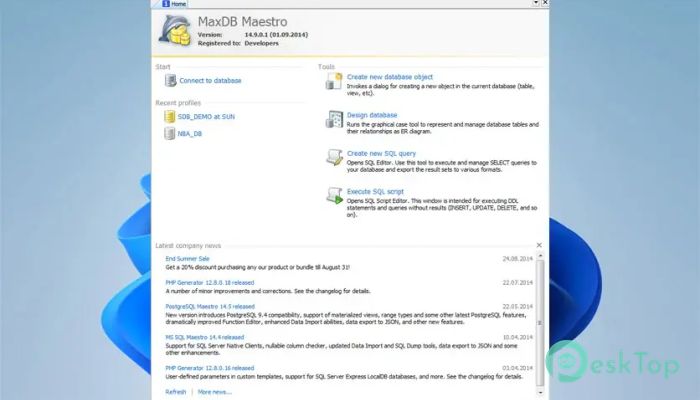
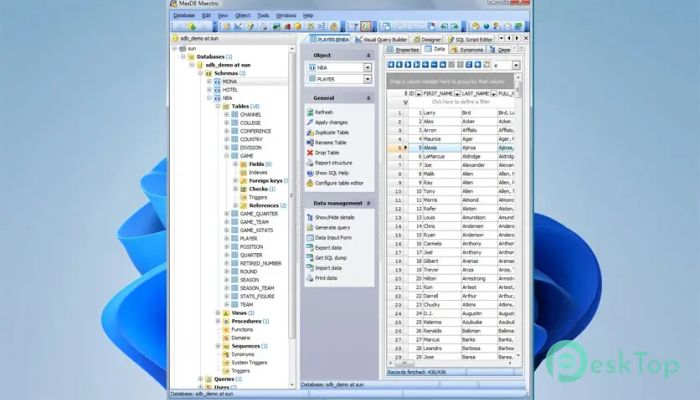
Download SQLMaestro MaxDB Maestro 14.9.0.2 for Windows.
SQLMaestro MaxDB Maestro Overview
It is built to make database work feel less like heavy lifting and more like smooth navigation. It brings all essential MaxDB management tools into a single, clean interface, helping administrators and developers stay focused without switching between multiple utilities. From routine maintenance to advanced database design, it offers a reliable environment where everything feels organized and predictable. Whether handling small projects or large enterprise databases, it keeps control simple and structured.Features of SQLMaestro MaxDB Maestro
Broad Compatibility and Stability
It supports all MaxDB versions from 7.5, so you can work with both legacy databases and newer deployments without compatibility issues. This wide version support makes it a dependable choice for long-term database environments.
The software maintains consistent performance even when managing complex database structures, giving users confidence during daily operations.
Simple Database Object Management
The software enables easy creation, editing, and deletion of database objects, including tables, views, indexes, and procedures. Everything is clearly laid out, so managing objects feels like arranging files in a well-organized folder.
This approach reduces mistakes and saves time, especially when working on large schemas with many dependencies.
Built-in Database Designer
The integrated designer helps visualize database structures clearly and logically. Relationships, fields, and constraints are displayed visually, making planning and adjustments easier to understand.
It works like a blueprint for your data, allowing you to see the full picture before making structural changes.
Security Management Made Accessible
Managing users, roles, and permissions becomes straightforward with comfortable access to security features. The interface simplifies permission handling, reducing the risk of misconfigurations.
This makes it easier to maintain strong access control without having to navigate complex commands.
Advanced Data Management Tools
The tool includes powerful data-editing features, including grouping, sorting, and filtering. Browsing through records feels similar to working with a smart spreadsheet that understands your database rules.
These features help quickly locate and modify data without writing extra queries.
Handy SQL Editor for Daily Work
The built-in SQL editor supports code folding and multi-threading, making it easier to work with long, complex scripts. Queries are easier to read, edit, and manage without clutter.
It feels like having a well-organized notebook where every command has its place.
Visual Query Builder for Faster Results
The visual query builder lets users create queries without writing SQL. It supports subqueries and UNION operations, making advanced queries more accessible.
This feature is especially helpful for users who prefer visual logic over text-heavy scripts.
Flexible Import and Export Options
Data can be exported and imported in popular formats, ensuring smooth, reliable data exchange. This is useful when moving information between systems or creating backups.
The process is guided and clear, reducing errors during transfers.
Powerful BLOB Viewer and Editor
Handling BLOB data becomes manageable with the built-in viewer and editor. Images, documents, and binary files can be inspected and modified directly.
This saves time by eliminating the need for external tools for handling binary data.
System Requirements and Technical Details
Operating System: Windows 11 / 10 / 8.1 / 7
Processor: Minimum 1 GHz Processor (2.4 GHz recommended)
RAM: 2GB (4GB or more recommended)
Free Hard Disk Space: 200MB or more is recommended

-
Program size26.45 MB
-
Version14.9.0.2
-
Program languagemultilanguage
-
Last updatedBefore 9 Month
-
Downloads4
 Reportizer
 AccdbMerge
 RdpGuard
 Checkbook For Excel
 SysTools SQL Recovery
 Pointdev Ideal Dispatch