
 Arabic
  English
  Turkish
  Chinese
  Japanese
  Russian
  Spanish
  German
  French
  Hindi
Hindi Download SQLMaestro Oracle Maestro 16.1.0.5 for Windows
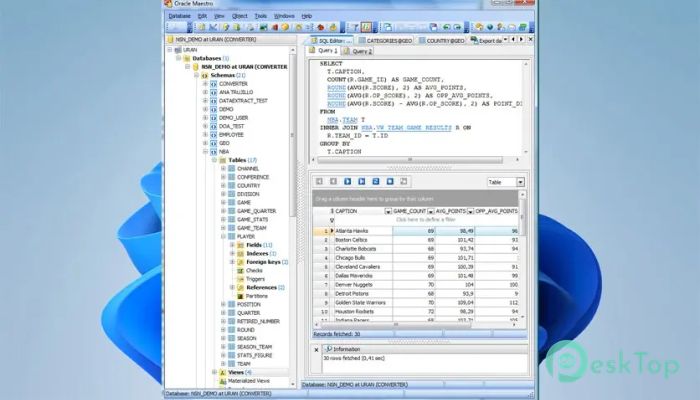
Download SQLMaestro Oracle Maestro 16.1.0.5 for Windows.
SQLMaestro Oracle Maestro Overview
It is designed to make Oracle database tasks feel less like heavy lifting and more like a smooth workflow. From the moment you connect, everything is clearly laid out, helping you focus on your data rather than navigating commands. It brings together administration, development, and data handling in a single, cohesive environment, making complex operations feel manageable even on busy days.Features of SQLMaestro Oracle Maestro
User-friendly database management
It allows you to create, connect, and remove databases without unnecessary steps. Database profiles save connection settings so you can jump into work with a single click. This saves time and keeps your focus on the databases that matter most, especially when managing multiple environments simultaneously.
Advanced object handling made simple
The software provides powerful tools for managing database objects in a clear, organized way. You can group, filter, and sort objects inside an intuitive browser. Drag-and-drop support feels like moving files on your desktop, making tasks like copying objects between databases fast and natural.
Efficient table and subobject control
Managing tables becomes straightforward thanks to built-in wizards and editors. You can easily create or modify fields, indexes, triggers, and foreign keys without writing long scripts. Think of it as assembling building blocks rather than carving everything by hand.
Visual and text-based query building
It supports both visual thinkers and code-focused users. You can write SQL manually with syntax highlighting and smart code completion, or design queries visually by linking tables and selecting fields. This flexibility helps beginners grow while still keeping experts comfortable.
Support for modern Oracle features
The tool works smoothly with Oracle versions from 8.x to 11.x. It supports advanced database objects, including procedures, functions, sequences, packages, queues, and custom types. This ensures compatibility with a wide range of existing systems and enterprise setups.
Strong data viewing and editing tools
You can browse and edit table data directly, including complex BLOB fields. Exporting and importing data is effortless, with support for formats such as Excel, Access, XML, CSV, TXT, and more. It is like having a universal adapter for your data.
Clear insight into database metadata
Metadata exploration is made easier through dedicated tools that help you understand structure and relationships. SQL script management includes features such as code folding, which helps keep large scripts tidy and readable.
Reliable security and privilege control
Managing permissions becomes far less stressful. You can grant or revoke access to specific objects, or manage user privileges, in a single place. This keeps security organized and reduces the risk of accidental access issues.
Customization to match your workflow
The interface can be adjusted to suit your preferences. From visual themes to behavior settings, the software adapts to how you work rather than forcing you into a rigid layout. It feels more like a personal workspace than a generic tool.
System Requirements and Technical Details
Operating System: Windows 11 / 10 / 8.1 / 7
Processor: Minimum 1 GHz Processor (2.4 GHz recommended)
RAM: 2GB (4GB or more recommended)
Free Hard Disk Space: 200MB or more is recommended

-
Program size29.21 MB
-
Version16.1.0.5
-
Program languagemultilanguage
-
Last updatedBefore 9 Month
-
Downloads4
 Reportizer
 AccdbMerge
 RdpGuard
 Checkbook For Excel
 SysTools SQL Recovery
 Pointdev Ideal Dispatch