
 Arabic
  English
  Turkish
  Chinese
  Japanese
  Russian
  Spanish
  German
  French
  Hindi
Hindi Download The Batchman 1.3 for Windows
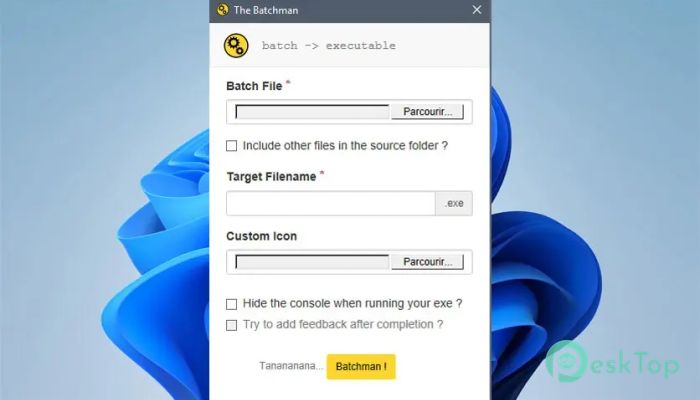
Download The Batchman 1.3 for Windows.
The Batchman Overview
It is designed for people who work with scripts and want an easier way to share or protect their work. Instead of sending raw batch or HTA files, you can package them into clean, executable files that convey a more professional impression. It focuses on simplicity, so even beginners can get results without digging into complex settings. This utility helps bridge the gap between scripting and finished applications. You write your script as usual, then let the tool handle the wrapping, compression, and presentation. The result feels less like a script and more like a proper Windows program.Features of The Batchman
Simple Script to EXE Conversion
One of the strongest points is how easily scripts are converted into executable files. You select your batch or HTA file, apply your preferred options, and build the output in just a few clicks. There is no need for extra coding or advanced configuration.
This process saves time and removes the fear of manual packaging. It feels like putting your script into a neat box, ready to run on any supported Windows system.
Automatic File Inclusion
When scripts rely on extra files, managing them can be messy. This tool solves that by allowing you to include all files located in the same folder as your main script. Everything is bundled into a single executable.
This approach reduces errors and broken paths. You can move or share the final file without worrying about missing resources.
Custom Icon Support
Appearance matters, especially when sharing tools with others. The software lets you customize your executable's icon, giving it a unique, recognizable look. A custom icon makes the output feel more trustworthy and polished.
It is a small detail, but it goes a long way in making your work stand out from plain script files.
Hidden Console Execution
When running batch files, you often see a flashing console window. This utility offers an option to run executables without displaying the console. The process runs quietly in the background, creating a smoother experience.
This is especially useful for automation tasks that do not require visual distractions.
Completion Feedback Dialog
When the console is hidden, it can be hard to know when a task is done. To fix this, the tool can display a simple dialog box once execution is complete. This feedback reassures users that everything finished successfully.
It feels like a friendly tap on the shoulder saying, “All done.”
Compression and Portability
The generated executable files are compressed to keep their size manageable. Smaller files are easier to store, upload, and distribute. This also helps when sharing tools through email or cloud storage.
Portability is a key advantage, as the output runs smoothly on supported Windows systems without additional setup.
User-Friendly Interface
The interface is clean and focused on essential options. There is no clutter or confusing layout. Each setting is clearly labeled, making its purpose easy to understand.
This simplicity lowers the learning curve and encourages experimentation without fear of breaking something.
Useful for Automation and Utilities
This solution fits perfectly into automation workflows. You can turn maintenance scripts, installers, or small helpers into executables that run quietly and efficiently. Sharing tools with non-technical users becomes much easier.
It is like converting handwritten notes into a printed guide that anyone can follow.
Lightweight and Efficient
The software does not demand heavy system resources. It runs smoothly even on modest machines, making it accessible to a wide range of users. This efficiency keeps your workflow fast and frustration-free.
You get results without slowing down your system.
System Requirements and Technical Details
Operating System: Windows 11 / 10 / 8.1 / 7
Processor: Minimum 1 GHz Processor (2.4 GHz recommended)
RAM: 2GB (4GB or more recommended)
Free Hard Disk Space: 200MB or more is recommended

-
Program size846.84 KB
-
Version1.3
-
Program languagemultilanguage
-
Last updatedBefore 7 Month
-
Downloads16
 Reportizer
 AccdbMerge
 RdpGuard
 Checkbook For Excel
 SysTools SQL Recovery
 Pointdev Ideal Dispatch