
 Arabic
  English
  Turkish
  Chinese
  Japanese
  Russian
  Spanish
  German
  French
  Hindi
Hindi Download Xero Software TaxCycle Enterprise 16.0.63710 for Windows
Download Xero Software TaxCycle Enterprise 16.0.63710 for Windows.
Xero Software TaxCycle Enterprise Overview
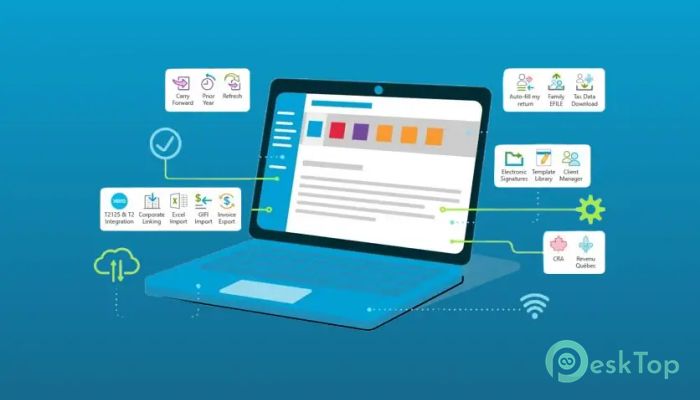
Handling tax compliance can feel like solving a puzzle with hundreds of moving pieces. This software simplifies that process by bringing everything into one clean, organized environment. It is designed for accountants, tax professionals, and bookkeepers who want speed, accuracy, and efficiency without complexity. The software helps reduce manual work, improves collaboration, and provides intelligent tools that speed up tax preparation. Whether working with individual returns or corporate filings, it delivers a smooth experience that saves time and minimizes mistakes. It also offers advanced automation features that help professionals easily manage large workloads. With built-in tools like carry-forward conversions, electronic signatures, and customizable workflows, professionals can focus more on clients and less on repetitive tasks.Features of Xero Software TaxCycle Enterprise
Reduced Data Entry and Smart Automation
Manual data entry often consumes a large portion of tax preparation time. The software removes that burden by offering intelligent automation and carry-forward options. It imports previous data, converts files from other software, and automatically fills in information where needed.
Carry-forward conversions make it easy for professionals to migrate from other systems. Auto-filling my return data downloads further reduces typing. The software also refreshes carry-forward data to ensure accuracy when working across multiple years.
Smart copy-and-paste functionality improves productivity. Instead of manually entering numbers repeatedly, professionals can quickly duplicate information across forms. Corporate linking also allows multiple returns to be connected seamlessly.
Excel import adds another layer of flexibility. Users can bring data directly from spreadsheets into tax returns. SlipSync integration automatically transfers slips into T1 returns, eliminating repetitive entry tasks.
Powerful Tools for Faster Client Service
Managing clients efficiently is essential for accounting professionals. The software includes powerful tools that help improve communication and workflow management. Electronic signatures allow documents to be signed instantly without printing or scanning.
The built-in client portal improves collaboration. Clients can upload documents securely and review returns quickly. This makes the process smoother and faster for everyone involved.
EFILE functionality enables quick electronic filing. Professionals can submit returns directly without switching between platforms. Data mining features help extract important insights from client information.
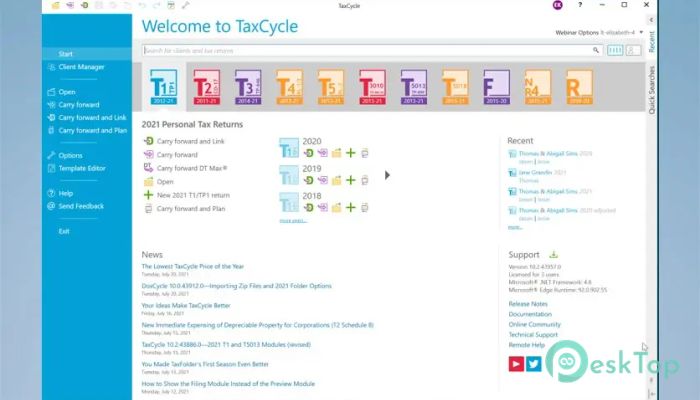
DoxCycle and Client Manager improve document organization. The Template Editor allows professionals to customize workflows to meet office needs. These tools work together to create a streamlined environment.
Professional Audit and Review Tools
Accuracy is critical in tax preparation. The software includes professional audit tools that detect potential issues instantly. Messages appear immediately when errors or inconsistencies are found.
Quick-fix solutions help resolve problems with one click. Instead of manually searching for issues, professionals can correct them instantly. This saves time and improves accuracy.
Review messages can be customized. Users can disable unnecessary alerts and focus only on important warnings. Multiple reviewers can also collaborate using review marks and memos.
This approach makes teamwork easier. Professionals can track changes, review data, and finalize returns efficiently.
Intuitive Form and Field Search
Finding information quickly is essential when working with tax forms. The software includes a powerful search feature that works like a search engine. Users can search by keyword, line number, or account number.
The search tool helps users jump directly to the field they need. This reduces time spent scrolling through forms. Professionals can also search names, businesses, or specific values.
On-form search improves navigation further. Users can quickly find specific words or numbers within forms. This makes working with large returns much easier.
Familiar Forms and Keyboard Shortcuts
The interface is designed to feel familiar and easy to use. Forms-based screens simplify data entry. Professionals can work quickly without having to learn complicated layouts.
Keyboard shortcuts speed up workflow. F4 fast find allows natural language search. Ctrl+F helps you locate information instantly.
These shortcuts reduce clicks and improve productivity. Users can complete tasks faster while maintaining accuracy.
Customizable Workflow and Flexible Options
Every office works differently. The software allows customization to match individual workflows. Users can configure status items, reports, and workflow tools.
Professionals can also hide unnecessary review messages. This keeps the interface clean and focused. Custom reports help track performance and workload.
The flexible setup makes it suitable for both small firms and large offices. Teams can share only the options they need.
Improved Collaboration and Productivity
Collaboration tools improve teamwork. Multiple reviewers can work on returns simultaneously. Review marks and memos help track progress.
Family Transmits allows professionals to send multiple returns at once. This saves time when handling large client groups. Customizable workflows ensure smooth coordination across teams.
These features make the software ideal for busy accounting offices. It helps reduce workload while improving productivity.
Advanced Data Management
Managing large amounts of tax data can be challenging. The software offers powerful data management features that efficiently organize everything. Users can access files quickly and manage returns across multiple years.
Data mining tools easily extract important information. This helps professionals analyze client data and make better decisions. Built-in tools improve organization and reduce clutter.
This approach helps maintain accuracy and consistency. Professionals can focus on delivering quality service to clients.
System Requirements and Technical Details
Operating System: Windows 11 / 10 / 8.1 / 7
Processor: Minimum 1 GHz Processor (2.4 GHz recommended)
RAM: 2GB (4GB or more recommended)
Free Hard Disk Space: 2GB or more is recommended

-
Program size717.18 MB
-
Version16.0.63710
-
Program languagemultilanguage
-
Last updatedBefore 2 Month
-
Downloads20
 Chess King 2026
 Easy German Platinum
 Easy French Platinum
 Easy English Platinum
 Moneyspire Desktop
 Concept Grid