
 Arabic
  English
  Turkish
  Chinese
  Japanese
  Russian
  Spanish
  German
  French
  Hindi
Hindi Download Zen Notes 1.0 for Windows
Download Zen Notes 1.0 for Windows.
Zen Notes Overview
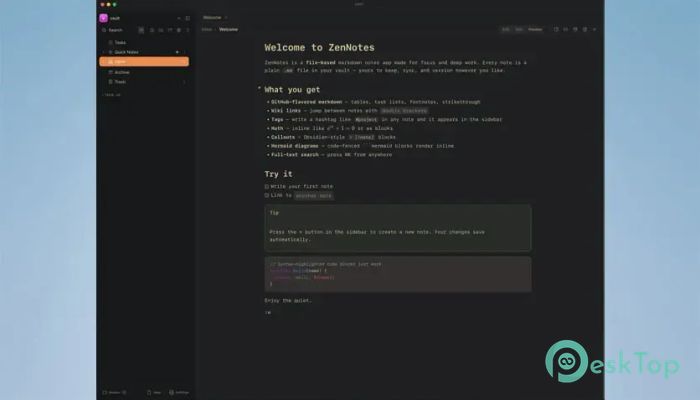
The software is designed for people who love fast, distraction-free writing. Instead of storing your notes in a hidden database, it saves everything as simple Markdown (.md) files inside a regular folder. This means your notes always stay under your control, making backup, sharing, and migration incredibly easy. Whether you are writing documentation, keeping daily journals, planning projects, or managing personal knowledge, the tool provides a clean workspace that focuses on speed and simplicity. It combines powerful editing features with an intuitive interface, allowing you to work without unnecessary distractions.Features of Zen Notes
Simple Markdown File Storage
Unlike many note-taking applications that rely on complex databases, the software treats every note as a plain Markdown file. Think of it as keeping documents in a normal folder rather than locking them in a digital vault. Your files remain readable even without the application.
You can organize your notes however you like and sync them with Git, Dropbox, iCloud, or any other cloud storage service. If you prefer complete privacy, you can simply keep everything offline without depending on any external service.
Keyboard-First Writing Experience
The tool is built for users who enjoy working with the keyboard instead of constantly reaching for the mouse. Real Vim motions make navigation incredibly fast, helping experienced users move through documents with ease.
Common writing actions become second nature after a short time. This workflow reduces interruptions, allowing your thoughts to flow naturally from your mind to the page.
Split Views and Floating Windows
Sometimes you need to compare two notes or keep important information visible while writing. The software makes this simple with side-by-side split views and floating note windows.
You can pin a reference note beside your current document, preview Markdown instantly, or move important content into a separate window. It feels like having multiple desks rather than trying to fit everything into one small workspace.
Live Math, Diagrams, and Visual Content
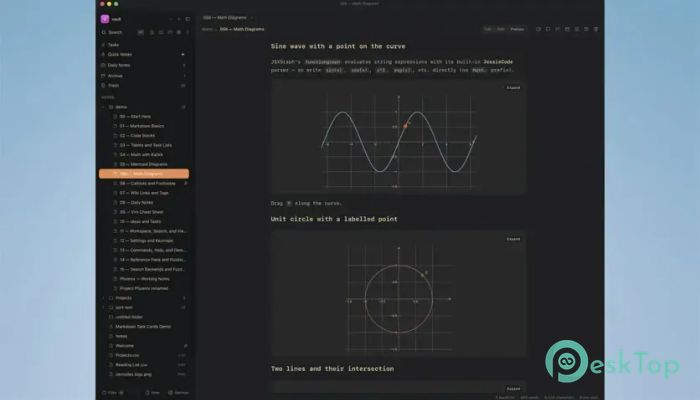
Writing technical documents becomes much easier thanks to built-in support for live rendering. Mathematical formulas created with KaTeX appear instantly, while Mermaid diagrams, TikZ graphics, JSXGraph content, and function plots are generated directly from fenced code blocks.
This allows students, developers, engineers, researchers, and educators to prepare professional documents without switching between multiple applications.
Powerful Organization Features
Keeping thousands of notes organized is surprisingly simple. You can create tags using the familiar # symbol, manage tasks with Markdown checkboxes, and build connections using wiki-style links.
The software automatically tracks backlinks between notes, making it easy to discover related information. Even unresolved links remain visible, reminding you to create missing pages whenever you're ready.
Fast Search Across Every Note
Finding information is almost instant, even inside large collections of notes. The built-in search engine scans every file in your vault and delivers accurate results within seconds.
If advanced tools like ripgrep or fzf are available on your computer, the application automatically uses them for even faster searching. Otherwise, the integrated search engine continues to provide reliable performance.
Daily Notes and Smart Shortcuts
Creating daily journals takes only a single keystroke. The software automatically generates a new note in ISO date format and stores it in your preferred folder.
Quick shortcuts make writing even smoother. Typing "/" opens formatting options such as headings, tables, callouts, code blocks, and links, while "@" quickly inserts dates whenever you need them.
Compatible with Existing Vaults
If you already use another Markdown-based knowledge management system, switching is refreshingly easy. The tool can open existing note collections without forcing you to convert anything.
Image embeds continue working correctly, loose files appear naturally inside the folder tree, and newly created notes follow your existing folder structure. This compatibility eliminates the frustration of migrating years of work.
Comments and Distraction-Free Writing
Reviewing documents becomes more convenient with inline comments. Simply highlight any passage and attach comments inside the side panel. The markers remain connected to the correct text even after editing.
When it's time to focus completely, Zen Mode removes sidebars, tabs, and status bars with a single shortcut. Only your writing remains visible, creating an environment that feels calm and free from distractions.
Desktop and Self-Hosted Flexibility
The software gives you complete freedom over where you work. You can install the native Windows application for the best desktop experience or self-host the web version using the official Docker image.
Because the browser version can run on your own network, you maintain full ownership of your notes without relying on third-party online services.
Custom Themes and Fonts
Long writing sessions become more comfortable with customizable appearance settings. Light and dark themes are included, allowing you to choose whichever feels easier on your eyes.
You can also select separate fonts for the interface, document text, and source code. This small detail greatly improves readability and creates a workspace tailored to your personal preferences.
Built-in CLI and MCP Server
The software includes a bundled Zen CLI that allows advanced users to automate workflows and manage notes directly from the command line. It also features an integrated MCP server that works with compatible AI assistants.
This combination opens the door to automation, intelligent searching, and AI-assisted writing while keeping your notes stored locally under your own control.
System Requirements and Technical Details
Operating System: Windows 11 / 10 / 8.1 / 7
Processor: Minimum 1 GHz Processor (2.4 GHz recommended)
RAM: 2GB (4GB or more recommended)
Free Hard Disk Space: 200MB or more is recommended

-
Program size185.01 MB
-
Version1.0
-
Program languagemultilanguage
-
Last updatedBefore 2 Month
-
Downloads14
 Reportizer
 AccdbMerge
 RdpGuard
 Checkbook For Excel
 SysTools SQL Recovery
 Pointdev Ideal Dispatch