
 Arabic
  English
  Turkish
  Chinese
  Japanese
  Russian
  Spanish
  German
  French
  Hindi
Hindi Download Abacre Web Site Uploader 1.0 for Windows
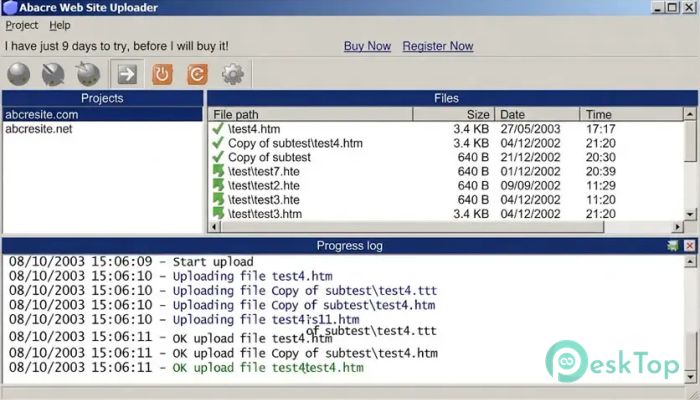
Download Abacre Web Site Uploader 1.0 for Windows.
Abacre Web Site Uploader Overview
Managing a website can become difficult when you need to upload files manually every time you make a small change. This software removes that hassle by providing a fast, organized way to publish website files. Designed for webmasters, website administrators, businesses, and even home users, it makes website maintenance much easier. The software focuses on speed, simplicity, and automation. Instead of uploading every file repeatedly, it intelligently detects changes and transfers only the updated files. This saves valuable time, reduces bandwidth usage, and keeps websites synchronized without unnecessary effort.Features of Abacre Web Site Uploader
One-Click Website Publishing
The biggest advantage of the software is its one-click publishing feature. Once your website project is configured, you can upload the entire website with just a single click. There is no need to select folders or files every time you publish updates.
This feature is especially useful for people who update their websites regularly. It works like pressing a single button to send your latest work directly to the web server, making website management quick and stress-free.
Smart FTP Synchronization
Uploading an entire website after every small modification wastes both time and internet bandwidth. The software solves this problem with intelligent synchronization that transfers only the files that have actually changed.
This smart approach makes publishing much faster. Large websites benefit the most, as even a few updated pages can be uploaded within seconds rather than waiting for the entire project to transfer.
Automatic Scheduled Uploads
Keeping a website updated becomes much easier with the built-in scheduling feature. You can set automatic upload times according to your preferred schedule, allowing updates to happen even when you are away from your computer.
This option works well for business websites, blogs, or company portals that require regular content updates. Once configured, the tool handles the process automatically, giving you one less task to worry about.
Fast Multi-Threaded Uploading
Speed matters when dealing with hundreds or even thousands of website files. The software uses multiple upload threads to transfer files simultaneously instead of sending them one by one.
This technology significantly reduces upload time. It's like opening several checkout counters in a supermarket instead of making everyone wait in a single line. More files move at once, and the entire process finishes much faster.
Intelligent File Comparison
Before transferring files, the tool compares the local and remote versions using details such as file size and modification date. This helps determine which files actually need updating.
Because unnecessary uploads are avoided, websites remain synchronized while saving both server resources and internet bandwidth. The comparison process also minimizes the risk of accidentally overwriting newer files.
Advanced File Filtering
Not every file in a project needs to be uploaded. The software includes flexible filtering options that let users filter files by name, extension, or size.
This makes it easy to exclude temporary files, backups, logs, or development resources that should never be published. Better control means cleaner website uploads and fewer mistakes.
Remote Directory Cache Support
Checking remote server folders repeatedly can slow down the publishing process. To improve performance, the software uses a remote directory cache to store directory information for faster access.
This feature reduces unnecessary communication with the server, allowing uploads to start faster and complete more efficiently, especially when managing larger website projects.
Automatic Time Zone Adjustment
Website files are often stored on servers located in different countries. Different time zones can create confusion when comparing file modification dates.
The software automatically adjusts for time zone differences, ensuring accurate synchronization between local and remote files. This small feature prevents many synchronization errors and keeps projects organized.
Easy-to-Use Interface
The software is designed with simplicity in mind. Its clean interface allows even beginners to configure FTP connections and upload website files without a steep learning curve.
Experienced webmasters will also appreciate the straightforward workflow because it reduces the number of steps required for routine publishing tasks. Everything is logically organized, allowing users to focus on maintaining their websites rather than managing complex software.
Perfect for Different Types of Users
The tool is suitable for a wide range of users. Professional web developers can manage multiple client websites, while businesses can quickly publish company websites. Home users can also upload personal websites without needing advanced technical knowledge.
Its combination of automation, synchronization, and speed makes it useful for projects of all sizes, from simple personal pages to large corporate websites.
System Requirements and Technical Details
Operating System: Windows 11 / 10 / 8.1 / 7
Processor: Minimum 1 GHz Processor (2.4 GHz recommended)
RAM: 2GB (4GB or more recommended)
Free Hard Disk Space: 200MB or more is recommended

-
Program size845.25 KB
-
Version1.0
-
Program languagemultilanguage
-
Last updatedBefore 1 Month
-
Downloads5
 Cyotek WebCopy
 Linphone
 Cinny
Cinny AllMapSoft Bing Maps Downloader
  AllMapSoft Yandex Maps Downloader
  AllMapSoft google earth images downloader