
 Arabic
  English
  Turkish
  Chinese
  Japanese
  Russian
  Spanish
  German
  French
  Hindi
Hindi Download AiseeFox Dr.Wiper 1.0 for Windows
Download AiseeFox Dr.Wiper 1.0 for Windows.
AiseeFox Dr.Wiper Overview
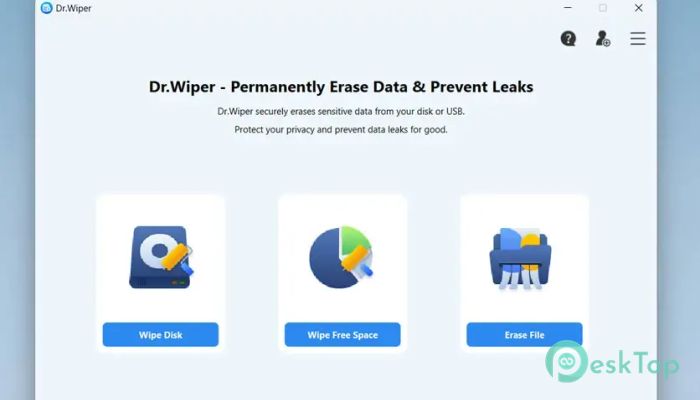
This tool works like a digital shredder for your Windows system. Instead of simply deleting files and leaving traces, it ensures data is overwritten repeatedly until recovery becomes impossible. The focus here is on simplicity, safety, and control, so both beginners and experienced users can wipe data with confidence.Features of AiseeFox Dr.Wiper
One-Stop Data Wiping Solution
The software brings all data wiping needs under one roof. Whether you want to clean an entire hard drive or remove just a few sensitive documents, everything can be done from a single dashboard. There is no need to switch between multiple tools or deal with complex settings. It keeps the process clean, focused, and stress-free.
Erase Entire Drives Securely
When selling, donating, or recycling a computer, clearing the whole drive is critical. This utility allows you to wipe entire disks, ensuring no personal data remains. Once the process finishes, the drive is left clean and safe for reuse. This approach helps protect against identity theft and unwanted data leaks.
Wipe Individual Partitions
Sometimes you only need to clean a specific partition rather than the full disk. The software enables this with just a few clicks. You can select the exact partition, confirm your choice, and let the process run smoothly in the background. This is especially useful when reorganizing storage or preparing space for a fresh system setup.
Clean Free Space Without Touching Files
Deleted files often leave hidden traces in free space. The tool includes a mode that targets only unused areas of the drive. This means your current files remain untouched, while old files are permanently deleted. It is a smart way to boost privacy without disrupting your daily work.
Erase Specific Files and Folders
For quick cleanup tasks, the file-erasing option is ideal. You can select individual files or folders and securely remove them. This works well for sensitive documents, old backups, or personal media you no longer want to keep. Once erased, recovery tools cannot restore them.
Military-Grade Overwrite Algorithms
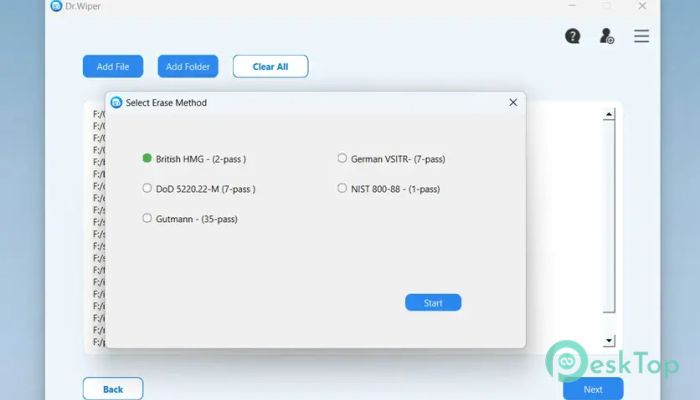
Security is handled through advanced overwrite methods trusted worldwide. You can choose from popular standards such as DoD and Gutmann, or set a custom number of passes. Each pass overwrites existing data, making recovery practically impossible. This layered approach provides peace of mind when handling confidential data.
Simple Step-by-Step Workflow
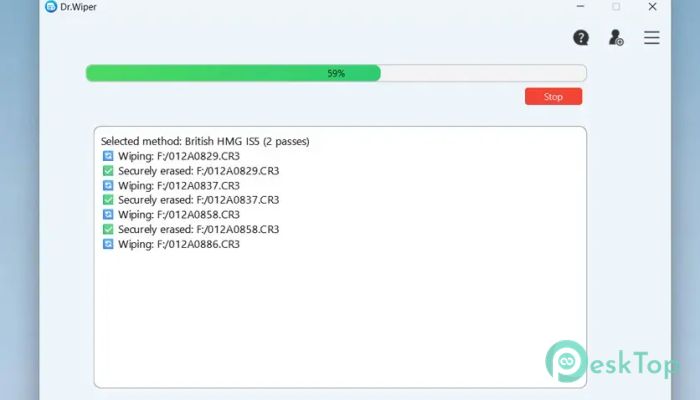
The process is broken down into clear steps that guide you from start to finish. First, select a wipe mode: disk, partition, free space, or file. Next, select an overwrite method that aligns with your security needs. Finally, you review your choices and start the wipe while tracking progress in real time.
Beginner-Friendly Interface
The design focuses on clarity rather than complexity. Buttons are clearly labeled, instructions are easy to follow, and warnings appear before any critical action. Even users with little technical knowledge can perform secure wipes without fear of error. It feels more like following a checklist than operating advanced software.
Real-Time Progress Monitoring
Once the process begins, you can track progress in real time. Status indicators show how much work is completed and how much time remains. This transparency helps you stay informed and confident throughout the task. There is no guessing or waiting blindly.
Wide Windows Compatibility
The software runs smoothly on both modern and older Windows systems. Support includes Windows 11, 10, 8.1, and 7, ensuring flexibility for different setups. This broad compatibility makes it suitable for home users, offices, and technicians managing multiple machines.
Reliable Performance Without System Strain
Despite its powerful features, the tool runs efficiently without slowing down your computer. It balances speed and accuracy so that wiping tasks are completed reliably. You can continue light work or leave it running without worrying about system crashes or freezes.
Privacy Protection for Everyday Users
Data privacy is no longer just a concern for businesses. Everyday users also store personal photos, passwords, and documents. This utility helps protect that information by ensuring it is permanently deleted when you delete it. Think of it as locking the door after you leave.
System Requirements and Technical Details
Operating System: Windows 11 / 10 / 8.1 / 7
Processor: Minimum 1 GHz Processor (2.4 GHz recommended)
RAM: 2GB (4GB or more recommended)
Free Hard Disk Space: 200MB or more is recommended

-
Program size17.50 MB
-
Version1.0
-
Program languagemultilanguage
-
Last updatedBefore 8 Month
-
Downloads35
 Bravely Diskaroo
 DiskGenius Free
 Disk Pulse
 DiskGenius Professional
 Disk Sorter
 Hasleo Disk Clone Free