
 Arabic
  English
  Turkish
  Chinese
  Japanese
  Russian
  Spanish
  German
  French
  Hindi
Hindi Download Aryson MBOX Migrator Tool 1.0 for Windows
Download Aryson MBOX Migrator Tool 1.0 for Windows.
Aryson MBOX Migrator Tool Overview
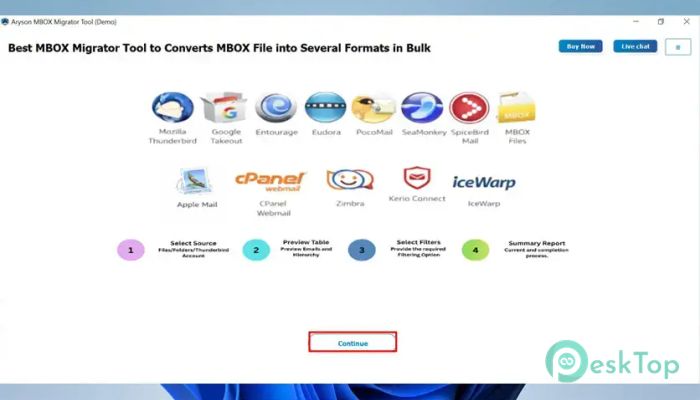
It is a powerful utility designed for users who need to move their tool mailbox data to different email platforms and file formats. Whether you are switching email services, backing up important emails, or managing large mailbox collections, it provides a simple and efficient way to handle the process. The software supports popular MBOX-based email clients, including Thunderbird, Apple Mail, Google Takeout, Eudora, SeaMonkey, PocoMail, Entourage, Spicebird, and cPanel Webmail. With advanced migration and conversion capabilities, it helps both individual users and enterprise environments complete complex tasks without data loss.Features of Aryson MBOX Migrator Tool
Easy Migration to Cloud Email Platforms
The software makes it easy to migrate mailbox data directly to cloud-based email services. Users can transfer emails from the tool files to Office 365, Gmail, Google Workspace, Hotmail, IMAP servers, and GoDaddy accounts.
This feature eliminates the need for lengthy manual procedures. The entire migration process remains secure and maintains email properties, folder structure, and metadata throughout the transfer.
Multiple File Conversion Options
The tool is not limited to email migration. It also allows users to convert mailbox data into various file formats for backup and accessibility purposes. Supported output formats include PST, MBOX, EML, MSG, PDF, CSV, and Thunderbird-compatible files.
This flexibility ensures users can store, share, or access their email data according to their specific requirements. It acts like a universal translator for email archives.
Bulk Migration and Conversion Support
Managing hundreds or thousands of emails manually can be overwhelming. The software simplifies this process by supporting bulk migration and conversion operations.
Users can process multiple tool files simultaneously, saving valuable time and effort. This feature is particularly useful for businesses, IT administrators, and organizations handling large mailbox collections.
Flexible File Selection Options
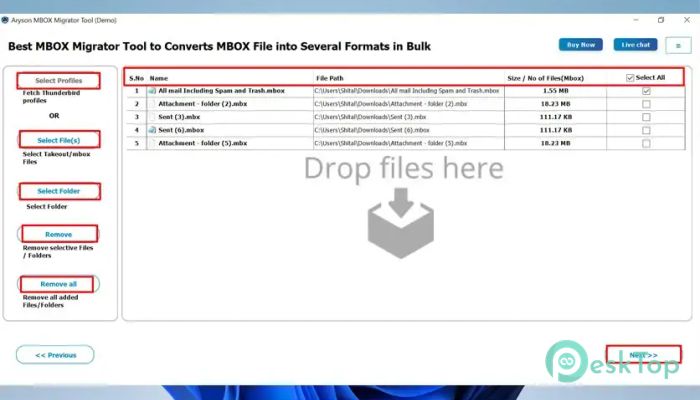
Different users have different needs, and the software provides several ways to load mailbox data. Users can select individual tool files, entire folders containing multiple files, or complete Thunderbird profiles.
This flexibility makes the migration process convenient regardless of mailbox size or storage structure.
Support for Google Takeout and Apple Mail
Many users export their emails using Google Takeout or Apple Mail. The tool supports these files directly without requiring additional configuration or manual adjustments.
Users can simply load exported mailbox files and start migration or conversion immediately. This saves time and reduces technical complications.
Advanced Preview and Search Features
Before processing data, users can preview email content directly within the software. Important details such as sender information, recipient addresses, subject lines, and message content can be reviewed beforehand.
The built-in search function further improves efficiency by allowing users to quickly locate specific emails. This feature becomes especially useful when working with large mailbox databases.
Split and Merge Mailbox Files
Large mailbox files can sometimes become difficult to manage. The software includes a split feature that allows users to split oversized MBOX and PST files based on selected size limits.
At the same time, the merge option allows multiple mailbox files to be combined into a single file. This helps keep email archives organized and easier to maintain.
Attachment Management Features
Email attachments often consume significant storage space. The software gives users complete control over attachment handling during migration and conversion.
Attachments can be embedded in emails or saved separately, depending on user preference. This flexibility helps optimize storage and simplify email management.
Duplicate Email Removal
Duplicate messages can create unnecessary clutter and increase storage usage. To solve this problem, the tool includes an intelligent duplicate removal feature.
It identifies duplicate emails based on parameters such as To, From, and Body content. By automatically removing duplicates, users can maintain a cleaner, more organized mailbox.
Advanced Filters and Authentication
The software includes powerful filtering options that help users migrate only the data they need. Features such as Date Range Filter and Skip Previously Converted Files prevent unnecessary processing and improve efficiency.
Modern Authentication using OAuth is supported for Office 365 and Gmail accounts. This enhances account security and ensures safe access during migration operations.
Custom Naming and PDF Management
Users can apply different naming conventions when saving converted emails. Subject-based and date-based naming options make it easier to organize exported files.
The software also provides PDF size management controls, allowing merged PDF files to remain within specified limits. This feature is useful when creating portable email archives.
Wide Compatibility with Email Clients
One of the strongest advantages of the tool is its extensive compatibility. It works smoothly with many popular MBOX-supported email applications used by individuals and businesses worldwide.
This broad support ensures users can migrate data between platforms without worrying about compatibility issues or data accessibility problems.
System Requirements and Technical Details
Operating System: Windows 11 / 10 / 8.1 / 7
Processor: Minimum 1 GHz Processor (2.4 GHz recommended)
RAM: 2GB (4GB or more recommended)
Free Hard Disk Space: 500MB or more is recommended

-
Program size240.06 MB
-
Version1.0
-
Program languagemultilanguage
-
Last updatedBefore 4 Month
-
Downloads9Ralated programs
![Operant Peak Spectroscopy]() Operant Peak Spectroscopy
Operant Peak Spectroscopy ![NeverWrite]() NeverWrite
NeverWrite![FluentCleaner]() FluentCleaner
FluentCleaner![Snippai]() Snippai
Snippai![ChillShot AI]() ChillShot AI
ChillShot AI![Splunk Enterprise]() Splunk Enterprise
Splunk Enterprise
 Operant Peak Spectroscopy
  NeverWrite
 FluentCleaner
 Snippai
 ChillShot AI
 Splunk Enterprise