
 Arabic
  English
  Turkish
  Chinese
  Japanese
  Russian
  Spanish
  German
  French
  Hindi
Hindi Download AskAvatar - AI Stream Assistant 0.3.0 for Windows
Download AskAvatar - AI Stream Assistant 0.3.0 for Windows.
AskAvatar - AI Stream Assistant Overview
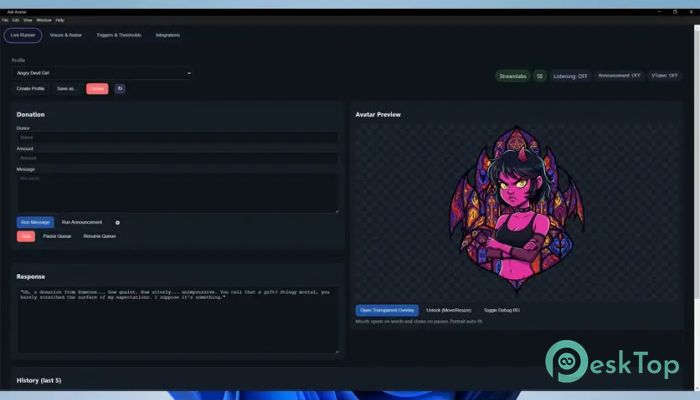
This software is designed to enhance streaming engagement by enabling virtual characters to respond to alerts in real time. It listens for events such as donations, subscriptions, Bits, follows, and raids, and then reacts using AI-generated voice lines that match the personality you assign. The tool gives streamers a fresh way to entertain viewers without adding extra pressure. How It Enhances Streaming The tool lets you bring personality-filled avatars onto your stream, making your channel feel more alive. Instead of reacting manually every time something happens, your AI companion jumps in with a fitting message. It feels natural, smooth, and fun for both the streamer and the audience, making interactions more memorable.Features of AskAvatar - AI Stream Assistant
Built-In Avatars and Custom Personality Options
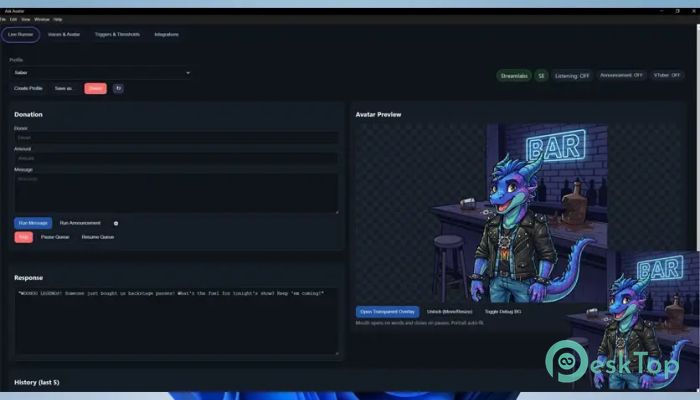
You get 13 ready-made characters, each with its own charm and style. These include funny, energetic, calm, sarcastic, and friendly personalities. If you want something unique, the software lets you create a completely custom persona through a guided template. This means you can shape voice tone, behavior, humor style, and reaction style. You can also upload up to four custom avatar images along with a background to match your branding.
VTuber Mode for Camera-Free Streaming
The software includes a dedicated VTuber mode. This is perfect for days when you prefer not to be on camera. The avatar handles all expressions and interactions, giving you a strong digital presence without showing your actual face. This mode is handy for privacy-focused streamers or creators who want extra creative freedom.
Voice Options and Language Support
You get 17 English AI voices built in, each offering different tones, accents, and emotions. The tool also supports multiple languages, letting you reach a wider audience. Some languages are freely available on the software’s website, and there are additional voice packs you can download to expand your options even more. This multilingual capability enables viewers to connect with your content regardless of their region.
Live Alerts and Announcements
The tool connects smoothly with Streamlabs, StreamElements, and webhooks. That means you can set it to react instantly to all major alert types. An announcement feature with adjustable timers is also included to help you remember to take breaks or drink water during long streaming sessions. It becomes like a helpful assistant by your side that never forgets.
Easy Setup and User-Friendly Controls
Everything in the software is straightforward and built for convenience. The interface keeps things simple so you can set up your avatar and voice in just a few steps. Whether you’re customizing responses or choosing a character, the process feels intuitive. Even new streamers can get things running quickly without any complicated adjustments.
Creative Freedom for All Streamers
One of the tool's strongest features is the creative control it provides. You can experiment with traits, jokes, emotional tones, and behavior styles. The AI learns how to respond based on the personality you design. As a result, every streamer can build a truly unique digital companion that stands out in a crowded streaming landscape.
System Requirements and Technical Details
Operating System: Windows 11 / 10
Processor: Minimum 1 GHz Processor (2.4 GHz recommended)
RAM: 2GB (4GB or more recommended)
Free Hard Disk Space: 2GB or more is recommended

-
Program size1.30 GB
-
Version0.3.0
-
Program languagemultilanguage
-
Last updatedBefore 9 Month
-
Downloads20
 Cyotek WebCopy
 Linphone
 Cinny
Cinny AllMapSoft Bing Maps Downloader
  AllMapSoft Yandex Maps Downloader
  AllMapSoft google earth images downloader