
 Arabic
  English
  Turkish
  Chinese
  Japanese
  Russian
  Spanish
  German
  French
  Hindi
Hindi Download AutomationX Studio 1.0.0 for Windows
Download AutomationX Studio 1.0.0 for Windows.
AutomationX Studio Overview
It is a complete desktop automation environment designed for users who want their computers to handle repetitive work automatically. It combines a visual workflow builder, reusable variables, advanced logic, scripting tools, local storage, and task monitoring into a single practical workspace. The software does much more than run a few basic actions. You can create detailed workflows that control applications, organize files, monitor folders, communicate with devices on a local network, and respond to system events. Everything works directly on your computer without requiring an online account, cloud subscription, or permanent internet connection.Features of AutomationX Studio
Visual Automation Flow Builder
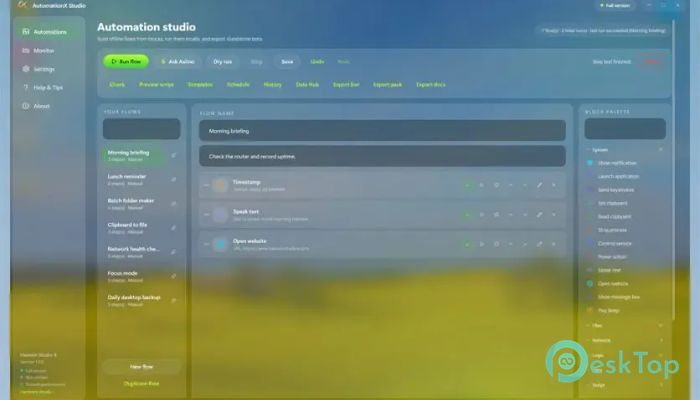
The visual builder makes automation easier to understand. Instead of writing every instruction manually, you can connect blocks that represent actions, decisions, triggers, and data operations. The completed flow looks like a map showing how each task moves from one step to another.
This approach is useful for beginners because it removes much of the complexity associated with traditional programming. Experienced users can also build advanced processes with conditions, loops, parallel branches, subflows, and error-handling sections. It feels like assembling a machine from clearly labeled parts.
Powerful Automation Blocks
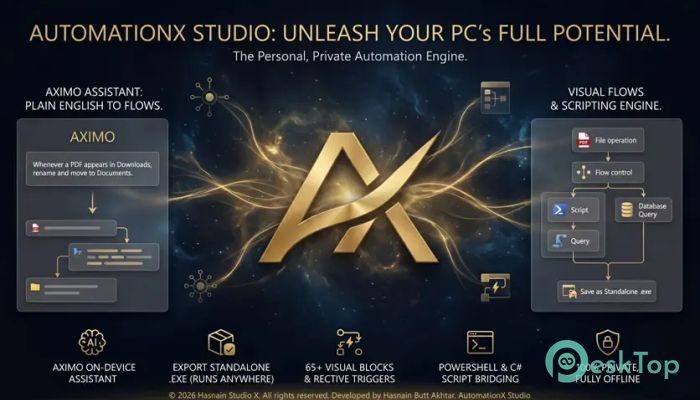
The software includes more than 65 automation blocks organized into useful categories, including System, Files, Desktop, Network, Logic, Data, Script, and Flow. These ready-made components cover many everyday automation needs.
You can start and stop processes, control windows, rename files, move folders, interact with desktop applications, send network requests, store information, and perform calculations. Since the blocks are reusable, you do not need to rebuild the same action every time you create a new project.
Built-In Aximo Assistant
Aximo is an on-device assistant that turns plain-English instructions into working automation flows. You can describe the task you want to perform, and the assistant creates the required steps, variables, triggers, and conditions.
For example, you can ask it to watch the Downloads folder, rename newly added PDF files with the current date, and move them into Documents. The assistant understands the request, prepares the visual flow, checks its structure, and saves it locally.
This feature makes automation more approachable for people with ideas but limited programming experience. More importantly, the processing remains on your machine, so private instructions and project information are not sent to an external server.
Variables and Reusable Steps
Variables allow flows to store and reuse values while they are running. A variable may contain a file path, a date, a username, a calculation result, a folder name, or information collected from another application.
Reusable steps make larger projects easier to manage. You can create a common action once and use it in several workflows. This reduces repeated work and keeps your projects organized. When that shared step needs improvement, you can update it without rebuilding the entire automation.
Advanced Logic and Error Handling
Real-world tasks do not always follow a straight road. A file may be missing, an application may fail to open, or a network device may become unavailable. The tool includes conditions, loops, try-and-catch controls, and alternative branches to deal with these situations.
Conditions let the flow choose an action based on a value or event. Loops repeat steps until a task is complete. Parallel branches allow several actions to run concurrently, while error handling prevents a single failed step from crashing the entire process.
PowerShell and C# Scripting
Users who need more control can add PowerShell and C# scripts directly inside their flows. Variables can move between visual blocks and scripts, creating a flexible bridge between simple automation and professional programming.
This combination gives you freedom to begin with visual actions and add custom code only where necessary. You are not locked into buttons or limited to templates. The automation engine can grow with your technical skills and project requirements.
Desktop and Screen Automation
The software can interact with desktop programs through user-interface automation. It can click buttons, enter text, control windows, and follow actions that a person would normally perform with a mouse and keyboard.
On-device OCR can read visible text from the screen, while image recognition can locate a specific picture or button and click it. These tools are especially useful for older applications that lack modern APIs or built-in automation support.
Reactive Triggers
Flows can begin automatically when a specific event occurs. Available triggers can react to folder changes, running processes, keyboard shortcuts, CPU usage, battery levels, webhooks, and other system conditions.
A trigger acts like a watchful guard. It waits quietly and launches the correct flow when its condition becomes true. This means you do not need to open the program and press Run each time a repeated task is required.
Local Data Storage and Privacy
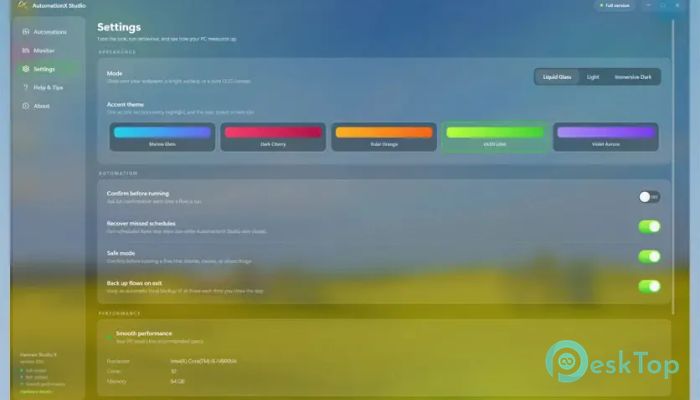
All flows, variables, settings, and stored values remain on the device. The platform includes a local database, JSON storage, cache support, and global variables for managing information without relying on online services.
There is no mandatory cloud synchronization, account registration, or telemetry. This private design is valuable to businesses, developers, administrators, and individuals who handle confidential files. It also allows automations to continue working when the internet is unavailable.
Live Logs and Flow Monitoring
A live activity log shows what the workflow is doing while it runs. You can see completed actions, current steps, values, warnings, and errors as they happen.
This visibility makes testing much easier. Instead of guessing where a problem occurred, you can review the log and identify the exact step that needs attention. It is like having a window inside the engine while the machine is working.
Standalone Automation Bots
Completed flows can be exported as standalone Windows executable files. The runtime is bundled inside the exported file, so the automation can run on another compatible computer without requiring the main program to be installed.
Users may also export clean PowerShell bots or portable packages. These options make it easier to share workflows across several computers, deploy internal business tools, or provide automation utilities to clients. Executable files can optionally be signed with your own certificate to enhance trust and support professional distribution.
Offline Performance and Reliability
Because the platform works locally, its main features are not affected by cloud downtime, service limits, or subscription changes. Workflows can run without an internet connection unless the task itself needs online access.
Local processing also provides faster responses for many desktop actions. Your projects remain available on your machine, and you maintain direct control over backups, storage locations, and exported files.
System Requirements and Technical Details
Operating System: Windows 11 / 10
Processor: Quad Core Processor X64 (Minimum), Octa Core Processor X64 Or Better (Recommended)
DirectX: Version 11 (Minimum), DirectX 12 API, Hardware Feature Level 12 (Recommended)
RAM: 8GB (16GB or more recommended)
Free Hard Disk Space: 4GB or more is recommended

-
Program size72.24 MB
-
Version1.0.0
-
Program languagemultilanguage
-
Last updatedBefore 2 Month
-
Downloads15Ralated programs
![Operant Peak Spectroscopy]() Operant Peak Spectroscopy
Operant Peak Spectroscopy ![NeverWrite]() NeverWrite
NeverWrite![FluentCleaner]() FluentCleaner
FluentCleaner![Snippai]() Snippai
Snippai![ChillShot AI]() ChillShot AI
ChillShot AI![Splunk Enterprise]() Splunk Enterprise
Splunk Enterprise
 Operant Peak Spectroscopy
  NeverWrite
 FluentCleaner
 Snippai
 ChillShot AI
 Splunk Enterprise