
 Arabic
  English
  Turkish
  Chinese
  Japanese
  Russian
  Spanish
  German
  French
  Hindi
Hindi Download BitBroom Cleaner 1.2.5 for Windows
Download BitBroom Cleaner 1.2.5 for Windows.
BitBroom Cleaner Overview
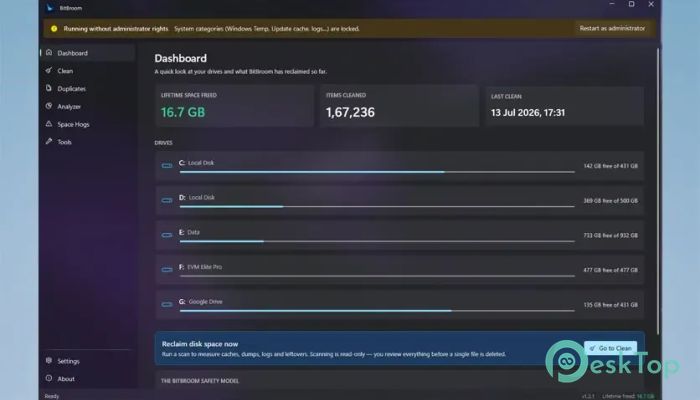
It is designed for people who want to free up storage space without worrying about deleting important files. Unlike many traditional cleaning utilities, it prioritizes safety. Every scan is read-only, so nothing is removed until you review the results and approve the cleanup. The software stands out by finding storage problems that many other cleaners completely miss. It can detect hidden space consumers, remove unnecessary caches, identify true duplicate files, analyze disk usage, and provide useful Windows maintenance tools. Best of all, it is completely open-source with no advertisements, no telemetry, and no paid Pro version.Features of BitBroom Cleaner
Safe Cleaning with Guarded Categories
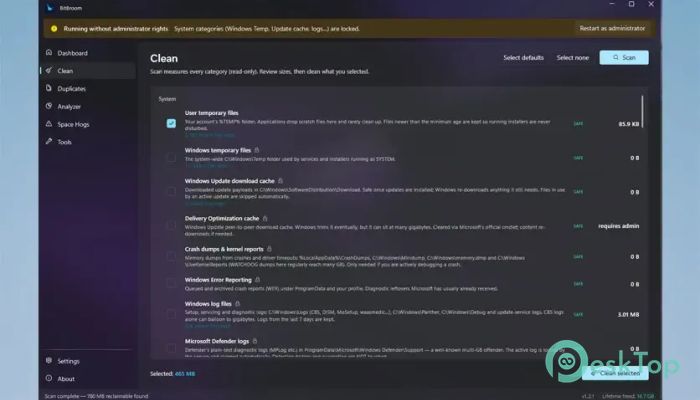
The software includes more than 60 carefully researched cleaning categories. Instead of blindly deleting files, every category is protected with safety checks and age filters. This means temporary files, Windows update leftovers, browser caches, developer caches, GPU shader caches, and many application caches can be cleaned without risking valuable data.
Since every scan is read-only, you stay in complete control. Think of it as a careful assistant that points out the clutter instead of throwing everything away.
Find Hidden Space Hogs
One of the strongest features is the Space Hogs radar. It searches for storage problems that usually remain hidden from users. The tool detects oversized WSL and Docker virtual disks, old DriverStore packages, restore points, Windows search indexes, and even known Windows storage issues that can consume hundreds of gigabytes.
Every result comes with a simple explanation and shows the official Windows method to safely recover the wasted storage. This makes cleanup easy even for beginners.
Reliable Duplicate File Finder
The software includes a powerful duplicate finder that avoids mistakes. Instead of comparing only file names, it performs several verification steps. It first checks file size, then compares partial hashes, and finally verifies everything with a full SHA-256 hash before marking files as duplicates.
This careful process ensures two files are never considered identical without proof. During cleanup, one original copy is always preserved, while removed files are safely sent to the Recycle Bin.
Powerful Disk Analyzer
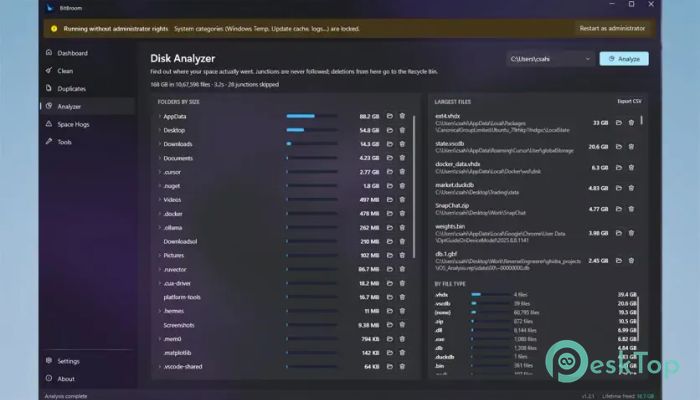
When your drive suddenly becomes full, it can be difficult to know where the storage disappeared. The built-in Disk Analyzer solves this problem in seconds.
It creates a visual folder map, lists the largest files, groups storage usage by file type, and even exports reports as CSV files. Since junction folders are ignored during analysis, the storage numbers remain accurate and trustworthy.
One-Click Windows Maintenance Tools
The software goes beyond basic cleaning by offering several useful Windows maintenance utilities. These tools perform tasks using official Windows mechanisms instead of risky shortcuts.
You can compact WSL and Docker virtual disks, remove outdated drivers, clean the DISM component store, free OneDrive storage, and control hibernation settings. Live output is displayed while each process runs, helping you understand exactly what is happening.
Automation Without Background Processes
Many cleaning utilities constantly run in the background and consume system resources. This tool takes a different approach.
Scheduled cleaning is handled through Windows Task Scheduler, so there are no startup programs or always-running background services. You receive automatic maintenance without sacrificing system performance.
Built for Developers and Power Users
The software also includes features that developers and advanced users will appreciate. A complete command-line interface supports options like --dry-run and --json, making automation and scripting much easier.
It also supports folder exclusions and includes a development junk finder that searches for old node_modules folders, helping developers recover significant storage space from outdated projects.
Privacy-Focused Design
Privacy is one of its biggest advantages. Unlike many cleaning tools that collect usage data or encourage paid upgrades, this one keeps everything simple.
There are no advertisements, no telemetry, and no premium edition hiding useful features. Every function is available to every user from the beginning, making it a refreshing choice for people who value transparency.
Fast Performance and Easy Interface
The interface is clean and beginner-friendly. Scans complete quickly, results are organized into understandable categories, and every recommendation explains why it matters.
Whether you are cleaning an everyday home computer or managing a development workstation, the software keeps the process straightforward while providing advanced information whenever needed.
System Requirements and Technical Details
Operating System: Windows 11 / 10 / 8.1 / 7
Processor: Minimum 1 GHz Processor (2.4 GHz recommended)
RAM: 2GB (4GB or more recommended)
Free Hard Disk Space: 200MB or more is recommended

-
Program size89.36 MB
-
Version1.2.5
-
Program languagemultilanguage
-
Last updatedBefore 3 Month
-
Downloads15Ralated programs
![Operant Peak Spectroscopy]() Operant Peak Spectroscopy
Operant Peak Spectroscopy ![NeverWrite]() NeverWrite
NeverWrite![FluentCleaner]() FluentCleaner
FluentCleaner![Snippai]() Snippai
Snippai![ChillShot AI]() ChillShot AI
ChillShot AI![Splunk Enterprise]() Splunk Enterprise
Splunk Enterprise
 Operant Peak Spectroscopy
  NeverWrite
 FluentCleaner
 Snippai
 ChillShot AI
 Splunk Enterprise