
 Arabic
  English
  Turkish
  Chinese
  Japanese
  Russian
  Spanish
  German
  French
  Hindi
Hindi Download Bravely PrintScreenly 1.0 for Windows
Download Bravely PrintScreenly 1.0 for Windows.
Bravely PrintScreenly Overview
Taking screenshots is something many of us do every day, but most built-in tools feel limited. This software changes that experience by offering a faster, smarter, and more organized way to capture everything happening on your screen. Whether you are a developer documenting bugs, a designer sharing concepts, or a writer collecting references, it helps you work more efficiently. The platform combines screenshot capture, screen recording, local file storage, and synchronized access into a single, clean package. Instead of juggling multiple utilities, you get everything in a single place. Every capture remains under your control, making it an excellent choice for users who value privacy and organization.Features of Bravely PrintScreenly
Precision Screenshot Capture
The software is built around accurate screenshot capturing. It allows users to grab specific regions, active windows, full-screen views, or even entire scrolling pages. Think of it as having a digital camera that never misses the exact shot you want.
Its pixel-perfect capture technology ensures that every image remains clear and detailed. Whether you need a small interface element or a complete webpage, the tool captures it without quality loss.
Scrolling Page Screenshots
One of the most useful features is the ability to capture entire scrolling pages. Traditional screenshot tools often require taking multiple images and manually stitching them together. Here, everything happens automatically.
This feature is especially valuable for capturing long articles, reports, product pages, documentation, or conversations. Instead of creating several screenshots, you get a single complete image that includes everything from top to bottom.
Professional Screen Recording
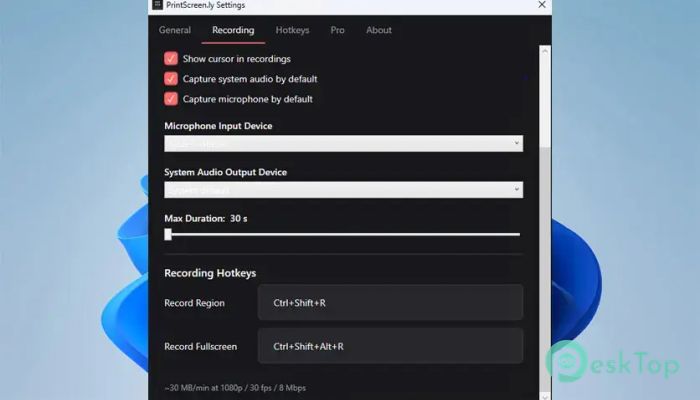
In addition to screenshots, the tool can record high-quality screen videos. Users can record a selected region or the entire screen, depending on their needs. This makes it suitable for tutorials, presentations, demonstrations, bug reports, and training sessions.
Recording is simple and straightforward. A few clicks are enough to start capturing your activity, making it easy even for beginners who have never used screen-recording software before.
System Audio and Microphone Support
Creating professional recordings often requires more than video alone. The software supports recording both system audio and microphone input simultaneously. This allows users to explain actions while capturing application sounds in real time.
For educators, content creators, and technical support teams, this capability removes the need for additional audio-recording applications. Everything is captured in a single, smooth workflow.
Standard MP4 Video Export
Compatibility matters when sharing recordings. The tool exports videos in the widely supported MP4 format. Since MP4 is supported on almost every device and platform, sharing recordings is effortless.
Whether you upload content to a website, send it to a client, or store it for future reference, the exported files remain accessible without requiring special software or codecs.
Local File Storage for Maximum Control
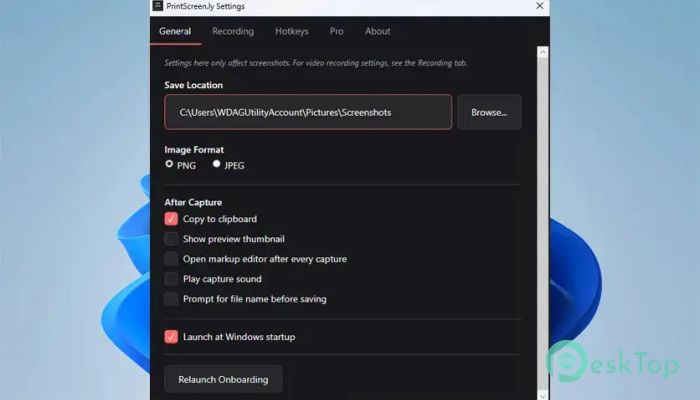
Many modern capture tools force users to upload files to the cloud. This software takes a different approach by saving everything directly on your computer. Your screenshots and recordings stay exactly where you want them.
This local-first design provides better privacy, faster access, and complete ownership of your content. You never have to worry about mandatory uploads or about losing access to important files due to a service change.
Synchronized Web Dashboard
While local storage remains the foundation, the Pro version introduces synchronized access across devices through a web dashboard. This creates the perfect balance between convenience and control.
Users can access their captures from multiple devices while still keeping their original files secure. It feels like having a personal digital archive that follows you wherever you work.
Designed for Heavy Daily Usage
People who capture dozens of screenshots every day need more than basic functionality. The software is designed specifically for professionals who constantly collect visual information.
Its workflow focuses on speed and efficiency. Actions that normally take several steps can often be completed in seconds, helping users stay productive throughout the day.
Simple and User-Friendly Interface
Powerful features do not have to mean complexity. The interface is clean, intuitive, and easy to navigate. New users can start capturing content almost immediately without spending hours learning menus and settings.
Everything is arranged logically, making common actions easy to find. This balance between simplicity and functionality creates a smooth user experience.
Perfect for Multiple Professions
The software serves a wide range of users. Engineers can document issues, designers can share visual concepts, writers can collect references, and support teams can create detailed guides.
Because it handles both images and videos, it adapts to a wide range of workflows. Instead of switching between separate screenshot and recording tools, professionals can rely on a single solution.
Fast Performance and Reliability
Speed is critical when capturing content. Nobody wants to miss an important moment because a tool is slow or unresponsive. The software is optimized for quick operation, ensuring captures happen exactly when needed.
Its lightweight design keeps system impact low while maintaining dependable performance during both screenshot sessions and long video recordings.
System Requirements and Technical Details
Operating System: Windows 11 / 10 / 8.1 / 7
Processor: Minimum 1 GHz Processor (2.4 GHz recommended)
RAM: 2GB (4GB or more recommended)
Free Hard Disk Space: 200MB or more is recommended

-
Program size73.73 MB
-
Version1.0
-
Program languagemultilanguage
-
Last updatedBefore 4 Month
-
Downloads10Ralated programs
![Operant Peak Spectroscopy]() Operant Peak Spectroscopy
Operant Peak Spectroscopy ![NeverWrite]() NeverWrite
NeverWrite![FluentCleaner]() FluentCleaner
FluentCleaner![Snippai]() Snippai
Snippai![ChillShot AI]() ChillShot AI
ChillShot AI![Splunk Enterprise]() Splunk Enterprise
Splunk Enterprise
 Operant Peak Spectroscopy
  NeverWrite
 FluentCleaner
 Snippai
 ChillShot AI
 Splunk Enterprise