
 Arabic
  English
  Turkish
  Chinese
  Japanese
  Russian
  Spanish
  German
  French
  Hindi
Hindi Download Bravely SayCopyPaste 1.0 for Windows
Download Bravely SayCopyPaste 1.0 for Windows.
Bravely SayCopyPaste Overview
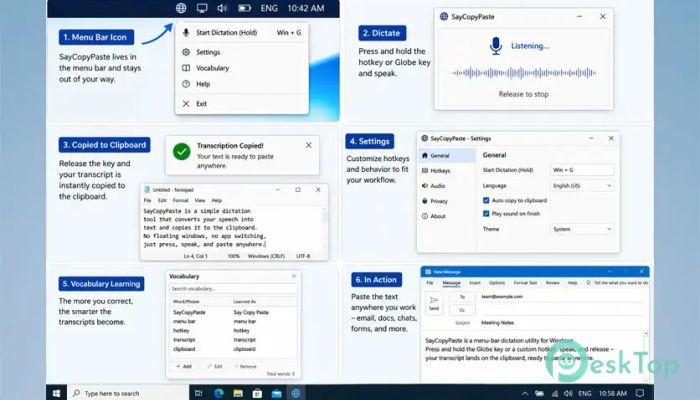
Voice typing has become an essential part of modern productivity, and this software takes a unique approach to it. Instead of opening floating windows or forcing users to switch applications, it focuses on a simple clipboard-first workflow. Speak naturally, release the hotkey, and your text is immediately copied to the clipboard, ready to paste wherever you need it. The tool is designed for people who want a fast and distraction-free way to dictate text. Whether you are writing emails, coding, taking notes, or chatting with colleagues, it keeps the process running smoothly and efficiently. Think of it as a bridge between your voice and any text field on your computer.Features of Bravely SayCopyPaste
Simple Push-to-Talk Workflow
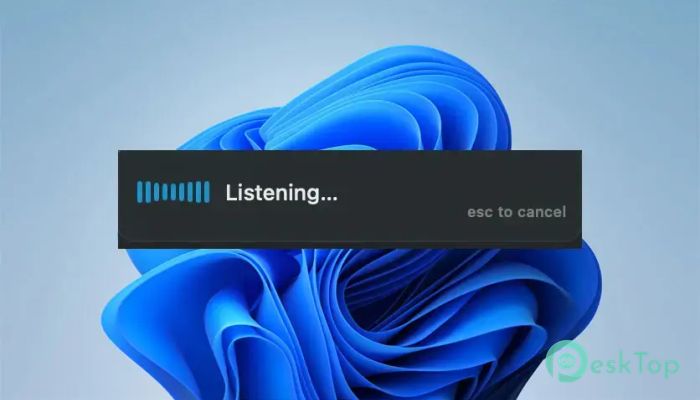
One of the biggest strengths of the software is its easy push-to-talk functionality. Users simply press and hold a designated hotkey, speak their thoughts, and release the key when finished. The spoken words are automatically converted into text and copied to the clipboard.
This approach feels natural and eliminates unnecessary steps. There is no need to manage pop-up windows or manually transfer text between applications. The process is as quick as speaking and pasting.
Clipboard-First Design
Unlike many dictation tools that insert text directly into an application, this solution treats the clipboard as the workflow's center. Once transcription is complete, the generated text is immediately available on the clipboard.
This method provides unmatched flexibility. Users can paste their words into messaging apps, development environments, office documents, web browsers, note-taking software, and virtually any other program that accepts text input.
Works Across Applications
The software is designed to work universally. Since the clipboard is supported by almost every application, dictated text can be used nearly anywhere on the system.
Whether you are writing documentation, replying to emails, filling out online forms, or drafting social media posts, the tool fits naturally into existing workflows. There is no need to learn special integrations or configurations.
No Floating Windows or Distractions
Many voice typing solutions clutter the screen with additional panels and controls. This tool avoids that problem completely. It operates quietly from the system tray, remaining available whenever needed without interrupting ongoing work.
This clean design helps users stay focused. The screen remains uncluttered, allowing attention to stay on the current task rather than on managing another application.
Vocabulary Learning Technology
One standout feature is its ability to learn from corrections. If a word is corrected once, the software remembers that preference for future transcriptions.
This is especially valuable for people who frequently use technical terminology, product names, company-specific phrases, acronyms, or uncommon words. Over time, transcription accuracy improves, making the experience more personalized and reliable.
Fast and Accurate Speech Recognition
Speed plays a major role in productivity, and the tool is built to deliver quick transcription results. Spoken words are processed efficiently, allowing users to continue working without long waiting periods.
Combined with modern speech recognition technology, it can capture natural speech patterns and convert them into readable text with impressive accuracy. This makes everyday dictation feel effortless.
Perfect for Professional Workflows
Professionals often spend hours typing reports, emails, documentation, and project notes. By allowing users to speak instead of type, the software can significantly reduce repetitive keyboard work.
Writers can draft ideas quickly, developers can dictate comments and documentation, and business users can create messages faster. It serves as a productivity companion that helps transform spoken thoughts into written content in seconds.
Cross-Platform Compatibility
The tool is designed to operate on both Windows and Mac systems. This flexibility makes it suitable for individuals and teams working across different platforms.
Users can enjoy a consistent experience regardless of the operating system they prefer. The familiar clipboard-based workflow remains the same, making transitions between devices simple and convenient.
Why the Clipboard Approach Works So Well
The clipboard is often described as the universal language of productivity software. Almost every application supports copy and paste commands, making the clipboard one of the most reliable communication channels on a computer.
By placing dictated text directly into this system, the software avoids compatibility issues and ensures smooth operation. It is a simple idea, yet it solves many of the frustrations associated with traditional voice typing tools.
Improved Productivity and Convenience
The biggest advantage of the tool is convenience. Instead of typing every word manually, users can simply speak and paste. This creates a faster workflow and allows thoughts to flow naturally.
For people who frequently multitask, brainstorm ideas, or create large amounts of written content, the software can become an invaluable time-saving assistant. It transforms voice into action with minimal effort.
System Requirements and Technical Details
Operating System: Windows 11 / 10 / 8.1 / 7
Processor: Minimum 1 GHz Processor (2.4 GHz recommended)
RAM: 2GB (4GB or more recommended)
Free Hard Disk Space: 200MB or more is recommended

-
Program size72.30 MB
-
Version1.0
-
Program languagemultilanguage
-
Last updatedBefore 3 Month
-
Downloads15Ralated programs
![Operant Peak Spectroscopy]() Operant Peak Spectroscopy
Operant Peak Spectroscopy ![NeverWrite]() NeverWrite
NeverWrite![FluentCleaner]() FluentCleaner
FluentCleaner![Snippai]() Snippai
Snippai![ChillShot AI]() ChillShot AI
ChillShot AI![Splunk Enterprise]() Splunk Enterprise
Splunk Enterprise
 Operant Peak Spectroscopy
  NeverWrite
 FluentCleaner
 Snippai
 ChillShot AI
 Splunk Enterprise