
 Arabic
  English
  Turkish
  Chinese
  Japanese
  Russian
  Spanish
  German
  French
  Hindi
Hindi Download BreviSoft EML Converter Tool 1.0 for Windows
Download BreviSoft EML Converter Tool 1.0 for Windows.
BreviSoft EML Converter Tool Overview
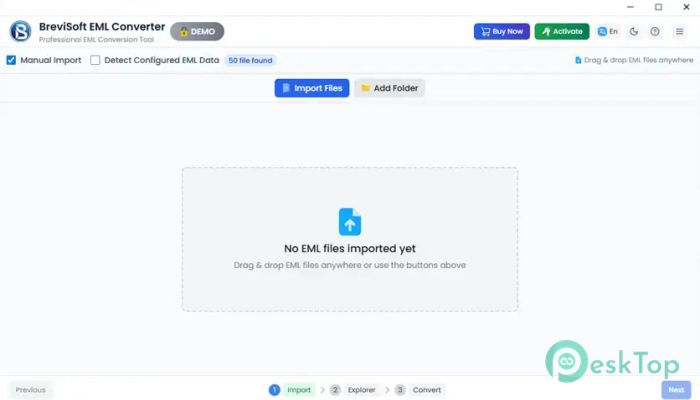
Managing large collections of EML files can be difficult, especially when you need to move emails between different applications or save them in another format. This software is designed to simplify that process by providing a fast and reliable way to convert email files without losing important information. The tool is suitable for both personal and professional use. Whether you have a few email files or thousands of messages, it can process them efficiently. Its clean interface makes every step simple, even for users who have little technical knowledge.Features of BreviSoft EML Converter Tool
Bulk Conversion of EML Files
One of the biggest advantages of the software is its ability to convert multiple EML files simultaneously. Instead of processing emails one by one, users can add entire folders and export all messages in a single operation.
This feature saves valuable time and makes large migration projects much easier. Businesses that manage large email archives can benefit especially from this capability.
Supports Multiple Export Formats
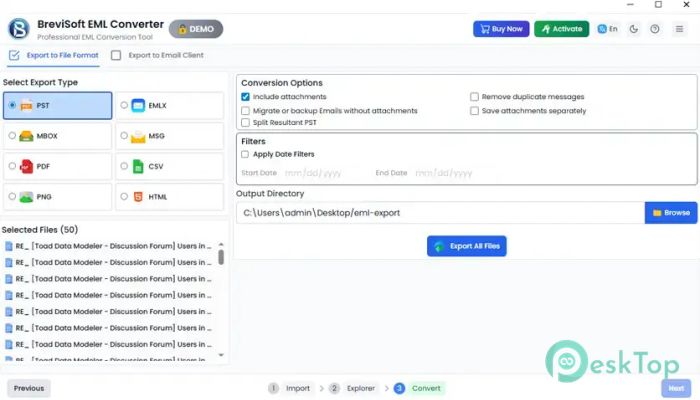
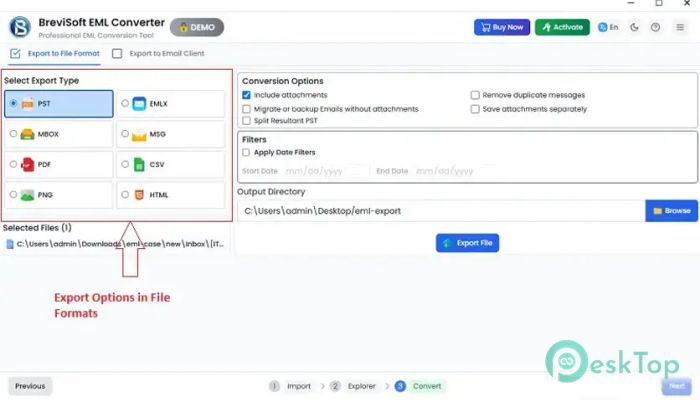
The tool provides a wide range of export options. Users can convert email files into popular formats such as PST, PDF, EMLX, MSG, MBOX, TXT, DOC, CSV, vCard, ICS, and many others.
This flexibility allows users to access their emails across different applications and platforms. It acts as a universal bridge, enabling emails to move freely across various environments.
Direct Migration to Email Platforms
Moving emails to cloud services is simple with this solution. Users can upload and import email files directly into Gmail, Microsoft 365, Office 365, Yahoo Mail, IMAP servers, Mozilla Thunderbird, and other supported services.
Instead of manually importing messages, the software automates the migration process and reduces the chances of errors.
Maintains Complete Data Integrity
Preserving email content is essential during conversion. The software preserves all email properties, including sender details, recipient information, subject lines, attachments, timestamps, and metadata.
This ensures that converted emails remain exactly as they were before processing. Users can trust the output files without worrying about missing information.
Advanced Email Preview Option
Before starting the conversion process, users can preview their emails directly within the application. The built-in viewer displays messages, attachments, headers, and other details.
This feature helps users verify the content before exporting. It also makes it easier to select only the required emails for conversion.
Date Range and Smart Filters
The software includes advanced filtering options that help users export only specific messages. A date range filter allows emails from a selected period to be processed while excluding unnecessary items.
These filtering capabilities make email management more organized and efficient. Users can focus only on the information they need.
Supports Attachments and Mailbox Items
Email files often contain more than just messages. The tool supports attachments, notes, tasks, contacts, and other mailbox-related items during the conversion process.
This comprehensive support ensures that all important data remains available after migration or export.
Easy-to-Use Interface
The application is designed with simplicity in mind. The graphical interface is clean, organized, and easy to navigate. Even first-time users can understand the workflow without requiring special training.
Every option is placed logically, allowing users to complete conversions quickly and confidently.
Reliable Performance for Business and Personal Use
Whether you are managing personal email archives or handling company data, the software delivers dependable results. Its bulk processing engine ensures accurate conversions while maintaining performance and stability.
The ability to process large numbers of files without compromising quality makes it a practical solution for many different situations.
Free Demo Version Available
Users can evaluate the software through its free trial edition. The demo version allows exporting up to 50 emails from EML files, making it easy to test the features before purchasing.
This provides a risk-free way to explore the capabilities and understand how the software fits individual requirements.
System Requirements and Technical Details
Operating System: Windows 11 / 10 / 8.1 / 7
Processor: Minimum 1 GHz Processor (2.4 GHz recommended)
RAM: 2GB (4GB or more recommended)
Free Hard Disk Space: 200MB or more is recommended

-
Program size43.63 MB
-
Version1.0
-
Program languagemultilanguage
-
Last updatedBefore 3 Month
-
Downloads10Ralated programs
![Operant Peak Spectroscopy]() Operant Peak Spectroscopy
Operant Peak Spectroscopy ![NeverWrite]() NeverWrite
NeverWrite![FluentCleaner]() FluentCleaner
FluentCleaner![Snippai]() Snippai
Snippai![ChillShot AI]() ChillShot AI
ChillShot AI![Splunk Enterprise]() Splunk Enterprise
Splunk Enterprise
 Operant Peak Spectroscopy
  NeverWrite
 FluentCleaner
 Snippai
 ChillShot AI
 Splunk Enterprise