
 Arabic
  English
  Turkish
  Chinese
  Japanese
  Russian
  Spanish
  German
  French
  Hindi
Hindi Download BreviSoft MBOX Converter Tool 1.0 for Windows
Download BreviSoft MBOX Converter Tool 1.0 for Windows.
BreviSoft MBOX Converter Tool Overview
The software is designed for users who want to safely migrate email data from MBOX-based files to formats such as PST, PDF, EML, MSG, EMLX, and CSV. It helps users convert mailbox data without requiring the original email client to be installed on the system. It supports files from many email clients, including Thunderbird profiles, orphan mailbox files, and Google Takeout data. This makes it useful for home users, professionals, and businesses that need a clean way to manage old or exported email records.Features of BreviSoft MBOX Converter Tool
Easy Email File Conversion
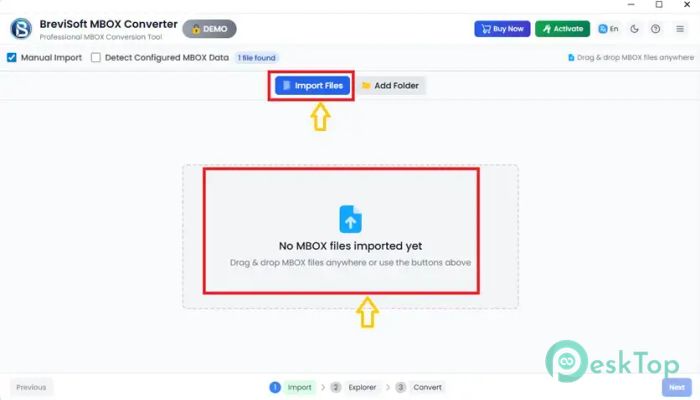
The tool makes the conversion process smooth and simple. Users can add a single mailbox file or load multiple files together for bulk processing. This saves time, especially when working with large email archives.
It supports MBOX, MBX, MBS, and even extensionless files. This flexibility helps users handle different mailbox sources without worrying about file compatibility problems.
Multiple Export Options
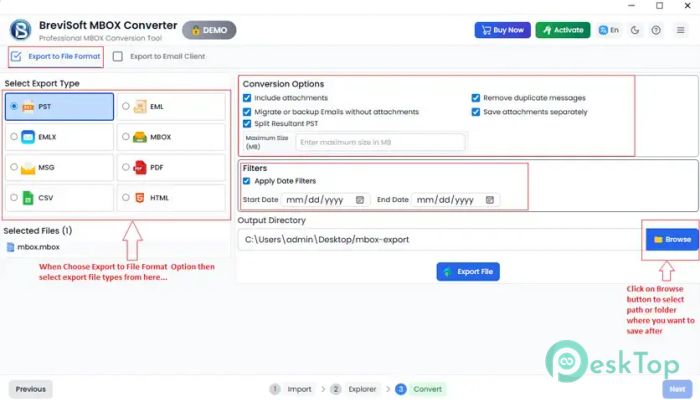
The software allows users to export emails into several useful formats. You can convert mailbox data to PST for Outlook, PDF for documentation, EML or MSG for individual messages, EMLX for Apple Mail, and CSV for structured records.
This wide-format support makes it easy to choose the right output based on your purpose. Whether you need backup, migration, printing, sharing, or legal record-keeping, the tool offers suitable options.
Google Takeout Support
It can handle Google Takeout MBOX files while preserving the folder structure and email details. This is helpful for users who download their Gmail data and want to convert or import it into another platform.
The conversion preserves attachments, metadata, and message formatting. As a result, users can access their exported emails without losing important information.
Thunderbird Profile Detection
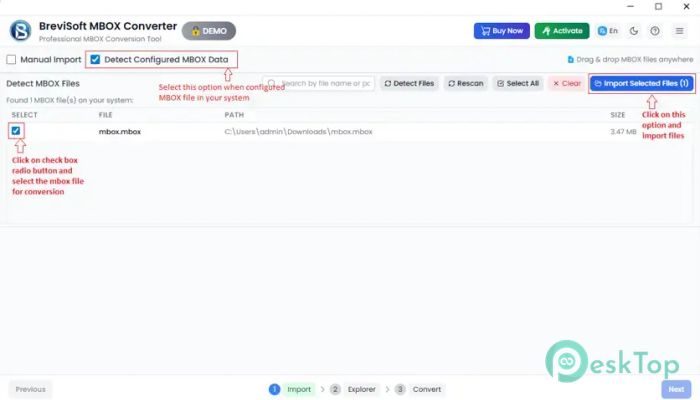
The tool can automatically detect verified Thunderbird profiles from the system. This removes the need to manually search for mailbox folders, which can be confusing for beginners.
It also supports data from multiple Thunderbird identities. This is useful when a computer has multiple email profiles or when different accounts are stored in the same client.
Email Platform Migration
The software is not limited to file-based export. It can also import mailbox data directly into IMAP accounts, Gmail, and Office 365 mailboxes. This makes it a handy option for users who want to shift emails from local files to cloud-based platforms.
During migration, it maintains the original structure so users can find their emails easily after the process is complete. The result feels like moving a well-organized cabinet from one room to another without mixing the folders.
Preview Before Conversion
It includes a preview option that lets users check emails before exporting them. This helps confirm that the selected data is correct before starting the final conversion.
The preview feature is useful when dealing with large mailboxes. Users can verify messages, attachments, sender details, dates, and subject lines before saving the output.
Preserves Email Integrity
The tool focuses on keeping email content safe during conversion. It preserves attachments, folder hierarchy, metadata, and message formatting so the final output remains accurate.
This is important for users who rely on old emails for business records, customer communication, legal references, or personal archives. A safe conversion means less risk of missing or damaged information.
Advanced Filtering and Management
The software provides date-range filters that help users export only selected emails. This is useful when you do not want to convert the entire mailbox and only need messages from a specific time period.
It can also create single or multiple PST files based on user needs. The option to split output files by size helps manage large exports and prevents oversized files from becoming difficult to handle.
Organized Output Naming
The tool includes multiple file naming options for better output management. Users can save converted emails with clear naming patterns, making it easier to search and identify messages later.
This feature is especially helpful for professionals who handle thousands of emails and need a clean folder structure after conversion.
Quick and Secure Processing
It performs a quick mailbox conversion while keeping the data secure. The interface is simple enough for beginners, yet the features are strong enough for technical users who need precise control.
Bulk conversion, format selection, preview, filtering, and platform migration all work together to make the process faster and more dependable.
System Requirements and Technical Details
Operating System: Windows 11 / 10 / 8.1 / 7
Processor: Minimum 1 GHz Processor (2.4 GHz recommended)
RAM: 2GB (4GB or more recommended)
Free Hard Disk Space: 200MB or more is recommended

-
Program size40.66 MB
-
Version1.0
-
Program languagemultilanguage
-
Last updatedBefore 3 Month
-
Downloads7Ralated programs
![Operant Peak Spectroscopy]() Operant Peak Spectroscopy
Operant Peak Spectroscopy ![NeverWrite]() NeverWrite
NeverWrite![FluentCleaner]() FluentCleaner
FluentCleaner![Snippai]() Snippai
Snippai![ChillShot AI]() ChillShot AI
ChillShot AI![Splunk Enterprise]() Splunk Enterprise
Splunk Enterprise
 Operant Peak Spectroscopy
  NeverWrite
 FluentCleaner
 Snippai
 ChillShot AI
 Splunk Enterprise