
 Arabic
  English
  Turkish
  Chinese
  Japanese
  Russian
  Spanish
  German
  French
  Hindi
Hindi Download Bureausoft TransFlash TF Format Tool 3.2 for Windows
Download Bureausoft TransFlash TF Format Tool 3.2 for Windows.
Bureausoft TransFlash TF Format Tool Overview
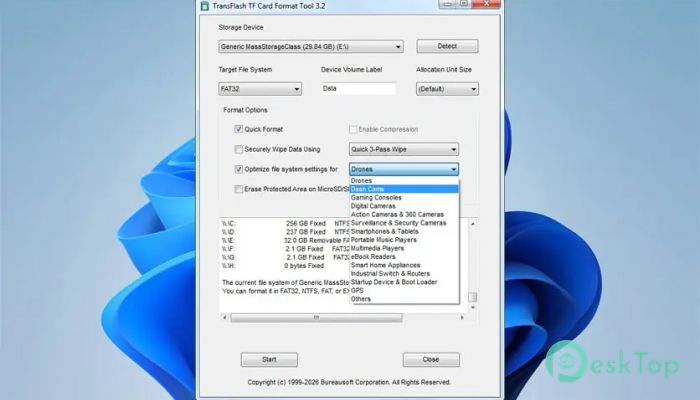
Working with small storage devices can sometimes feel tricky, especially when they start slowing down or showing errors. That is where this tool steps in. It is designed to handle TF cards, also known as TransFlash cards, which are tiny yet powerful storage devices used in many portable gadgets. These cards are commonly found in smartphones, cameras, drones, dash cams, and even gaming consoles. Over time, they can become cluttered, fragmented, or even corrupted. This software gives you a clean and efficient way to format them, making them feel like new again. Unlike the standard Windows formatting option, the software uses advanced methods to ensure the process is safe and optimized. It not only wipes the card but also prepares it for better performance based on how you plan to use it. What is a TF Card and Why It Matters A TF card is a compact, high-density memory card measuring 15 x 11 x 1 mm. Despite its small size, it holds a large amount of data. Think of it as a tiny digital backpack that carries your photos, videos, music, and important files. Because these cards are used across so many devices, they are often heavily used. This can lead to slower speeds, file errors, or even complete failure. That is why proper formatting is important. It refreshes the card and keeps it running smoothly.Features of Bureausoft TransFlash TF Format Tool
Smart Formatting for Better Performance
The software is not just about deleting files. It is about optimizing the entire file system. When you format a TF card with this tool, it prepares the storage to match your usage.
For example, a card used in a dash cam needs continuous recording support, while one used in a smartphone needs quick access for apps and media. The tool adjusts the formatting style to meet these needs, improving speed and reliability.
It is like tuning a car engine based on how you drive. Whether you prefer speed or endurance, the tool makes sure the card performs at its best.
Safe and Reliable Formatting Process
One of the biggest concerns when formatting a memory card is data corruption. Poor formatting can damage the card or make it unstable. This is where the software stands out.
It follows a safe approach that reduces the chances of corruption. The tool carefully cleans the storage sectors and rebuilds the file structure. This ensures that your card remains stable and ready for long-term use.
It also replaces the basic Windows formatting method, which may not always be ideal for TF cards. By using a dedicated solution, you get better results and peace of mind.
Wide Compatibility with Devices
One of the best things about the software is its versatility. It supports TF cards used in a wide range of devices. Whether you are using a drone, camera, or smartphone, the tool can handle it with ease.
It is also useful for devices like security cameras, GPS systems, routers, and even industrial equipment. This makes it a great choice for both personal and professional use.
Instead of using different tools for different devices, you can rely on one solution that works across the board. That saves time and effort while keeping things simple.
Faster Access and Improved Speed
Over time, memory cards can slow down due to fragmented data and inefficient file systems. The software fixes this problem by reorganizing the storage structure during formatting.
This leads to faster read and write speeds. Opening files becomes quicker, recording videos becomes smoother, and overall performance improves.
It is like cleaning up a messy room. Once everything is organized, you can find things faster and work more efficiently. The same idea applies to TF cards.
Easy to Use Interface
Not everyone is a tech expert, and that is perfectly fine. The tool is designed with simplicity in mind. Its interface is clean and easy to understand, even for beginners.
You do not need to go through complicated steps or settings. Just insert your card, select it, and start the formatting process. The software takes care of the rest.
This makes it a great option for everyday users who want a quick and reliable solution without any confusion.
Use Cases Across Different Industries
The software is not limited to personal use. It is also helpful in many professional environments. For example, security systems rely on memory cards for continuous recording. Proper formatting ensures that data is stored without interruptions.
In industrial settings, devices such as routers and switches use memory cards for booting. A well-formatted card ensures stable operation and reduces errors.
Even in creative fields like photography and videography, having a reliable storage system is crucial. This tool helps maintain that reliability.
System Requirements and Technical Details
Operating System: Windows 11 / 10 / 8.1 / 7
Processor: Minimum 1 GHz Processor (2.4 GHz recommended)
RAM: 2GB (4GB or more recommended)
Free Hard Disk Space: 200MB or more is recommended

-
Program size655.28 KB
-
Version3.2
-
Program languagemultilanguage
-
Last updatedBefore 4 Month
-
Downloads95
 Bravely Diskaroo
 DiskGenius Free
 Disk Pulse
 DiskGenius Professional
 Disk Sorter
 Hasleo Disk Clone Free