
 Arabic
  English
  Turkish
  Chinese
  Japanese
  Russian
  Spanish
  German
  French
  Hindi
Hindi Download Chatto 0.4.20 for Windows
Download Chatto 0.4.20 for Windows.
Chatto Overview
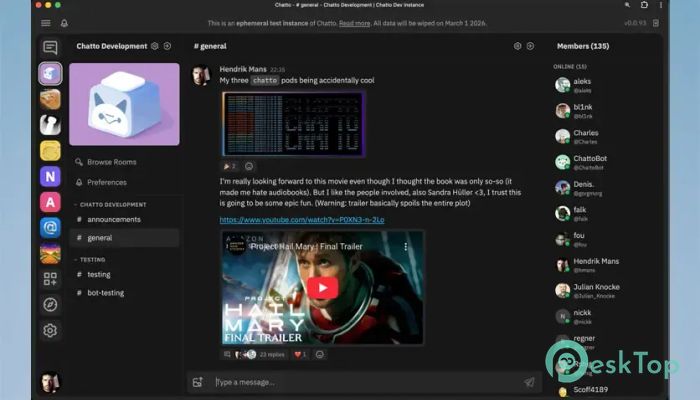
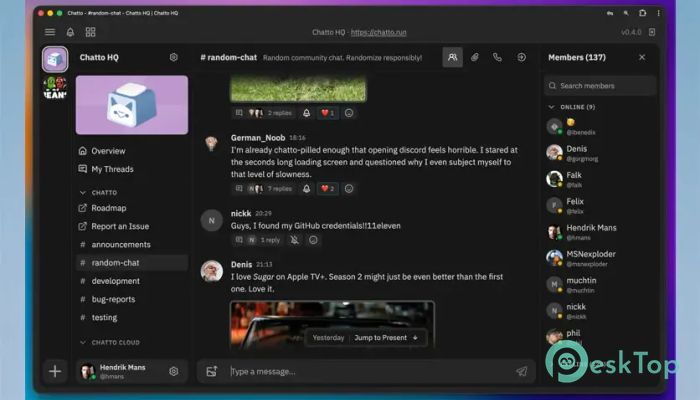
It is a modern communication solution built for groups that need a private and customizable place to talk, collaborate, and share information. It combines instant messaging, organized rooms, audio and video communication, permissions, and integration tools in one convenient environment. Instead of relying entirely on traditional messaging platforms, organizations can gain greater control over how their communication systems operate. The platform can work well for professional teams, online communities, private organizations, and other groups. Its flexible structure means rooms can support different communication styles, from casual conversations to organized discussions. Users can therefore create a digital workspace that is suited to their needs, rather than adjusting their workflow around a rigid chat system.Features of Chatto
Self-Hosted Communication
One of the most useful options is self-hosting. Organizations can run the software on their own server, giving them greater control over conversations and stored information. This approach can be especially attractive to teams that prefer managing their own communication infrastructure.
Deployment is kept relatively simple through a single 50 MB binary with zero dependencies. This reduces unnecessary setup complexity and makes server management more straightforward. It is like having your own communications headquarters instead of renting a desk in someone else's building.
Convenient Cloud Hosting
Not every team wants to maintain a server, and that is where cloud hosting comes in handy. The hosted option takes care of infrastructure and maintenance, so users can focus on communicating rather than handling technical administration.
This flexibility gives organizations a choice. Technical teams can opt for self-hosting when they want greater control over infrastructure, while other groups can use managed hosting for a simpler experience. Both approaches aim to provide the same core communication environment without forcing everyone to use a single deployment method.
Private by Default
Privacy is a major part of the platform's design. Data is protected with encryption at rest and crypto shredding, helping organizations maintain stronger control over stored conversations. The service is also designed without tracking and analytics-based business practices.
It is also described as GDPR-ready, which can be valuable for organizations concerned with data management and privacy requirements. Instead of treating privacy like an optional switch hidden in the settings menu, the platform makes it part of the foundation.
Superpowered Rooms
Different conversations need different structures. A quick team discussion does not work the same way as a detailed support forum or community feed. The software addresses this through flexible rooms that can support several communication styles.
Rooms can range from free-form chat spaces to forums and social-style feeds. This gives administrators more freedom when organizing discussions. A project group could use a conversational room for everyday updates, while another area could provide more structured discussions, making important information easier to follow.
Audio and Video Calls
Text messaging is useful, but sometimes speaking directly is faster. Built-in voice and video calling lets users move from written conversation to live communication without leaving the platform.
Screen sharing is also included, making the tool more practical for meetings, presentations, troubleshooting, and collaborative work. Since these communication capabilities are built in, without requiring a third-party service, teams can keep more of their workflow within a single environment.
Roles and Permissions
Large communities and professional teams often require more than basic administrator and member accounts. The platform provides an extensive system of roles and permissions that allows administrators to configure access according to their requirements.
Different users can receive appropriate levels of control based on their responsibilities. This can help organizations create structured spaces where members have access to the tools and areas they actually need. Good permission management works like giving everyone the correct key rather than handing out a master key to the entire building.
Modular and Extensible Design
Every organization communicates differently, so a fixed feature set can quickly become limiting. The software uses a modular approach that allows functionality to be customized and expanded through pluggable system extensions.
This extensibility can make the platform useful for teams with specialized workflows. Instead of replacing the entire communication solution when requirements change, organizations can adapt and extend their existing setup. It creates room for the system to grow alongside the community using it.
GraphQL and NATS APIs
Developers can leverage first-class GraphQL and NATS APIs for deeper integration. These interfaces provide a foundation for connecting the communication platform with other applications, services, and internal systems.
API support is particularly valuable for organizations that want to automate workflows or build additional functionality around their communication environment. Developers can create integrations that better match specific business processes rather than relying only on features included out of the box.
Flexible Team and Community Experience
The combination of customizable rooms, calling features, permissions, privacy tools, and extensibility creates a flexible environment for a wide range of groups. Small teams can keep communication simple, while larger communities can build a more carefully organized structure.
Users are not limited to basic instant messaging. Discussions can be shaped around the way people actually communicate, while administrators retain control over access and deployment. This balance between simplicity and customization is one of the platform's strongest qualities.
System Requirements and Technical Details
Operating System: Windows 11 / 10 / 8.1 / 7
Processor: Minimum 1 GHz Processor (2.4 GHz recommended)
RAM: 2GB (4GB or more recommended)
Free Hard Disk Space: 200MB or more is recommended

-
Program size21.41 MB
-
Version0.4.20
-
Program languagemultilanguage
-
Last updatedBefore 1 Month
-
Downloads1
 Cyotek WebCopy
 Linphone
 Cinny
Cinny AllMapSoft Bing Maps Downloader
  AllMapSoft Yandex Maps Downloader
  AllMapSoft google earth images downloader