
 Arabic
  English
  Turkish
  Chinese
  Japanese
  Russian
  Spanish
  German
  French
  Hindi
Hindi Download CJWDev AD Info 1.8.2 for Windows
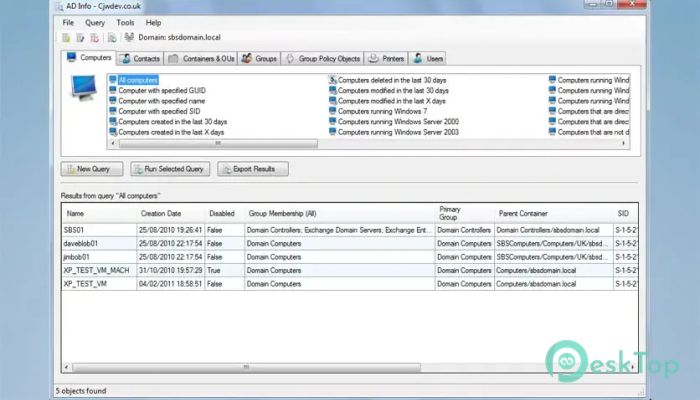
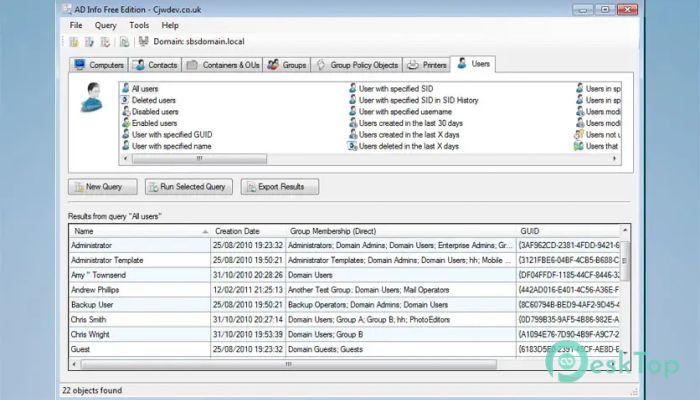
Download CJWDev AD Info 1.8.2 for Windows.
CJWDev AD Info Overview
It is a practical reporting solution designed for administrators who need clear information about an Active Directory environment. It includes more than 190 built-in reports, allowing users to check computers, users, groups, printers, organizational units, policies, and other domain objects without having to create complex scripts. The software focuses on speed, accuracy, and ease of use. Instead of searching through several management consoles or writing long PowerShell commands, administrators can select a ready-made query and receive organized results within seconds. It works like a powerful search engine for a Windows domain, helping users locate exactly the information they need.Features of CJWDev AD Info
More Than 190 Built-In Reports
One of the strongest features of the tool is its large collection of predefined reports. These reports cover many common administrative tasks, such as finding inactive accounts, viewing group members, checking computer details, reviewing contact information, and examining Group Policy Objects.
Because these queries are already prepared, users do not need advanced scripting knowledge. They can simply choose a suitable report, enter any required value, and run it. This saves valuable time, especially when working with large networks that contain thousands of objects.
Detailed Active Directory Queries
The software can retrieve a wide range of attributes from computers, contacts, containers, organizational units, groups, policies, printers, and user accounts. It can display both common and less visible information that may not appear in standard Windows management tools.
Administrators can use it to review account status, descriptions, email addresses, login information, group membership, operating system details, and many other attributes. This detailed reporting makes troubleshooting easier and gives IT teams a clearer picture of their domain.
Fast and Efficient Performance
Large directory environments can contain a huge amount of data. Searching all of that information can slow down an ordinary reporting application. This tool avoids unnecessary work by retrieving only the attributes the user selects.
It also uses intelligent caching to improve performance during repeated searches. As a result, reports can be generated quickly without placing excessive pressure on the domain controllers. The experience feels smooth and responsive, even when administrators work with complex queries.
Accurate Last Logon Information
Some Active Directory attributes are not replicated across all domain controllers. Last Logon is a common example. Checking only one server may therefore produce incomplete or outdated information.
To improve accuracy, the application can query each domain controller in the domain and compare the returned values. This approach helps administrators identify the correct login date for an account instead of relying on a single server. Accurate information is especially useful during account cleanup, security reviews, and compliance checks.
Direct and Nested Group Membership
Group membership can become difficult to understand when groups contain other groups. A user may have access to a resource through several layers of nested membership, even when the user is not directly listed inside the final group.
The reporting system can identify both direct and nested relationships. This gives administrators a clearer view of permissions and access paths. It is particularly helpful when reviewing privileged groups, investigating unexpected access, or preparing an audit report.
Flexible Report Options
Many reporting utilities provide fixed reports with hard-coded values. For example, they may only show the members of a specific administrative group. This software gives users more control by allowing them to select the group, container, object, or attribute they want to examine.
This flexibility makes the reports useful in many different environments. An administrator can use the same query for a security group, department group, application group, or any other object. It is like having a toolbox where each instrument can be adjusted for the current task.
Custom Query Designer
The Standard Edition includes a visual custom query designer. It allows users to build their own reports by choosing object types, attributes, filters, sorting rules, and display options. Every built-in report was created through the same query system.
This feature makes advanced reporting accessible to users who may not be comfortable with LDAP filters or command-line scripts. Administrators can create highly specific queries, save them for later, and share them with colleagues through a common network location.
User-Friendly Interface
The program uses a clean, modern interface that keeps its main functions easy to access. New users can usually run their first report shortly after opening the application. Reports are grouped into logical categories, reducing the time needed to find the right option.
Results appear in an organized table where users can review, sort, and compare information. The layout avoids unnecessary clutter, making it suitable for both experienced system administrators and support staff who only need occasional directory reports.
Secure LDAP Connections
Security is an important part of any directory management process. The tool uses encryption for standard LDAP queries and also provides an option to connect through SSL using LDAPS.
This helps protect communication between the application and domain controllers. Organizations that follow stricter security policies can use encrypted connections while still benefiting from fast and flexible reporting.
Exporting Report Results
The Free Edition allows users to export query results to CSV files. CSV is widely supported and can be opened in spreadsheet programs, imported into databases, or processed through automation scripts.
The Standard Edition provides additional export formats, including XLSX, TXT, and HTML. These choices make it easier to prepare professional reports, share findings with managers, archive important information, or use results in another system.
Command-Line Automation
Users of the Standard Edition can run saved reports through the command line. Results can be exported automatically to a file or sent by email. This makes it possible to schedule regular reports without opening the main interface each time.
For example, an IT team can create a report on inactive accounts and schedule it to run weekly. The generated file can then be emailed to the responsible administrator, turning a repetitive task into an automatic process.
Multi-Domain Support
The software is useful in environments that include trusted, parent, or child domains. It can correctly identify group membership across connected directory structures, rather than limiting reports to a single local domain.
It can also work from a computer that is not joined to the domain, provided the user enters suitable credentials and connection information. This is convenient for consultants, managed service providers, and administrators overseeing multiple customer networks.
Free and Standard Editions
The Free Edition is available for both personal and commercial use without a time limit. It is not simply a short trial; it still includes more than 190 predefined queries, along with CSV export support.
The Standard Edition adds advanced options such as custom query creation, command-line execution, email delivery, more export formats, shared query locations, custom attribute definitions, Group Policy configuration, and lifetime upgrades. Users can therefore start with the free version and upgrade to the advanced edition as their reporting needs grow.
System Requirements and Technical Details
Operating System: Windows 11 / 10 / 8.1 / 7
Processor: Minimum 1 GHz Processor (2.4 GHz recommended)
RAM: 2GB (4GB or more recommended)
Free Hard Disk Space: 200MB or more is recommended

-
Program size1.15 MB
-
Version1.8.2
-
Program languagemultilanguage
-
Last updatedBefore 2 Month
-
Downloads12
 Cyotek WebCopy
 Linphone
 Cinny
Cinny AllMapSoft Bing Maps Downloader
  AllMapSoft Yandex Maps Downloader
  AllMapSoft google earth images downloader