
 Arabic
  English
  Turkish
  Chinese
  Japanese
  Russian
  Spanish
  German
  French
  Hindi
Hindi Download Crynet Showcase 1.0 for Windows
Download Crynet Showcase 1.0 for Windows.
Crynet Showcase Overview
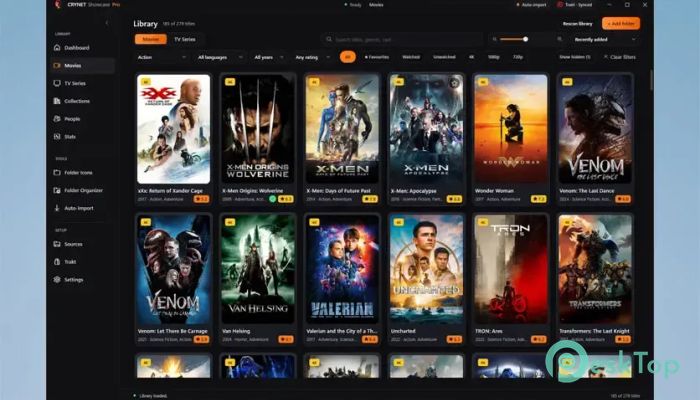
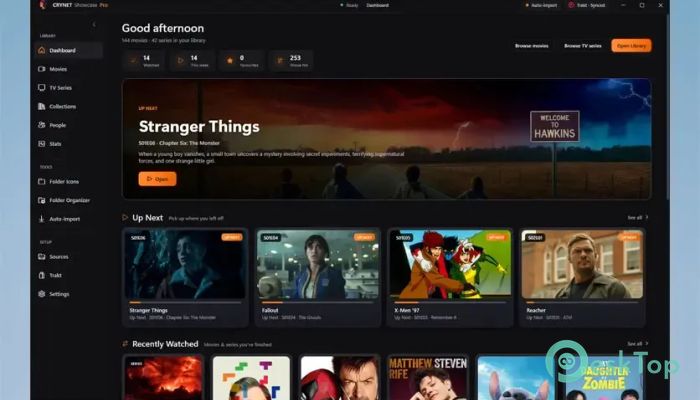
It is designed for Windows users with large collections of movies and TV series on local drives. Instead of browsing through plain folders and confusing filenames, the software turns your collection into an attractive and organized media library. It scans your storage, identifies titles, and adds useful information such as posters, cast members, ratings, and episode details. The tool works like a digital shelf for your entertainment collection. You can quickly browse titles, explore actors and crew members, organize franchises, and see useful library statistics. It combines practical file organization with a modern visual experience, making even a huge collection much easier to explore.Features of Crynet Showcase
Smart Media Library Scanner
The software includes an intelligent scanner that searches selected drives and folders for movie and television files. It can recognize individual movies as well as season and episode structures, making it suitable for collections with different types of media.
Once it detects content, the scanner matches titles with online information and builds a structured library. This saves you from entering details manually. For someone with hundreds of files, the feature can turn hours of organizing into a much simpler process.
Automatic Metadata and Artwork
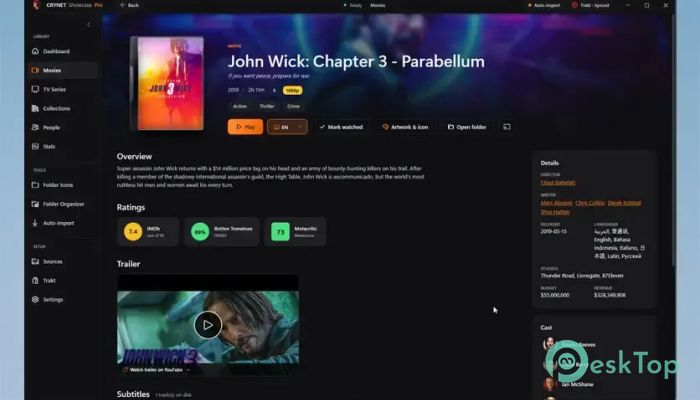
A media collection becomes much more useful when you can recognize titles at a glance. The tool automatically retrieves metadata and artwork for detected content. Posters, ratings, cast information, and episode data make the library feel more like a polished streaming catalog than a basic folder collection.
Integrations with TMDB, TVDB, and Trakt further improve the experience. These services help the application identify content and provide relevant information. As a result, users can spend more time enjoying their collection instead of manually searching for details.
Custom Windows Folder Icons
One of its most interesting features is the ability to generate custom Windows folder icons from movie and television artwork. Instead of seeing identical yellow folders in File Explorer, you can identify media folders with attractive artwork based on their posters.
Several icon styles are available, giving you control over how the collection appears. It is a simple idea, but it can completely change the look of a large media drive. Your folders become visual signposts, allowing you to spot a title without opening another application.
Collections and Custom Groupings
Large libraries often contain movie franchises, related television shows, sequels, and special collections. The software provides collection tools that help bring connected titles together. This keeps related content neatly organized rather than scattered across the library.
Custom groupings provide additional flexibility. You can arrange content to match your preferences instead of relying only on standard categories. This is especially useful when building themed collections or organizing titles by your own viewing habits.
Browse by Cast and Crew
Sometimes you may remember an actor but forget a movie's name. The tool makes this less of a problem by allowing you to browse your library using cast and crew information. It creates another natural way to discover content already stored on your computer.
This feature can also reveal connections between different titles in your collection. Exploring a favorite actor, director, or other crew member can quickly lead you toward something you may want to watch next.
Trakt Sync and Watched Status
Trakt integration helps users keep track of their viewing activity. Watched status can be synchronized, making it easier to see which content you have already finished and what remains unwatched. This becomes particularly helpful when managing television series with many seasons and episodes.
Instead of relying on memory, your viewing progress becomes part of the organized library experience. This small convenience can make a big difference as your collection grows.
Subtitle Lookup and Auto-Import
The built-in subtitle lookup feature adds another layer of convenience for movie and television fans. It helps users locate subtitles for supported content without turning the process into a separate search task.
Auto-import is equally useful for people who regularly add new media. New downloads can be filed into the library with less manual effort. Think of it as having a helpful assistant that keeps the shelves tidy while your collection continues expanding.
Custom Themes and Card Layouts
Not everyone wants their media library to look the same. The software provides customization options for themes, colors, and card layouts. These controls let you adjust the interface to your preferred visual style.
You can create a clean, simple look or choose a more artwork-focused layout. This flexibility helps the interface remain comfortable to browse, especially when you spend a lot of time managing a large entertainment collection.
Library Statistics and Easy Discovery
Library statistics provide a useful overview of the content stored in your collection. They can help you better understand the size and makeup of your media library instead of treating it as one enormous pile of files.
Combined with posters, metadata, collections, cast browsing, and episode information, these statistics make discovering stored entertainment much easier. Older titles that might otherwise disappear deep inside folders become easier to find again.
Multi-Language Interface
The application supports 13 interface languages, making it accessible to users from different regions. Language support is particularly helpful for people who prefer managing their entertainment library using a familiar interface language.
Despite offering many organizational features, the overall approach remains straightforward. The software focuses on turning locally stored media into a visually rich collection without making everyday browsing unnecessarily complicated.
System Requirements and Technical Details
Operating System: Windows 11 / 10 / 8.1 / 7
Processor: Minimum 1 GHz Processor (2.4 GHz recommended)
RAM: 2GB (4GB or more recommended)
Free Hard Disk Space: 200MB or more is recommended

-
Program size73.76 MB
-
Version1.0
-
Program languagemultilanguage
-
Last updatedBefore 1 Month
-
Downloads38Ralated programs
![ChrisPC VideoTube Downloader Pro]() ChrisPC VideoTube Downloader Pro
ChrisPC VideoTube Downloader Pro![TranscribeKit]() TranscribeKit
TranscribeKit![Vision Search]() Vision Search
Vision Search![DVDFab]() DVDFab
DVDFab![Crynet Showcase]() Crynet Showcase
Crynet Showcase![OVRLEY]() OVRLEY
OVRLEY
 ChrisPC VideoTube Downloader Pro
 TranscribeKit
 Vision Search
 DVDFab
 Crynet Showcase
 OVRLEY