
 Arabic
  English
  Turkish
  Chinese
  Japanese
  Russian
  Spanish
  German
  French
  Hindi
Hindi Download CrystalMark 3D25 v1.0.0 for Windows
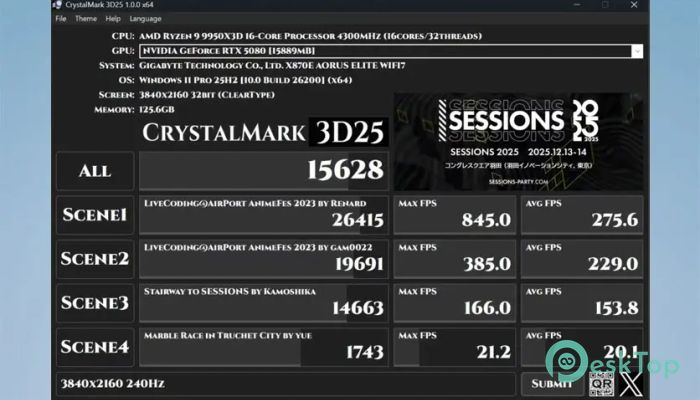
Download CrystalMark 3D25 v1.0.0 for Windows.
CrystalMark 3D25 Overview
This tool focuses on measuring 3D capability using GLSL and WebGL technologies. It gives users a quick and straightforward way to understand how well their system handles visual workloads. The software was built to highlight the creative world of the demo scene and share its beauty with PC lovers around the globe. With support and inspiration from demo scene creators in Japan, this application stands as a blend of performance testing and visual artistry.Features of CrystalMark 3D25
Easy One-Click Benchmarking
One of the software's strongest points is its ease of use. You don’t need advanced technical skills; a single click starts the test. This makes it ideal for beginners, hobbyists, and even professionals who need fast performance checks.
GLSL and WebGL Support
It works with modern graphics standards such as GLSL and WebGL, ensuring reliable benchmark results. These technologies help simulate realistic graphics loads, resulting in outcomes close to real-world performance.
Designed for Demo Scene Enthusiasts
The tool is not only about performance; it also celebrates demo scene art. Demo scene creators contributed visual works that appear during tests, giving users both performance data and artistic value. The project recognizes the spirit of creativity from the SESSIONS community, making it more than just a benchmarking tool.
Lightweight and User-Friendly
This benchmarking utility is lightweight and easy to install. It doesn’t require heavy system resources, so almost any Windows PC can run it smoothly. The interface is clean, making it easy for anyone to understand what they are testing.
Accurate Performance Output
Results are displayed in a clear and organized format. You can quickly compare your graphics performance after system upgrades or hardware changes. This makes it helpful for gamers, developers, hardware testers, and everyday users.
Ideal for Hardware Comparison
If you test multiple systems or different graphics cards, this tool is a convenient option. It delivers consistent results that help you identify what works best for your setup. Whether you’re upgrading, tuning, or troubleshooting, the benchmark helps guide decisions.
System Requirements and Technical Details
Operating System: Windows 11 / 10 / 8.1 / 7
Processor: Minimum 1 GHz Processor (2.4 GHz recommended)
RAM: 2GB (4GB or more recommended)
Free Hard Disk Space: 200MB or more is recommended

-
Program size5.97 MB
-
Versionv1.0.0
-
Program languagemultilanguage
-
Last updatedBefore 10 Month
-
Downloads33Ralated programs
![Operant Peak Spectroscopy]() Operant Peak Spectroscopy
Operant Peak Spectroscopy ![NeverWrite]() NeverWrite
NeverWrite![FluentCleaner]() FluentCleaner
FluentCleaner![Snippai]() Snippai
Snippai![ChillShot AI]() ChillShot AI
ChillShot AI![Splunk Enterprise]() Splunk Enterprise
Splunk Enterprise
 Operant Peak Spectroscopy
  NeverWrite
 FluentCleaner
 Snippai
 ChillShot AI
 Splunk Enterprise