
 Arabic
  English
  Turkish
  Chinese
  Japanese
  Russian
  Spanish
  German
  French
  Hindi
Hindi Download Cyotek NBT Editor 1.3.0.169 for Windows
Download Cyotek NBT Editor 1.3.0.169 for Windows.
Cyotek NBT Editor Overview
It is a lightweight utility designed to make working with Named Binary Tag (NBT) files quick and easy. The NBT format was originally created by Notch for Minecraft to store structured data, but it is also used by other software, including WebCopy and Sitemap Creator. The editor provides a clean interface that lets you open, browse, edit, and save NBT documents without unnecessary complexity. The software was first created as an internal tool after Cyotek switched from slow XML files to the faster NBT format. Thanks to its usefulness, it is now available to everyone. Whether you need to inspect data, edit values, or understand the structure of an NBT file, the tool offers a straightforward solution.Features of Cyotek NBT Editor
Simple and User-Friendly Interface
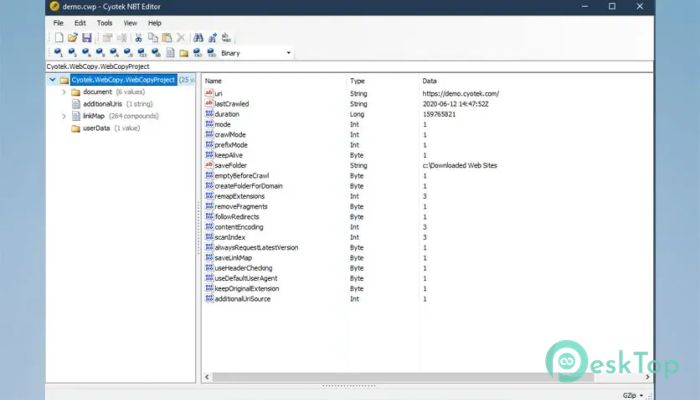
The software focuses on ease of use. Instead of making users deal with raw binary data, it displays information in a clear tree structure. This layout allows you to expand sections, browse different nodes, and quickly locate the data you need.
Even if you have never worked with NBT files before, the organized interface makes learning much easier. Editing values feels as natural as working with folders in Windows Explorer.
Designed for NBT Documents
The tool specializes in handling stand-alone NBT documents. It allows users to open files, inspect every tag, and make changes with confidence. Once edits are complete, the updated file can be saved without unnecessary steps.
This focused approach keeps the software lightweight while ensuring reliable performance for supported file types. It avoids clutter by concentrating on the tasks users need most.
Fast Data Browsing
Large NBT files can contain many nested entries, making manual inspection difficult. The software solves this by presenting information in a structured hierarchy that is easy to navigate.
You can move through parent and child nodes smoothly, expand only the sections you need, and understand the overall layout at a glance. This saves valuable time when reviewing complex data.
Easy Editing Features
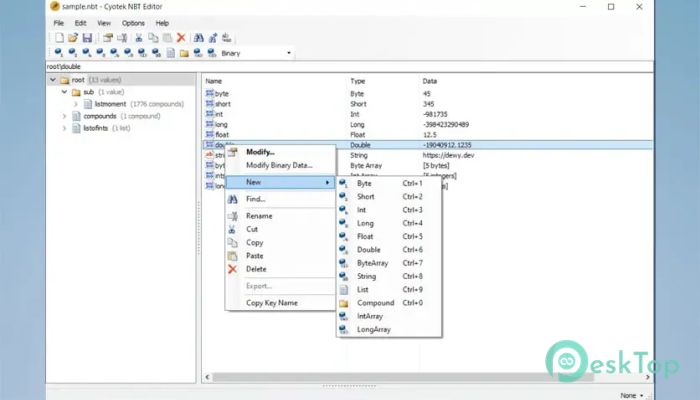
Changing values inside an NBT document is simple. The software allows you to edit supported tags directly without requiring advanced technical knowledge. Whether you need to adjust settings or correct stored information, the process remains straightforward.
Instead of working with complicated binary formats, you interact with readable data that can be updated quickly and accurately.
Originally Built for Internal Development
The editor began as an internal utility used during the development of Cyotek applications. Developers replaced traditional XML files with the much faster NBT format, creating a need for an efficient editor to inspect and modify stored data.
Because the utility proved dependable and practical, it was later released publicly so other developers and advanced users could benefit from the same workflow.
Useful for Minecraft and More
Although the NBT format is best known for Minecraft, it is not limited to gaming. Other desktop applications also use it to store structured information efficiently. The software makes it possible to inspect these files regardless of whether they originated from Minecraft or supported Cyotek applications.
This flexibility makes it useful for developers, modders, testers, and anyone interested in exploring structured binary data.
Current Limitations
The software supports stand-alone NBT documents but has a few limitations users should know about. It currently does not support the encoding variations used by Minecraft Bedrock Edition files.
It also cannot open Anvil or Region files directly because these formats contain additional structures beyond standard stand-alone NBT documents. Understanding these limits helps users choose the right tool for the right task.
Lightweight Performance
The editor is designed to be fast and responsive. Since it focuses only on NBT editing, it loads quickly and uses very little system memory. Even older computers can run it smoothly without affecting overall performance.
This lightweight design makes it a convenient utility to keep installed whenever you need to inspect or edit supported NBT files.
System Requirements and Technical Details
Operating System: Windows 11 / 10 / 8.1 / 7
Processor: Minimum 1 GHz Processor (2.4 GHz recommended)
RAM: 2GB (4GB or more recommended)
Free Hard Disk Space: 200MB or more is recommended

-
Program size780.36 KB
-
Version1.3.0.169
-
Program languagemultilanguage
-
Last updatedBefore 2 Month
-
Downloads5Ralated programs
![Operant Peak Spectroscopy]() Operant Peak Spectroscopy
Operant Peak Spectroscopy ![NeverWrite]() NeverWrite
NeverWrite![FluentCleaner]() FluentCleaner
FluentCleaner![Snippai]() Snippai
Snippai![ChillShot AI]() ChillShot AI
ChillShot AI![Splunk Enterprise]() Splunk Enterprise
Splunk Enterprise
 Operant Peak Spectroscopy
  NeverWrite
 FluentCleaner
 Snippai
 ChillShot AI
 Splunk Enterprise