
 Arabic
  English
  Turkish
  Chinese
  Japanese
  Russian
  Spanish
  German
  French
  Hindi
Hindi Download DeClutter-File Tagger and Organizer 1.13.7 for Windows
Download DeClutter-File Tagger and Organizer 1.13.7 for Windows.
DeClutter-File Tagger and Organizer Overview
Managing files on a computer can quickly become messy, especially when you have hundreds or even thousands of documents, images, and videos scattered across folders. This tool steps in like a personal assistant for your files. It simplifies how everything is stored, sorted, and accessed, making your digital life cleaner and more efficient. Built on PySide6, the software offers a clean and responsive interface that feels smooth and easy to use. Whether you are organizing work documents or personal media files, it helps you take control without needing advanced technical skills. Think of it like turning a cluttered desk into a well-organized workspace where everything has its place.Features of DeClutter-File Tagger and Organizer
Automated File Processing
One of the most powerful features is automation. Instead of manually sorting files again and again, you can create rules that do the work for you. It is like setting up a system that runs quietly in the background and keeps things tidy.
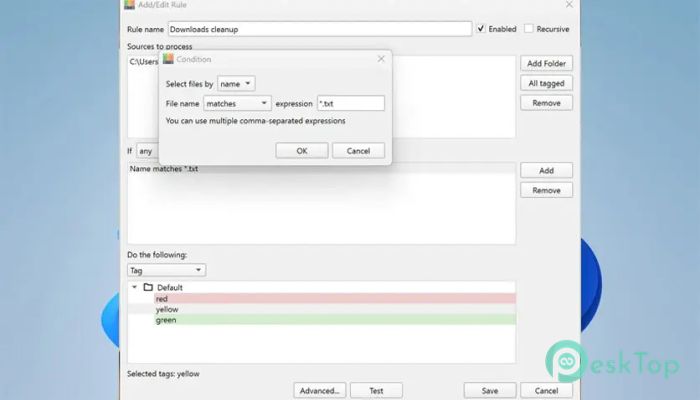
You can define sources, which are folders or tagged files that need monitoring. Then, you can set conditions such as file name, size, type, or date. Based on these conditions, the tool performs actions automatically. This means less time organizing and more time focusing on what matters.
For example, you can create a rule that moves all images into a specific folder or deletes temporary files after a certain period. It feels like having a smart assistant that understands your habits and keeps everything in order.
Flexible File Actions
The software gives you full control over how files are handled. You can automatically perform actions such as deleting, moving, copying, renaming, or tagging files. These actions can be combined with rules to create powerful workflows.
Imagine downloading files daily and having them automatically sorted into different folders based on type. No more dragging and dropping manually. The system handles everything while you sit back and relax.
This flexibility makes it useful for both casual users and professionals who regularly handle large amounts of data.
Smart File Tagging System
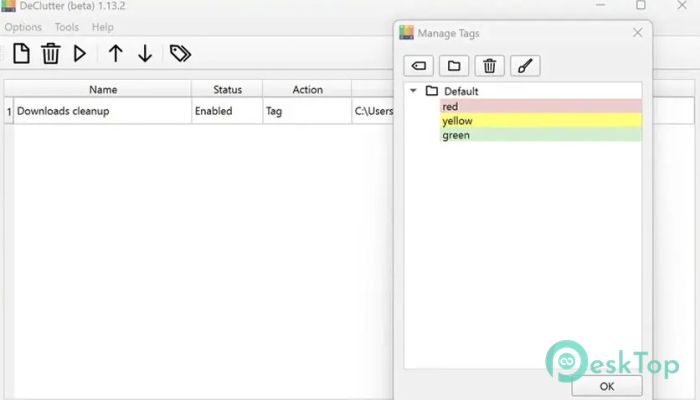
Tagging is where things get really interesting. Instead of relying only on folders, you can assign tags to files and folders. This makes searching and organizing much faster and more intuitive.
You can think of tags as labels that describe your files. For example, a single document can have tags like “work”, “important”, and “project”. This allows you to find it instantly without digging through multiple folders.
The tagging system brings a modern approach to file management, similar to how emails or notes are organized in advanced apps.
Tag Groups for Better Organization
To keep things even more structured, the tool allows you to create tag groups. These groups ensure that only one tag from a group can be applied to a file. This prevents confusion and keeps everything consistent.
For example, you can create a group for file status with tags like “completed”, “pending”, and “in progress”. A file can have only one of these, making its current state clear and easy to understand.
This feature adds a layer of discipline to your file organization, making it neat and logical.
Advanced Filtering Options
Finding files becomes incredibly easy with advanced filtering. You can search for files by tags, size, type, or other criteria. It is like having a powerful search engine built into your file manager.
Instead of scrolling endlessly through folders, you can filter results in seconds. For example, you can instantly view all files tagged as “urgent” or all videos added this week.
This saves time and reduces frustration, especially when dealing with large collections of files.
Media Preview Support
The built-in media preview feature lets you view audio, video, and image files directly in the tool. This means you do not have to open separate applications to check file content.
It feels smooth and convenient, like browsing a gallery where everything is visible at a glance. Whether you are sorting photos or checking videos, this feature makes the process faster and more enjoyable.
Drag and Drop Simplicity
Sometimes, the simplest features make the biggest difference. The drag-and-drop functionality allows you to move files between the software and your file explorer effortlessly.
You can quickly organize files by dragging them into the desired location or applying tags instantly. It feels natural and intuitive, just like moving items on your desk.
This ease of use makes it suitable for beginners while still being powerful enough for advanced users.
User-Friendly Interface
The interface is clean, simple, and easy to navigate. You do not need to spend hours learning how to use it. Everything is designed to be straightforward, so you can start organizing your files right away.
Menus are clear, options are easy to understand, and actions are quick to perform. It feels like a tool that respects your time and helps you stay productive.
Even if you are not tech-savvy, you will find it comfortable to use from day one.
Why It Stands Out
What makes this tool special is its combination of automation and manual control. You can let it handle repetitive tasks while still having the freedom to manage files your way.
It brings together features like tagging, filtering, and automation into one place. Instead of using multiple tools, you get everything in a single package.
It is like upgrading from a basic toolbox to a complete workstation where every tool works together smoothly.
System Requirements and Technical Details
Operating System: Windows 11 / 10 / 8.1 / 7
Processor: Minimum 1 GHz Processor (2.4 GHz recommended)
RAM: 2GB (4GB or more recommended)
Free Hard Disk Space: 200MB or more is recommended

-
Program size36.78 MB
-
Version1.13.7
-
Program languagemultilanguage
-
Last updatedBefore 5 Month
-
Downloads65Ralated programs
![Operant Peak Spectroscopy]() Operant Peak Spectroscopy
Operant Peak Spectroscopy ![NeverWrite]() NeverWrite
NeverWrite![FluentCleaner]() FluentCleaner
FluentCleaner![Snippai]() Snippai
Snippai![ChillShot AI]() ChillShot AI
ChillShot AI![Splunk Enterprise]() Splunk Enterprise
Splunk Enterprise
 Operant Peak Spectroscopy
  NeverWrite
 FluentCleaner
 Snippai
 ChillShot AI
 Splunk Enterprise