
 Arabic
  English
  Turkish
  Chinese
  Japanese
  Russian
  Spanish
  German
  French
  Hindi
Hindi Download Dupe Clear 3.1.0 for Windows
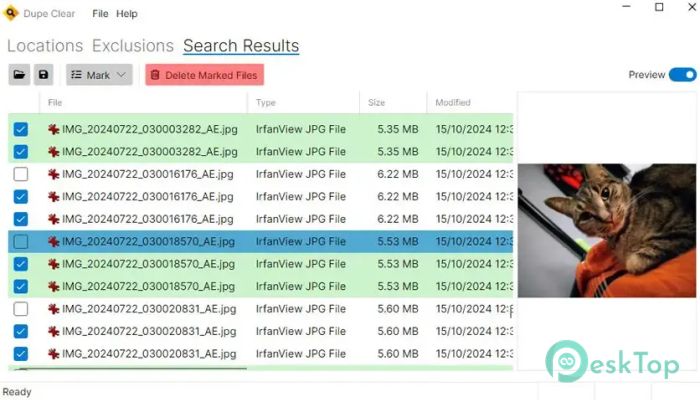
Download Dupe Clear 3.1.0 for Windows.
Dupe Clear Overview
Managing duplicate files can feel like cleaning a messy room where the same items are scattered everywhere. This software makes the job simple by scanning your folders, detecting identical files, and helping you remove the ones you no longer need. It is designed for users who want a fast, safe, and reliable way to free up disk space without spending money. The tool works with folders of all sizes and offers several search options to improve duplicate detection accuracy. Whether you have duplicate photos, videos, music, documents, or downloads, it helps you locate them in just a few clicks.Features of Dupe Clear
Fast Duplicate File Detection
The software scans selected folders and compares files to quickly find duplicates. Instead of checking every file manually, it does the hard work automatically, saving you both time and effort.
Its efficient scanning engine can process large collections of files while delivering accurate results. This makes it suitable for personal computers as well as systems with thousands of stored files.
Flexible Search Options
Not every duplicate search is the same. Sometimes you only want to scan specific file types or folders. The tool gives you that flexibility with customizable search settings.
You can search within any folder and narrow the results using useful filters. This keeps the scan focused and prevents unnecessary files from appearing in the results.
Smart Search Filters
The software includes practical filters that make searching easier. You can filter files by extension, modification date, and other criteria to reduce the number of results and speed up the process.
These filters are especially useful when working with large storage drives. Instead of searching everything, you can target only the files that matter, making the cleanup process much faster.
Easy Duplicate Selection
Finding duplicate files is only half the job. The software also provides several ways to select which copies to remove. This gives you more control and reduces the risk of deleting the wrong file.
You can choose duplicates based on different selection rules, making it easier to keep the original version while removing unnecessary copies. The process is simple enough for beginners but flexible enough for experienced users.
Safe and Organized Cleanup
Removing duplicate files should never feel risky. The tool presents duplicate groups clearly so you can review them before deleting anything. This helps you make informed decisions instead of guessing.
By cleaning up duplicate files regularly, you can free up storage space, improve file organization, and make it easier to find the documents, photos, and media you actually need.
Simple User Interface
The software features a clean and easy-to-understand interface that doesn't overwhelm users with complicated settings. Everything is arranged logically, allowing you to start scanning almost immediately.
Even first-time users can learn the workflow within minutes. Selecting folders, running scans, reviewing duplicates, and deleting unwanted files all follow a straightforward process.
Improves Storage Management
Duplicate files slowly consume valuable disk space without providing any benefit. Over time, they can fill hard drives and make file management frustrating. This tool helps solve that problem by identifying unnecessary copies that can safely be removed.
Regular cleanup keeps your storage organized and allows you to make better use of available space. Whether you use an SSD or a traditional hard drive, removing duplicate files can make your file library much easier to manage.
Suitable for Different File Types
The software is not limited to a single file type. It can detect duplicate images, videos, music, archives, documents, and many other common file formats. This makes it a useful utility for everyday computer maintenance.
Whether you accidentally copied folders, downloaded the same file multiple times, or created backup duplicates, it helps you locate and remove them with confidence.
System Requirements and Technical Details
Operating System: Windows 11 / 10 / 8.1 / 7
Processor: Minimum 1 GHz Processor (2.4 GHz recommended)
RAM: 2GB (4GB or more recommended)
Free Hard Disk Space: 200MB or more is recommended

-
Program size31.74 MB
-
Version3.1.0
-
Program languagemultilanguage
-
Last updatedBefore 3 Month
-
Downloads20Ralated programs
![Operant Peak Spectroscopy]() Operant Peak Spectroscopy
Operant Peak Spectroscopy ![NeverWrite]() NeverWrite
NeverWrite![FluentCleaner]() FluentCleaner
FluentCleaner![Snippai]() Snippai
Snippai![ChillShot AI]() ChillShot AI
ChillShot AI![Splunk Enterprise]() Splunk Enterprise
Splunk Enterprise
 Operant Peak Spectroscopy
  NeverWrite
 FluentCleaner
 Snippai
 ChillShot AI
 Splunk Enterprise